How to Start an Online Coaching Business (2026 Guide)
How to start an online coaching business: name the result, set session length, price and hours, take bookings on a phone, plus the real maths of a $90 call.

Here is how to start an online coaching business: pick one problem you solve, turn it into a session with a clear result, set its length and price, open your hours, and let clients book a time online. Below we do it for real in a demo store that also sells digital products, with every screen shown.
Photo: Swello on Unsplash
We built it on 8 November 2026 in Calm Money Studio, our demo store for freelancers. It now sells a paid 60-minute call, the Freelancer Money Reset at $90, and a free 20-minute check-in that a demo client booked from a phone.
How to start an online coaching business: the short answer
- Pick one problem and one type of client.
- Turn it into a session with a named result.
- Choose 1:1, group or a package, and the length.
- Set a price, or make a free discovery call.
- Decide where you meet: video link, phone or in person.
- Open your hours, with breaks and a daily limit.
- Ask one or two questions before each session.
- Switch on reminders and a follow-up email.
- Connect payments, publish and share one link.
What is an online coaching business? An online coaching business sells your time and know-how as sessions held over video or phone. Clients book a time that suits them, pay in advance, and meet you online. It can be one-to-one calls, small group sessions or packages of several calls.
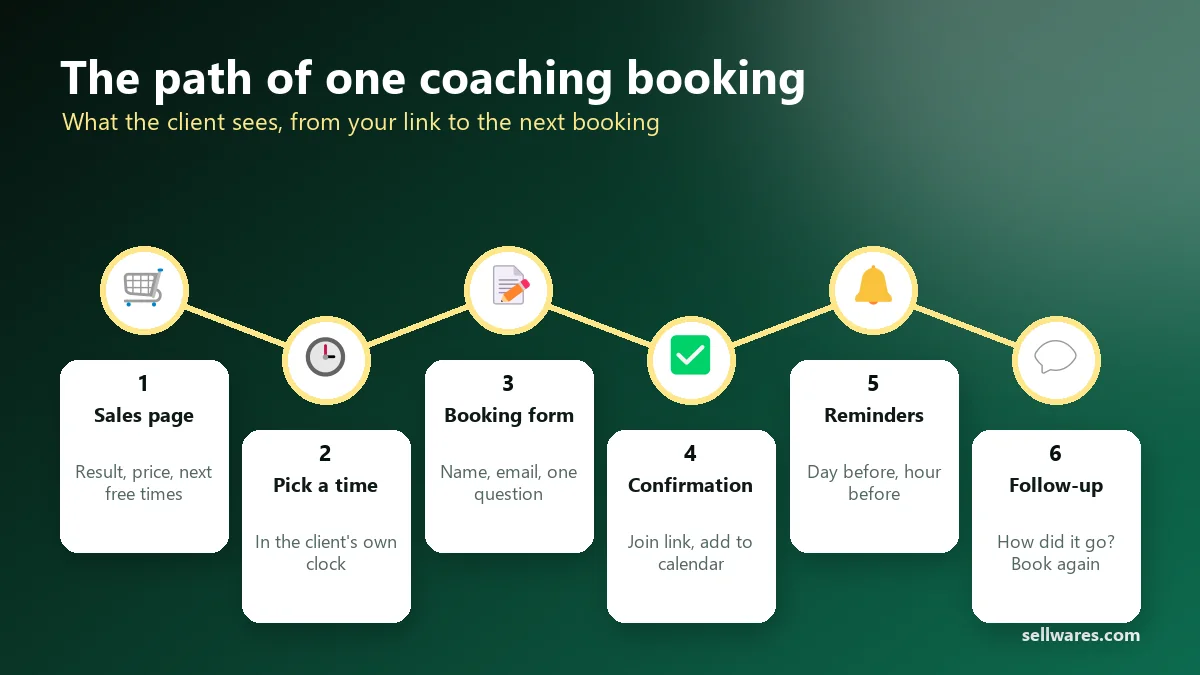
Before you start
Your offer. Starting an online coaching business begins with the offer, not the tools. Coaching sells a change, not an hour. Write the result in one line: a money plan for the next 90 days. If you are still deciding what kind of coach to be, our post on what a life coach does maps the main types. A one-page online coaching business plan is enough at first: who it is for, the result, the price, and how many sessions a week you want.
Do you need a license? Check the rules where you live, above all if your topic touches health, therapy or regulated advice. The best-known coaching credentials come from the International Coaching Federation. Its first credential, ACC, asks for 60+ hours of education and 100+ hours of coaching experience.
Tools. You need a video tool, a booking page and a payment provider. Free Zoom has a limit of 40 minutes per meeting on its Basic plan, so a 60-minute call needs a paid plan or another room.
Plan and time. If you want to know how to start a coaching business online without big costs: coaching works on the Sellwares Free plan (€0, no card, 3 products). Sellwares takes a 0% transaction fee on every plan. Our paid session took about 10 minutes from Start to the launch check. The free check-in, with the words ready, took under 2 minutes to publish.
How to start an online coaching business step by step
On a phone, tap any screenshot to open it full size and zoom in.
Create a Coaching product
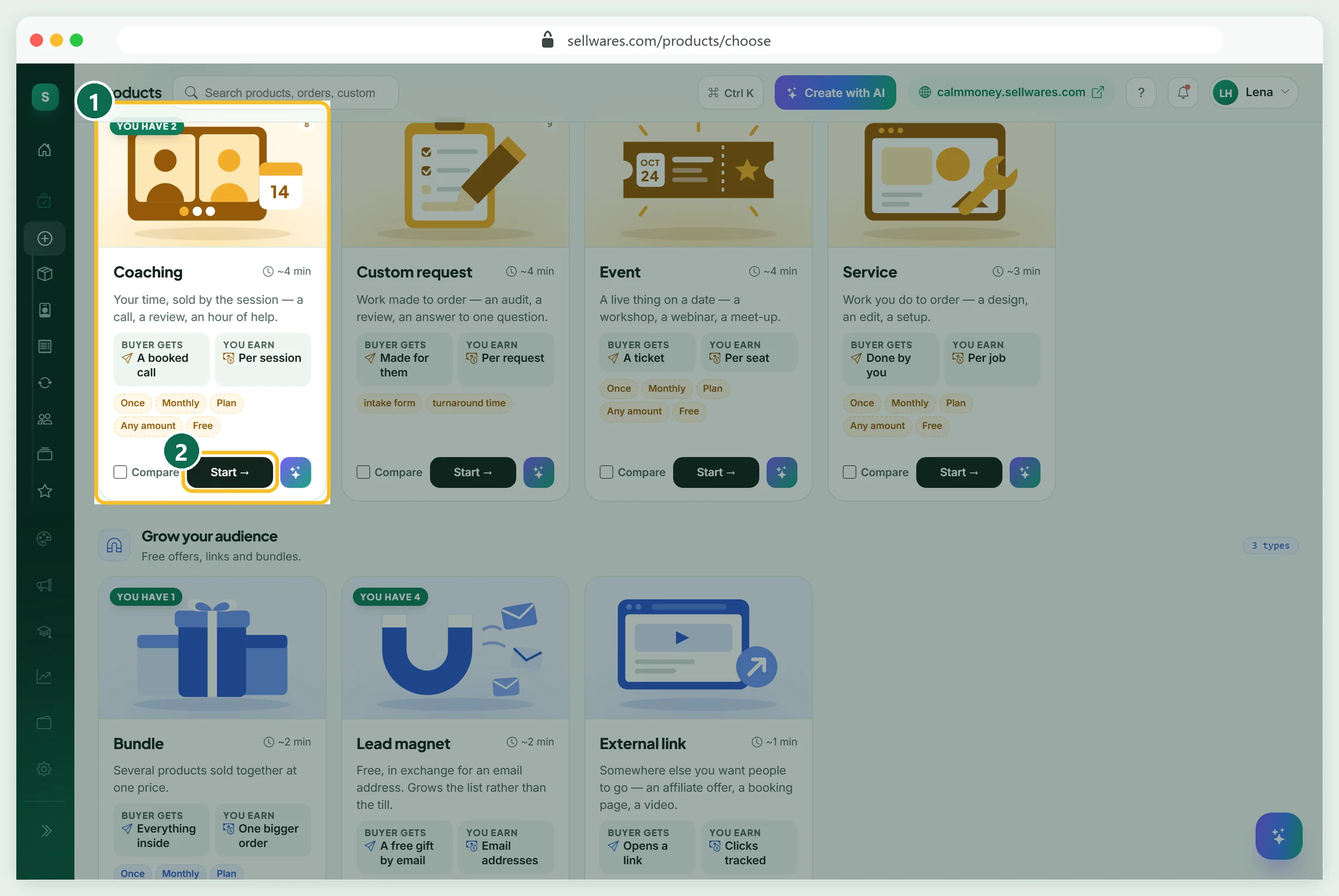
Open Create Product and find the Coaching card (1): your time, sold by the session. Press Start (2). The studio opens as a draft, so nothing is public yet.
Thumbnail: name the result
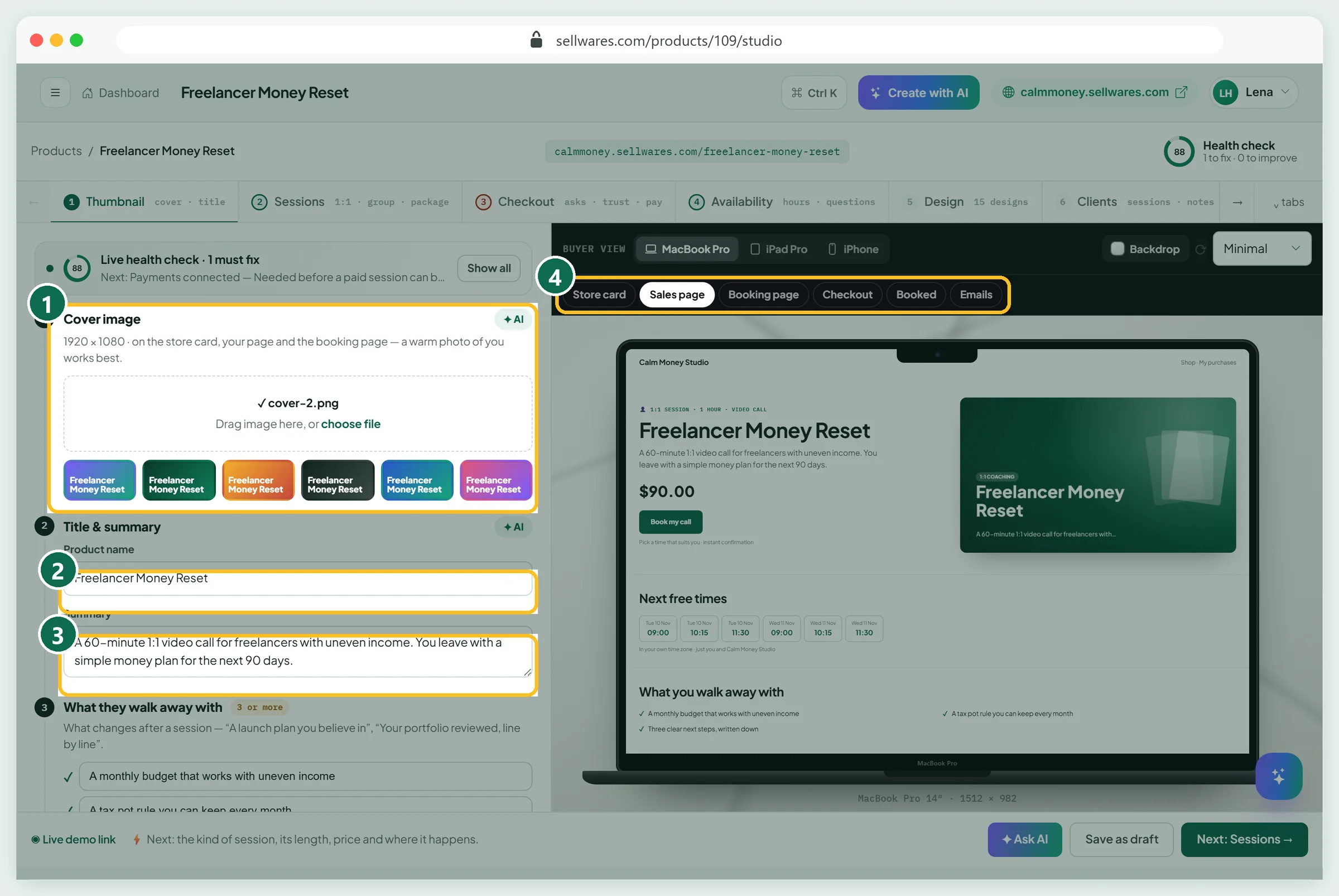
Pick a cover (1): a warm photo of you works best, or one of six coloured covers. Type the final name first (2), because the link is made from it. Ours is Freelancer Money Reset. The summary (3) says who it is for and what they leave with.
The preview tabs (4) switch between sales page, booking page, checkout, the booked screen and emails. The cover and page tabs work as in our PDF studio tour.
Sessions: kind, length, price and place
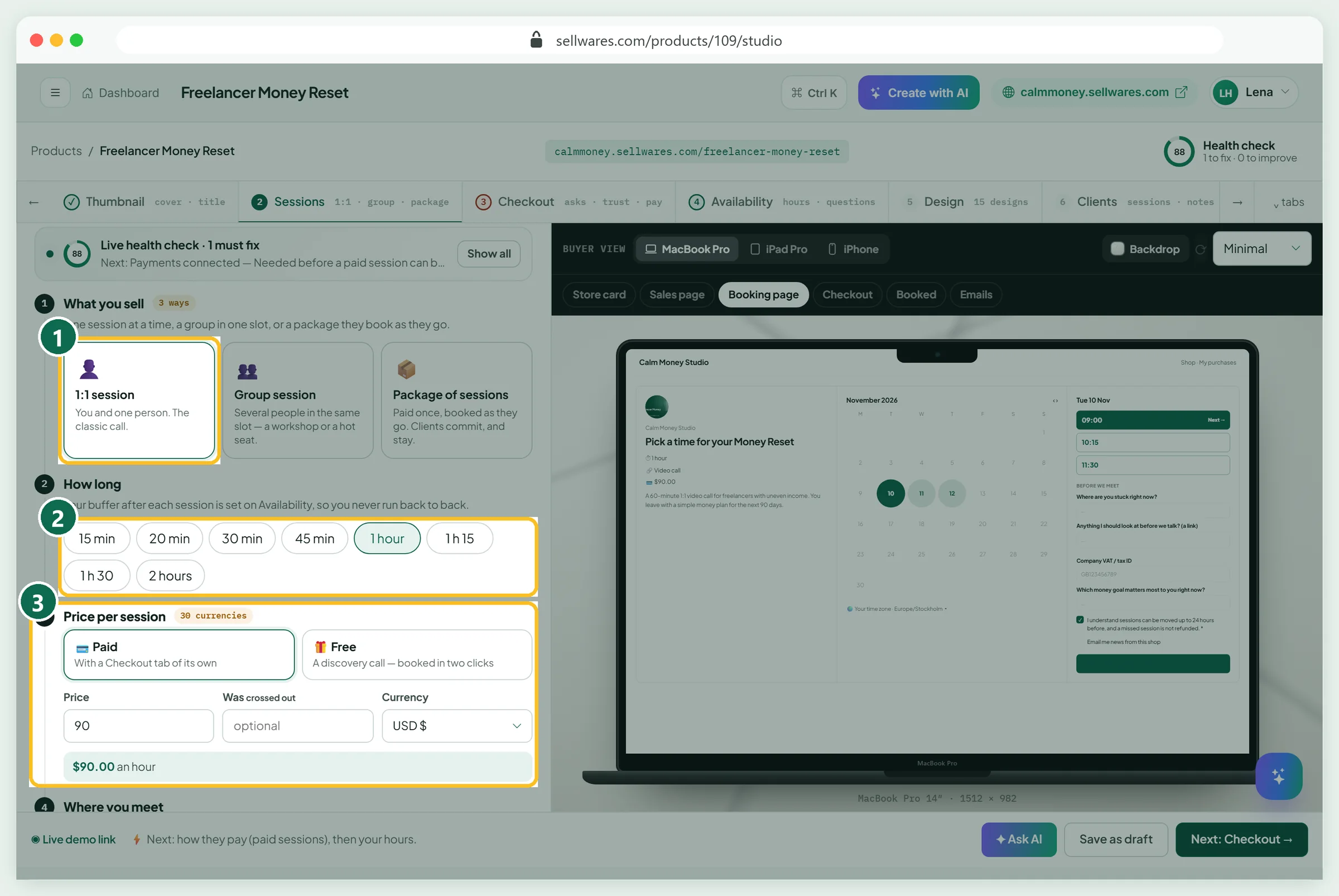
What you sell has three kinds (1):
- 1:1 session: you and one person. The best start.
- Group session: several people in one slot, with 3 to 50 seats.
- Package of sessions: paid once, booked as they go, 3 to 12 sessions.
How long (2) runs from 15 minutes to 2 hours; we chose 1 hour. Under Price per session (3), pick Paid or Free.
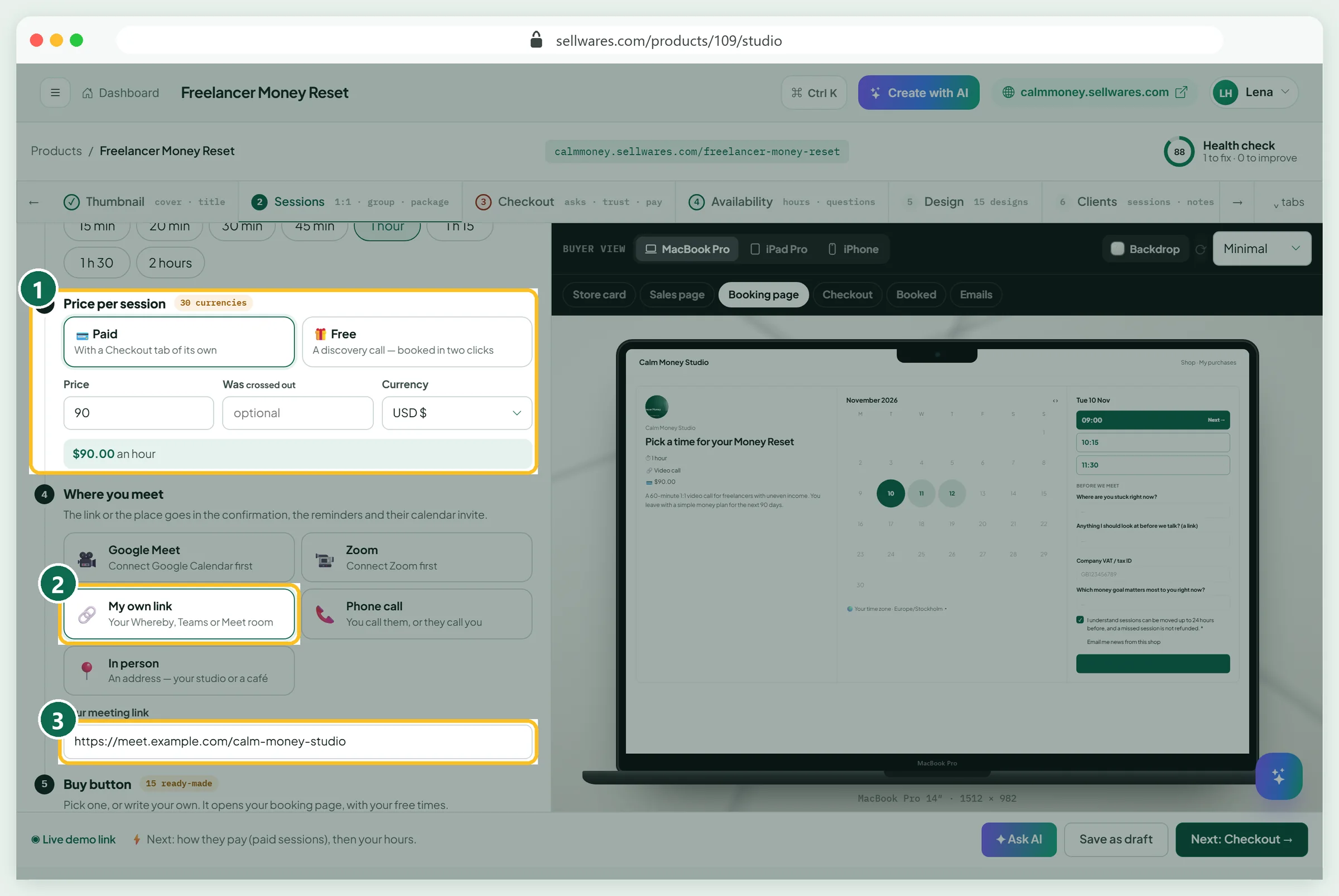
We typed 90 in USD (1); the box confirms $90.00 an hour. Where you meet offers Google Meet or Zoom (after you connect them), My own link (2), phone or in person. We pasted our room link (3). It goes into every email and calendar invite.
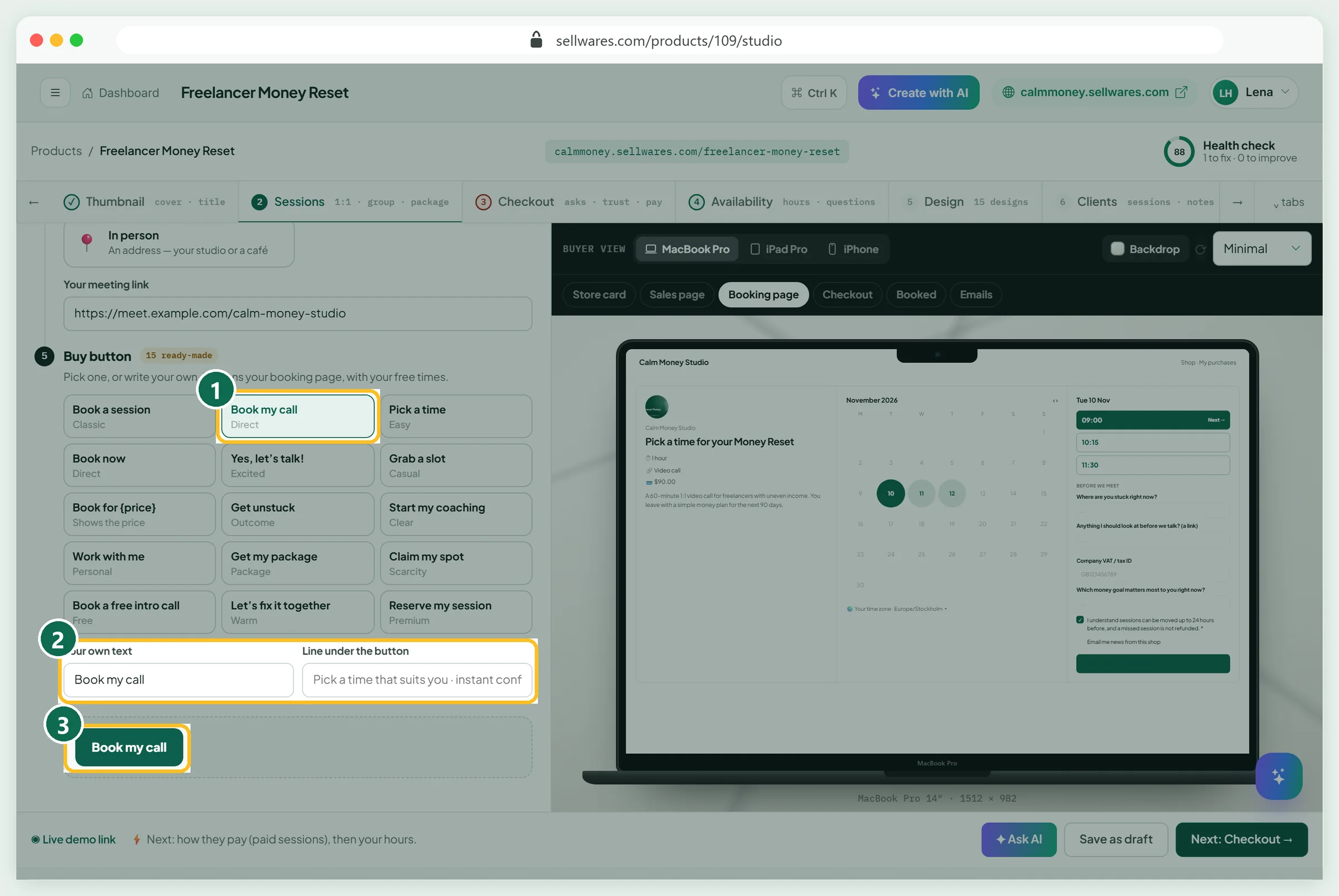
Buy button has 15 ready-made labels; we chose Book my call (1). You can write your own text and a line under it (2), shown in the preview (3).
Checkout: questions, terms and trust
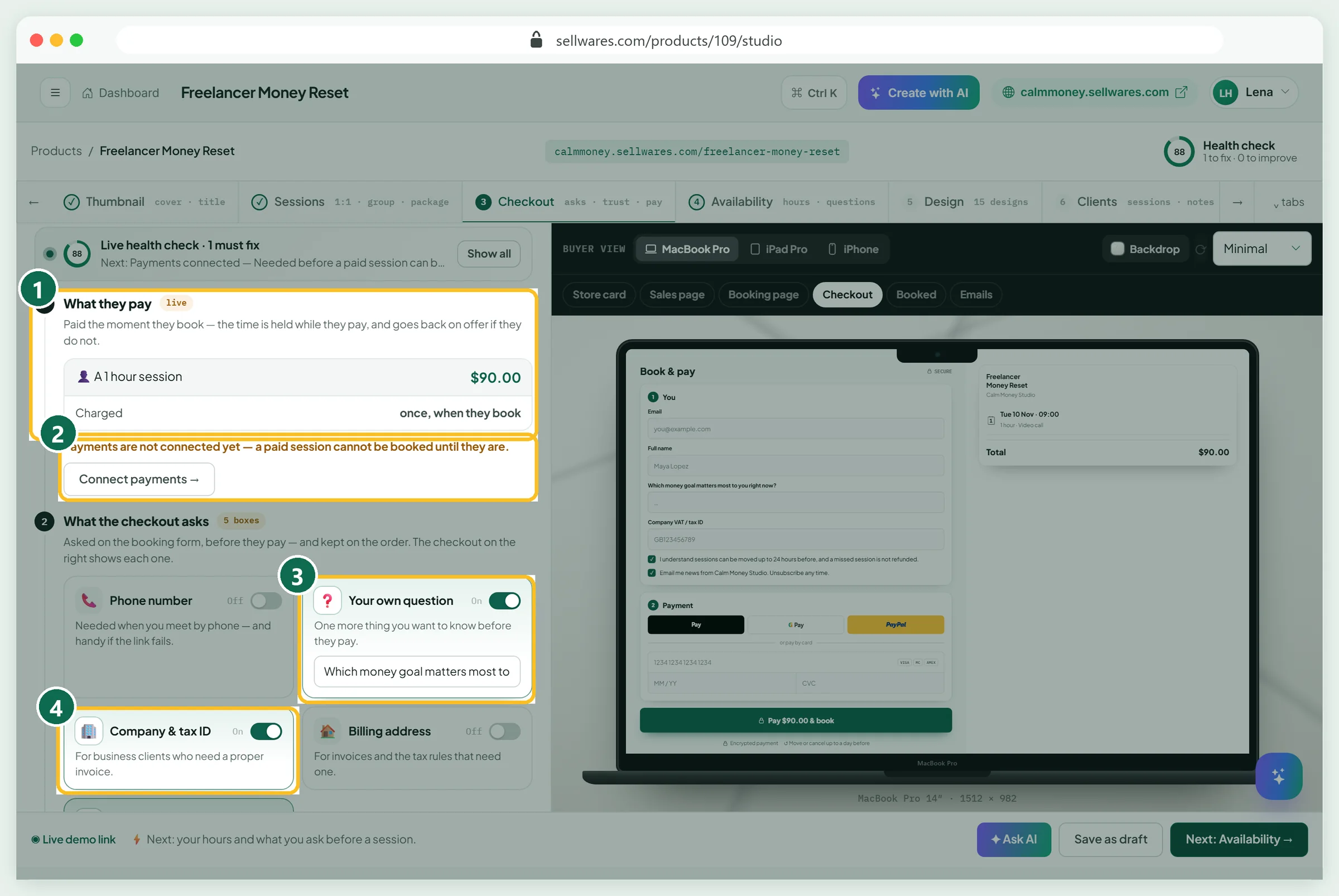
A paid session adds a Checkout tab. What they pay (1) shows $90.00, charged once, when they book. The time is held while they pay and goes back on offer if they do not. The red note (2) says payments are not connected yet.
What the checkout asks has five boxes. We switched on Your own question (3): Which money goal matters most to you right now? Company & tax ID (4) helps business clients get an invoice. Leave the rest off.
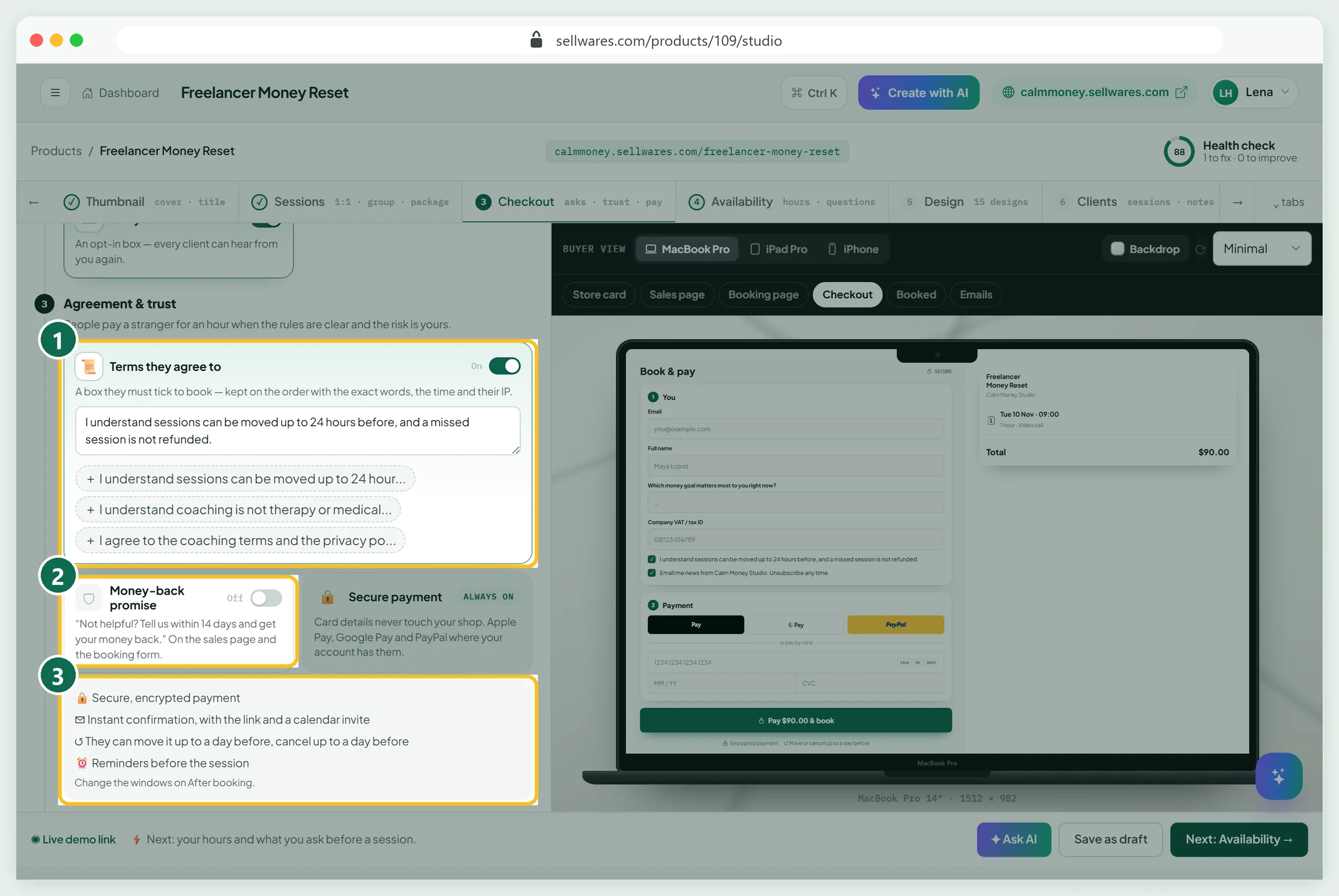
Terms they agree to (1) adds a box the client must tick. It is kept on the order with the exact words, the time and their IP. We used the ready-made 24-hour line. The Money-back promise (2) stays off unless you will refund. The list (3) is what clients see.
Availability: your week and breathing room
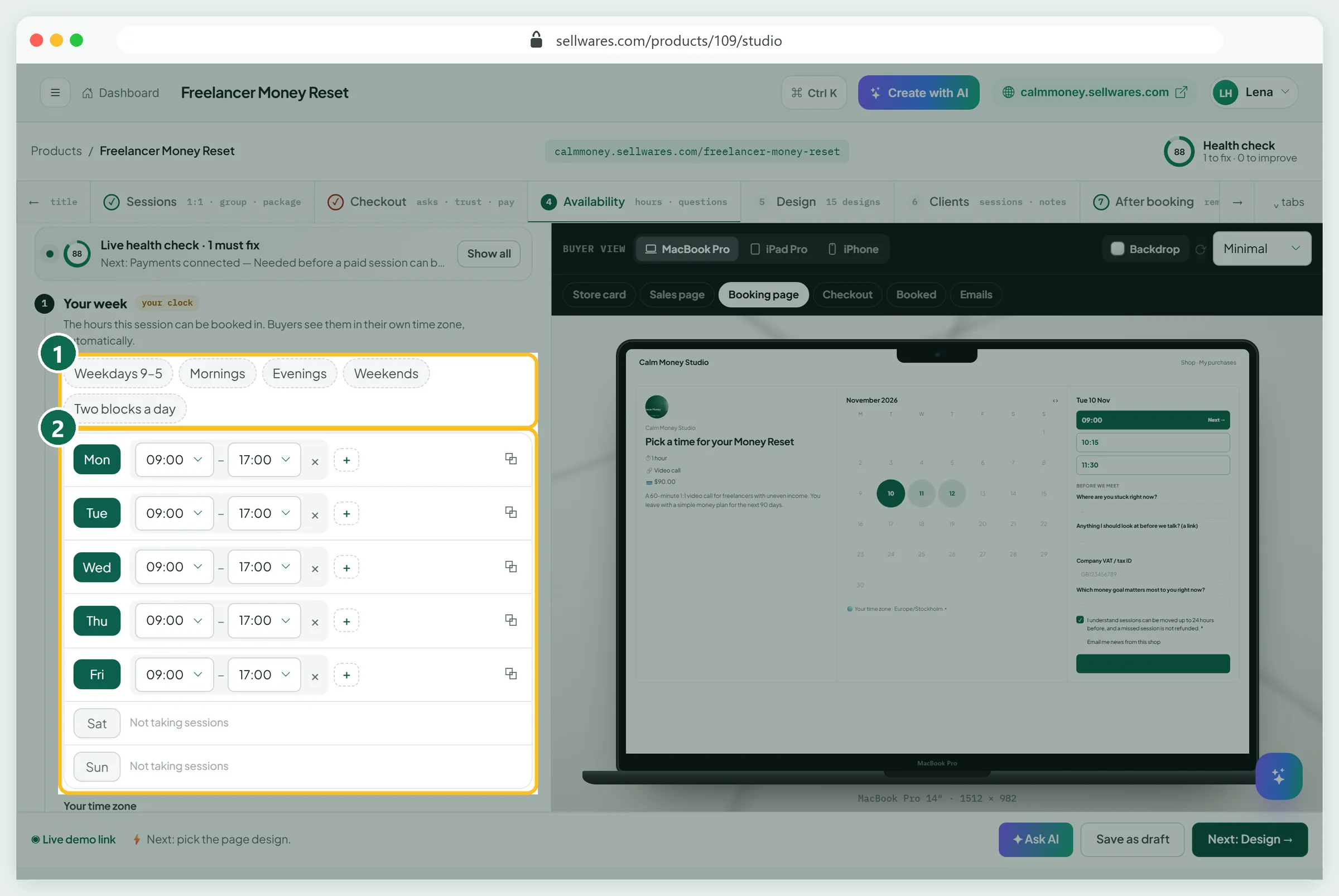
Pick a ready-made week (1): weekdays 9–5, mornings, evenings, weekends or two blocks a day. Then edit any day (2).
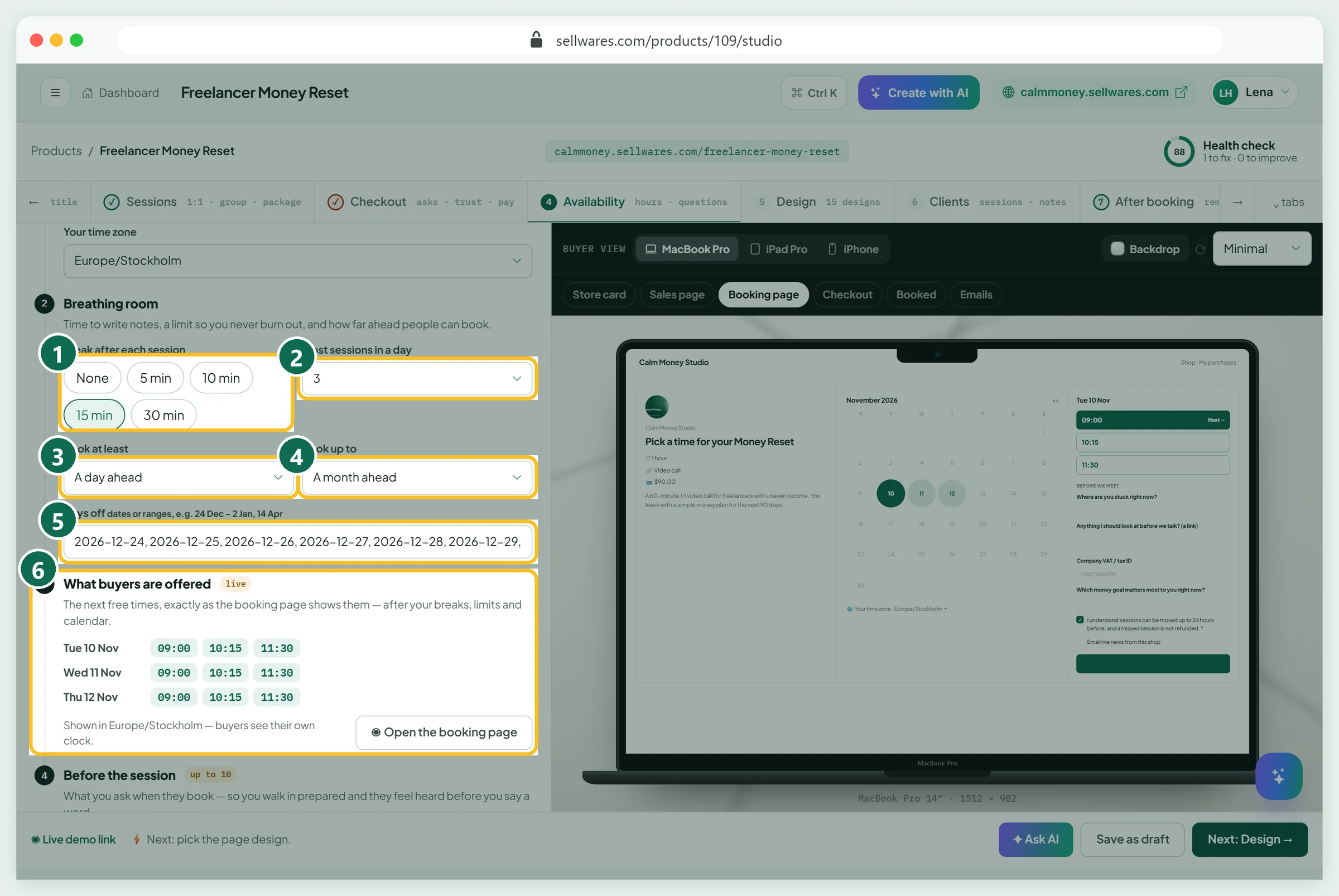
Breathing room keeps you rested. Our beginner settings:
- Break after each session (1): 15 minutes, for notes.
- Most sessions in a day (2): 3.
- Book at least (3): a day ahead. The default is 12 hours.
- Book up to (4): a month ahead.
- Days off (5): we typed 24 Dec – 2 Jan and it turned into ten dates.
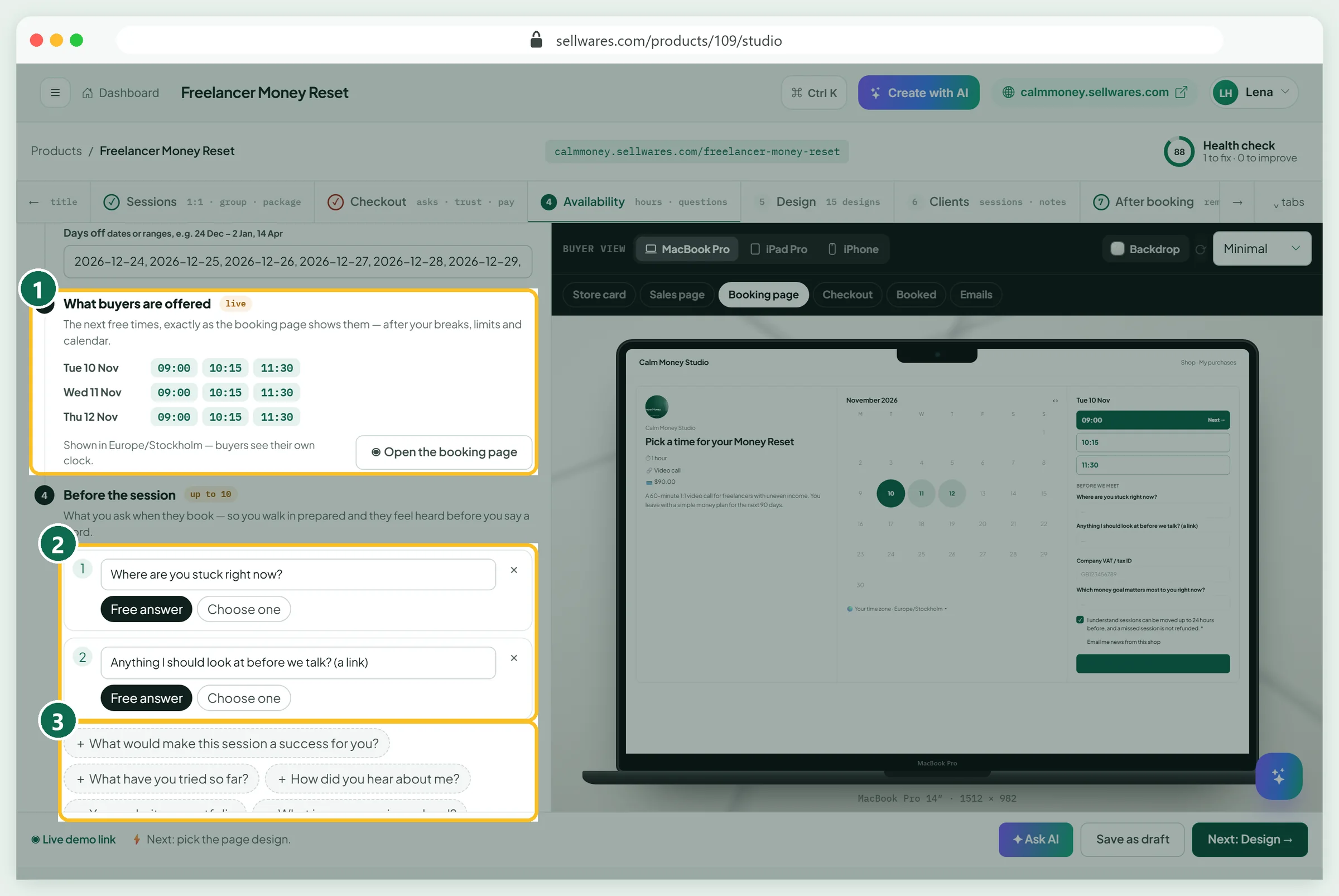
What buyers are offered (1) shows the real free times: 09:00, 10:15 and 11:30, three a day. Before the session (2) holds up to 10 questions, as a free answer or a choice. We added two from the suggestions (3).
After booking: reminders and follow-up
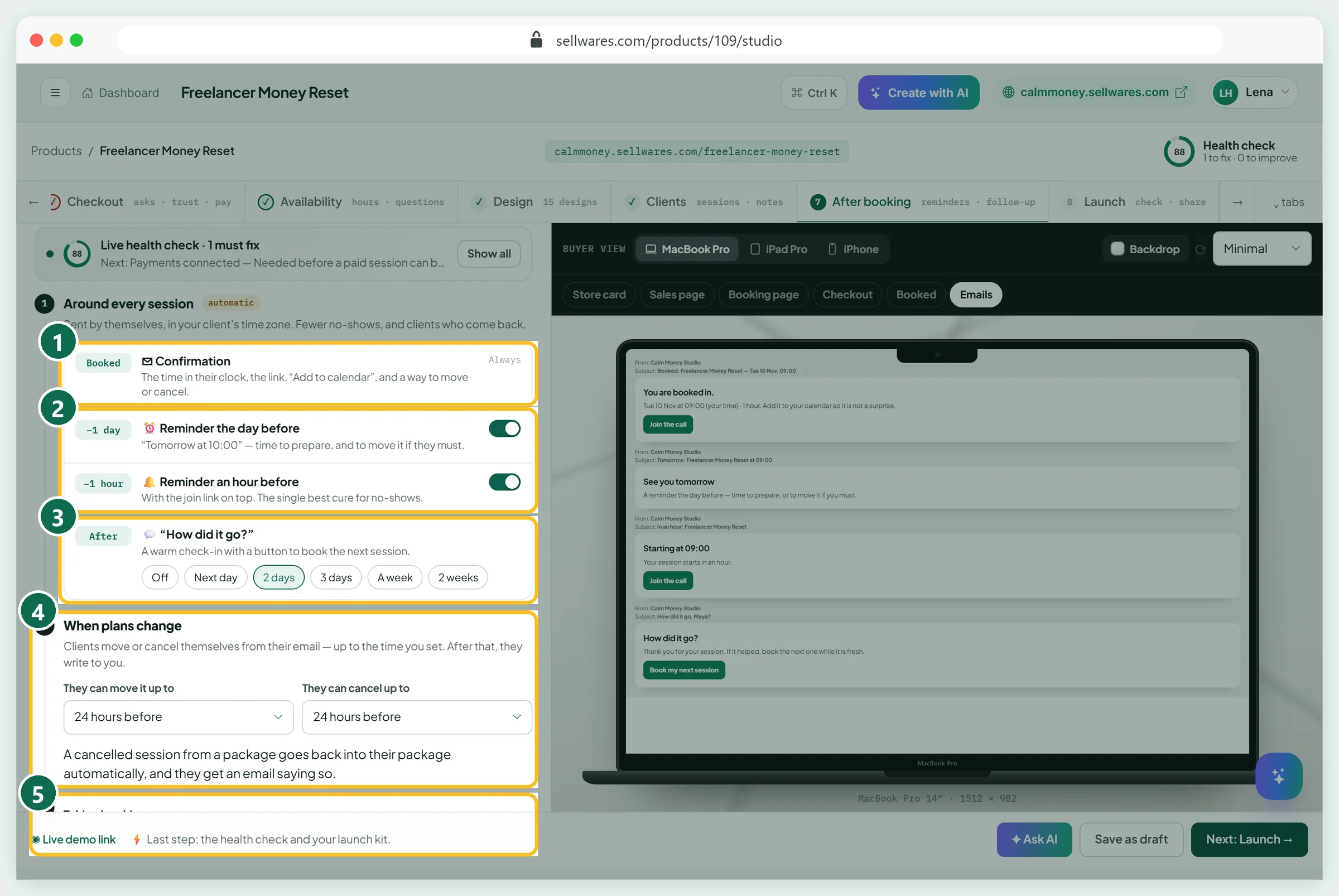
The confirmation (1) always goes out, with the time in their clock, the link and Add to calendar. Keep both reminders on (2): the day before and an hour before. The How did it go? email (3) offers the next booking; two days after is the default.
When plans change (4): clients can move or cancel up to 24 hours before. Taking bookings (5) pauses new bookings for a holiday. The page look lives on the Design tab, as in the PDF tour.
Launch: the health check
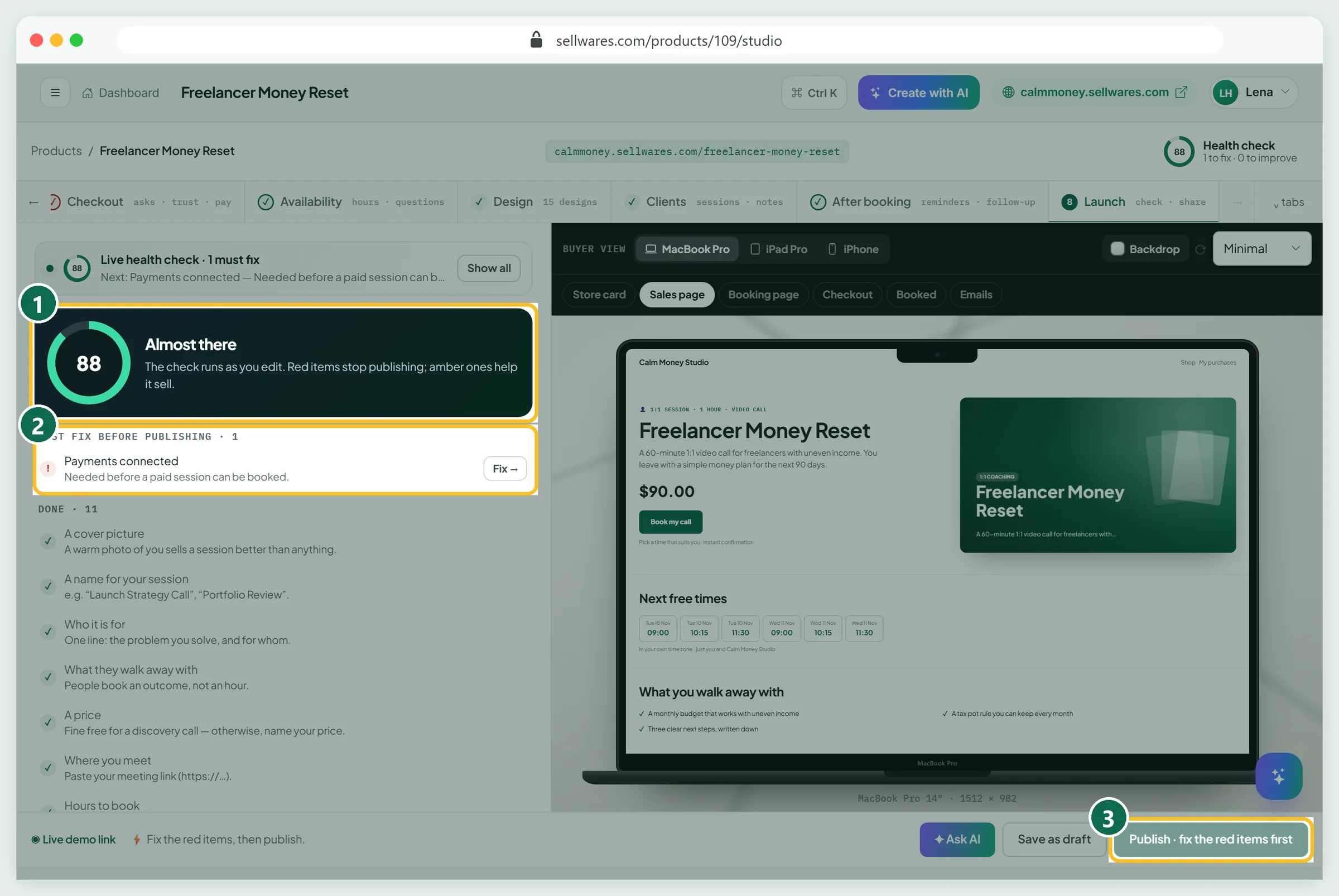
Launch scored our paid session 88 (1). One red item was left, Payments connected (2), so Publish stayed grey (3). Our test site has providers switched off, so this is the real state before you connect.
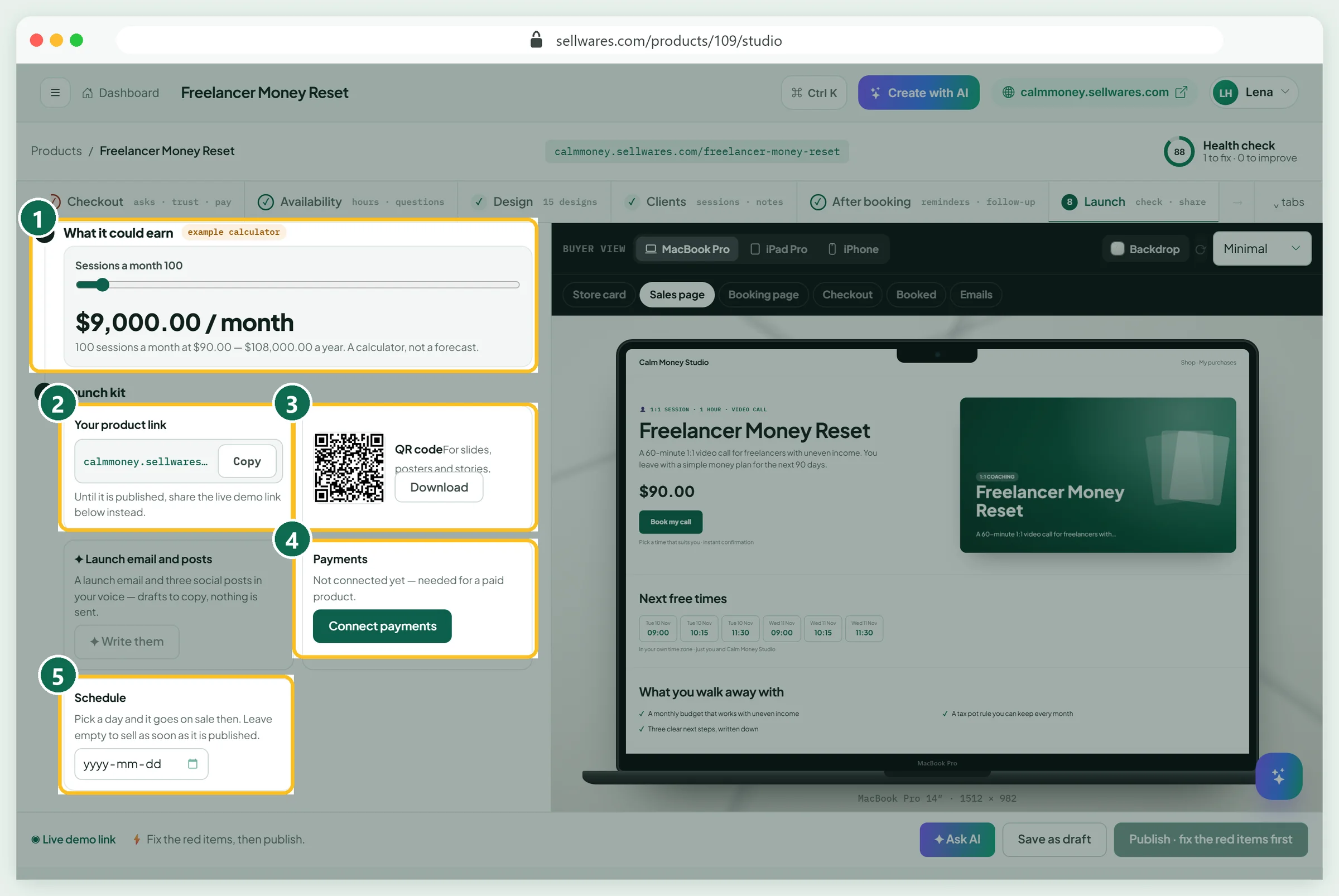
Below: an earnings calculator (1), your link (2), a QR code (3), Connect payments (4) and a Schedule date (5). Connect Stripe, PayPal or Mollie, or paste a Revolut key; clients pay into your own account.
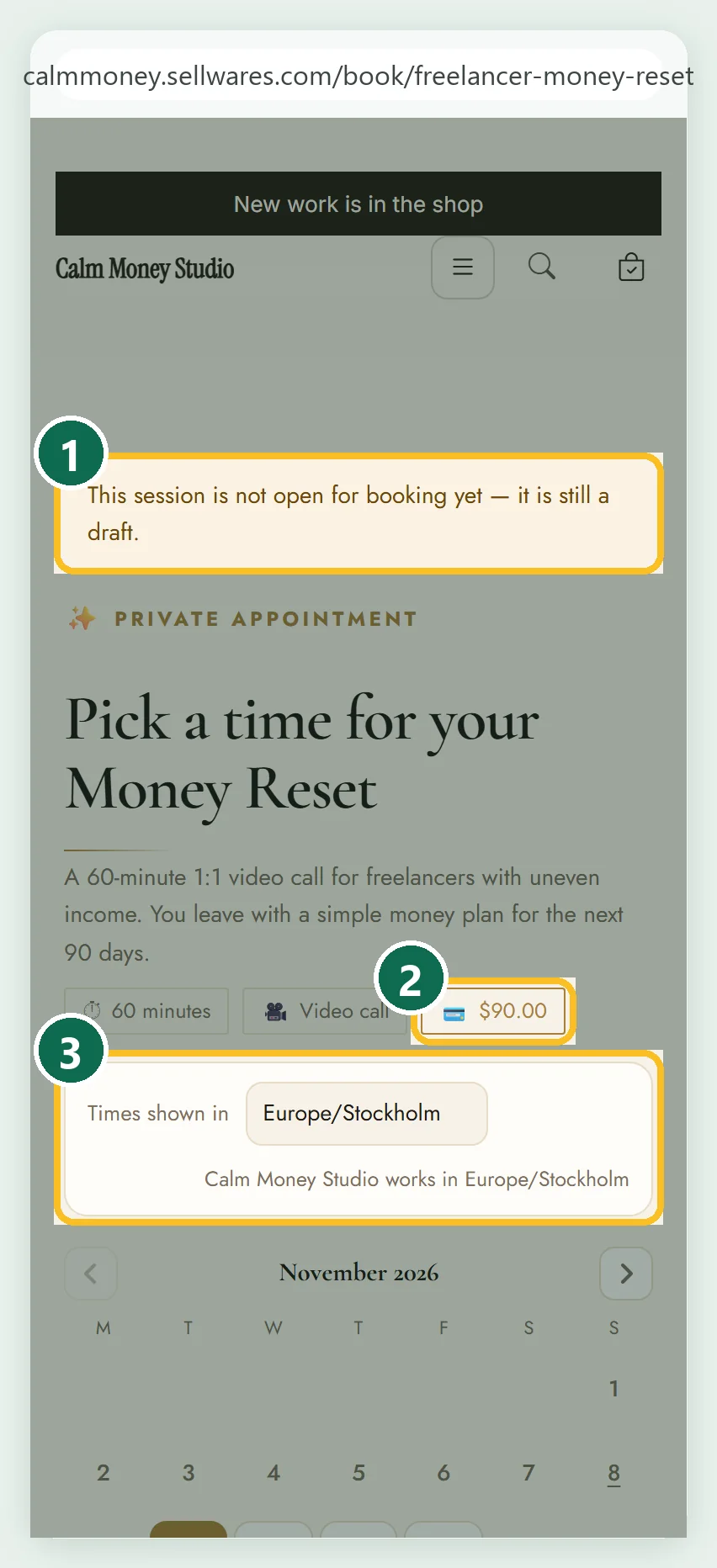
Until then, the booking page tells visitors it is a draft (1). It still shows the $90 price (2) and the time zone picker (3).
Publish a free discovery call
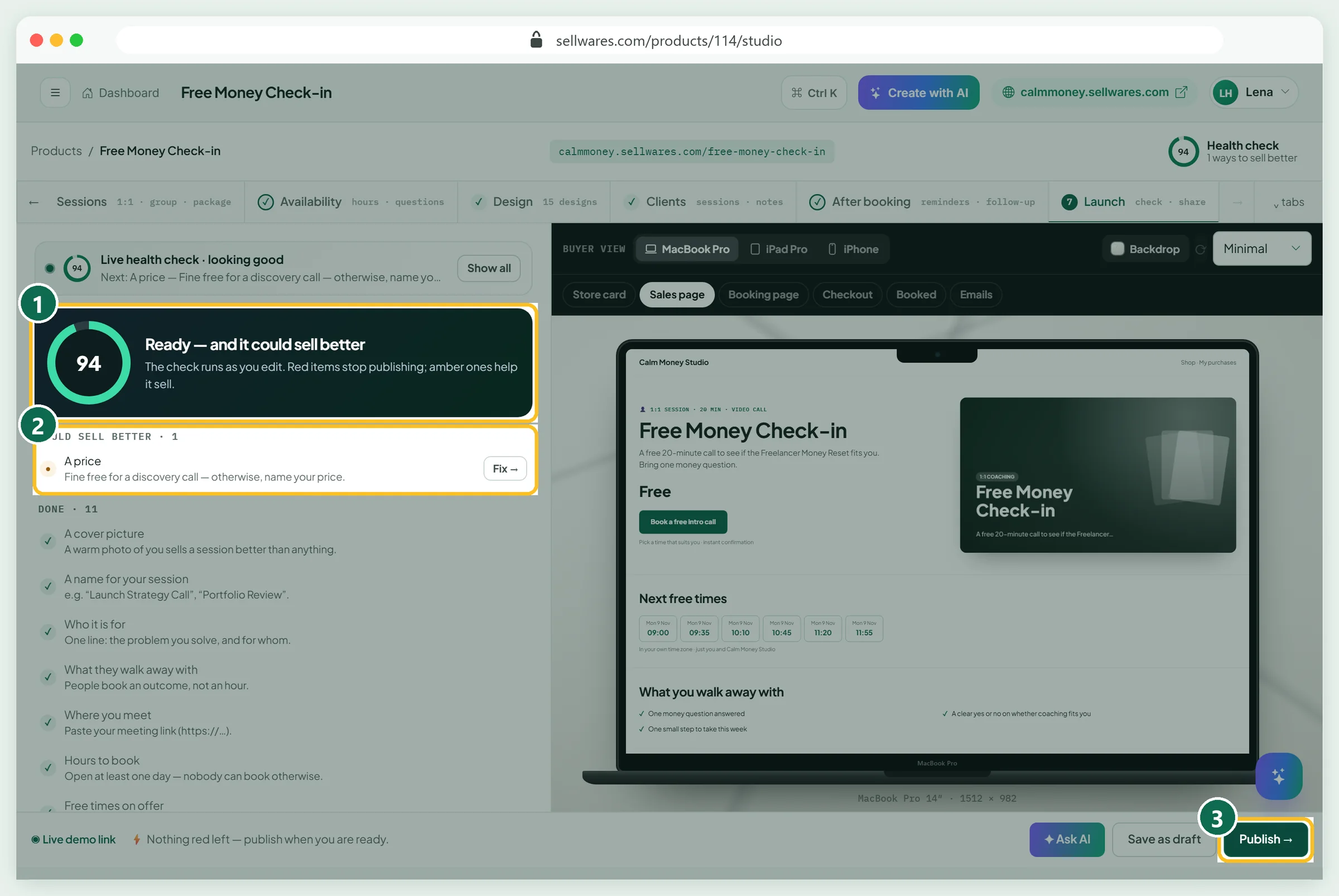
A free call needs no payments. We made a second one, the Free Money Check-in: 20 minutes, Free, one question. It scored 94 (1). The only amber item was the price (2), a hint you can ignore for a free call. Publish (3) was green.
Book it as a client on a phone
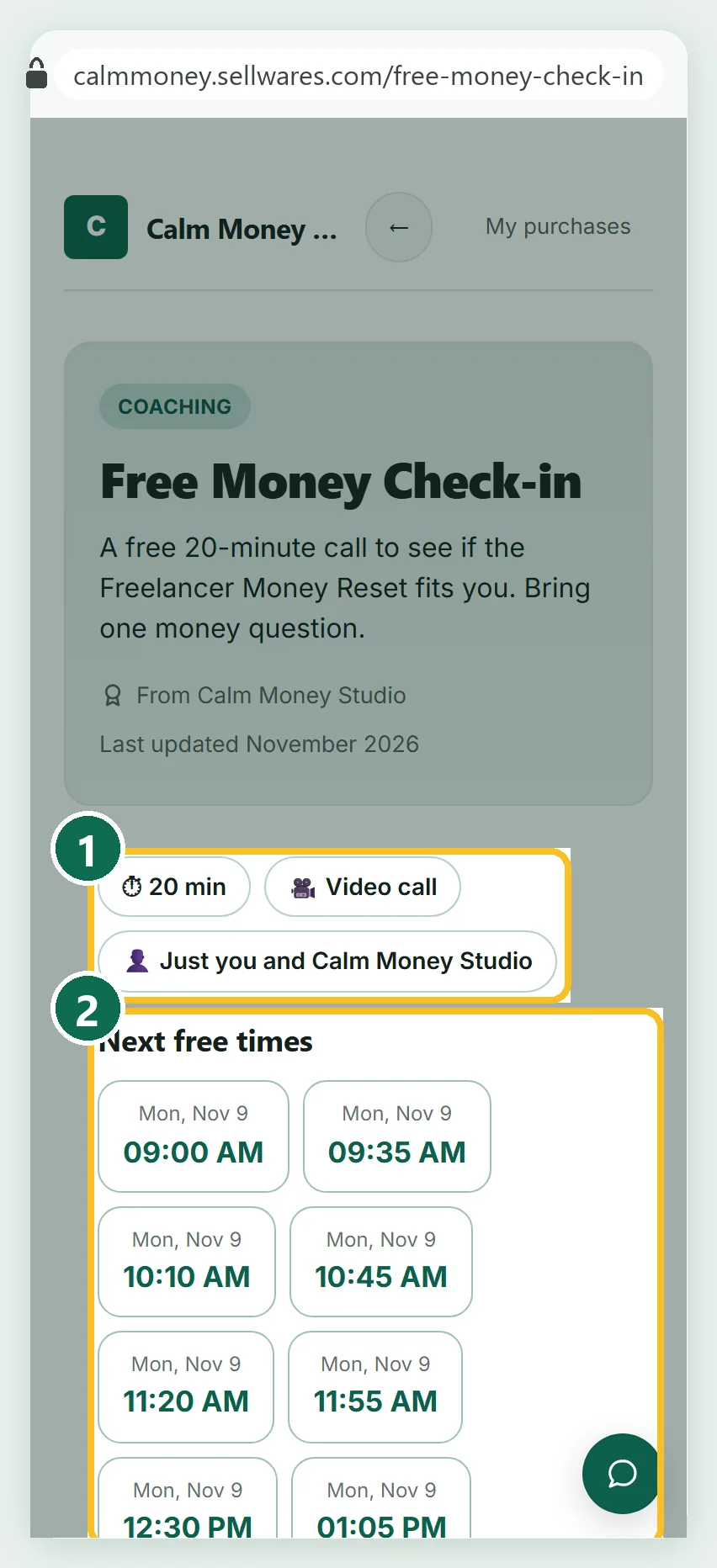
On a 390 px phone, the sales page shows the length and meeting type (1) and the next free times (2).
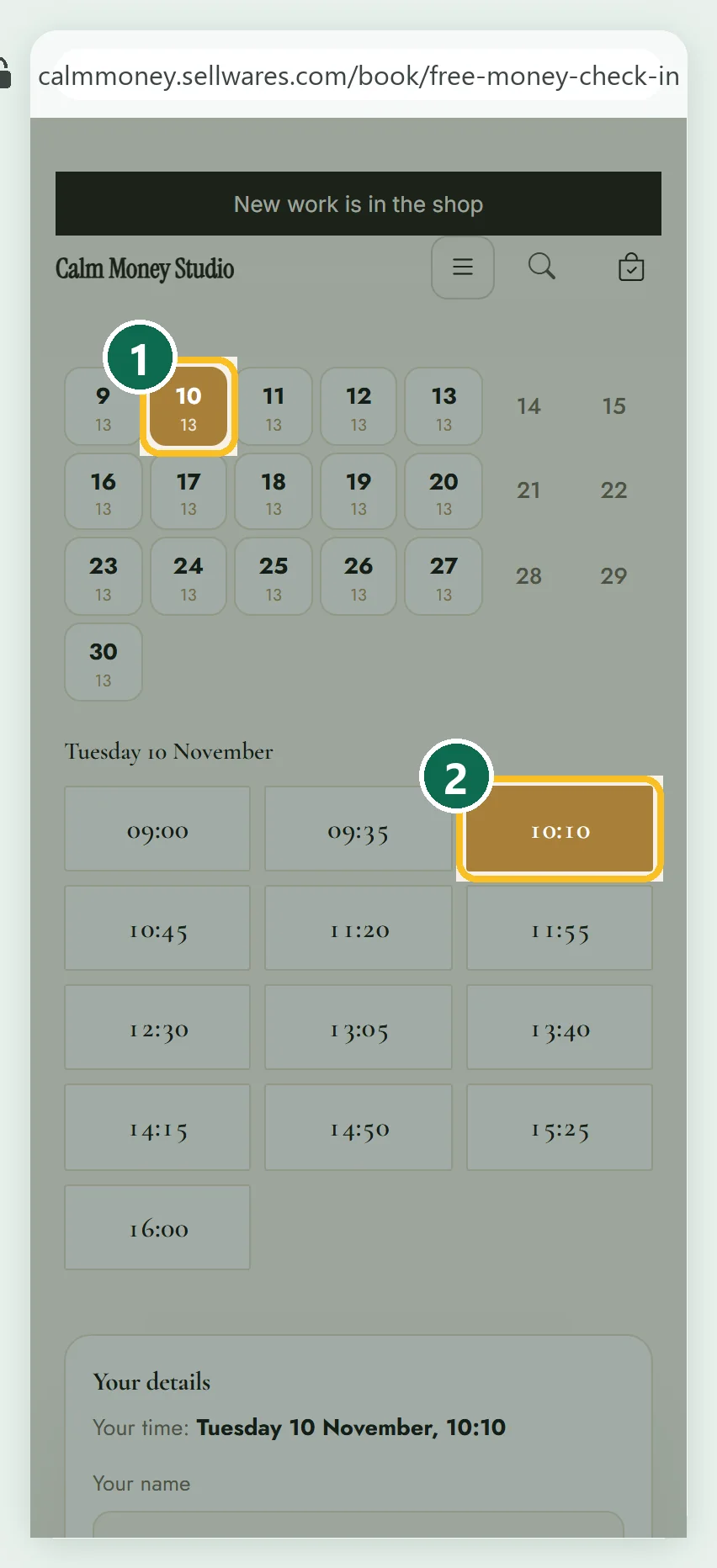
Our demo client, Maya Chen, tapped Tuesday 10 November (1) and 10:10 (2). With the 15-minute break, slots start every 35 minutes.
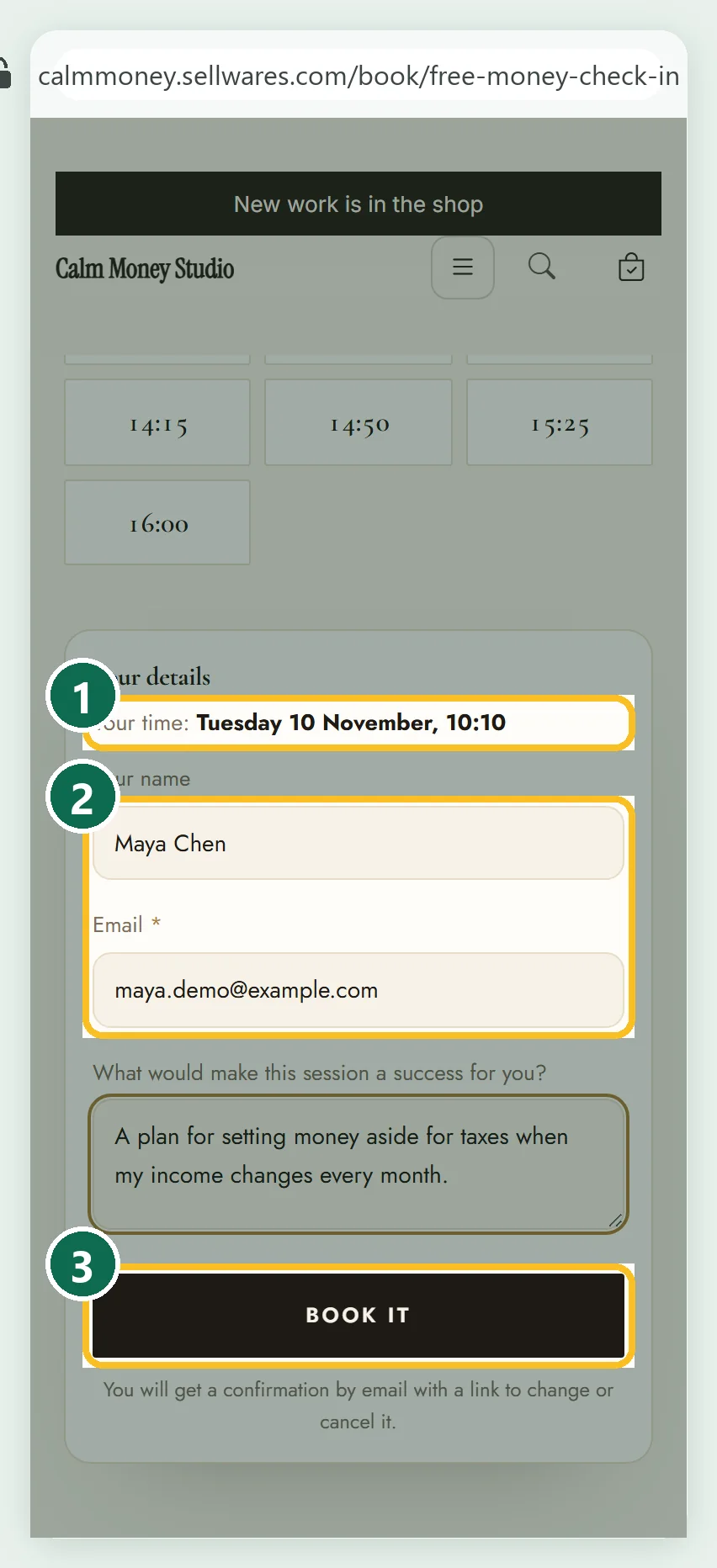
The form repeats her time (1), asks name, email and our question (2), then Book it (3).
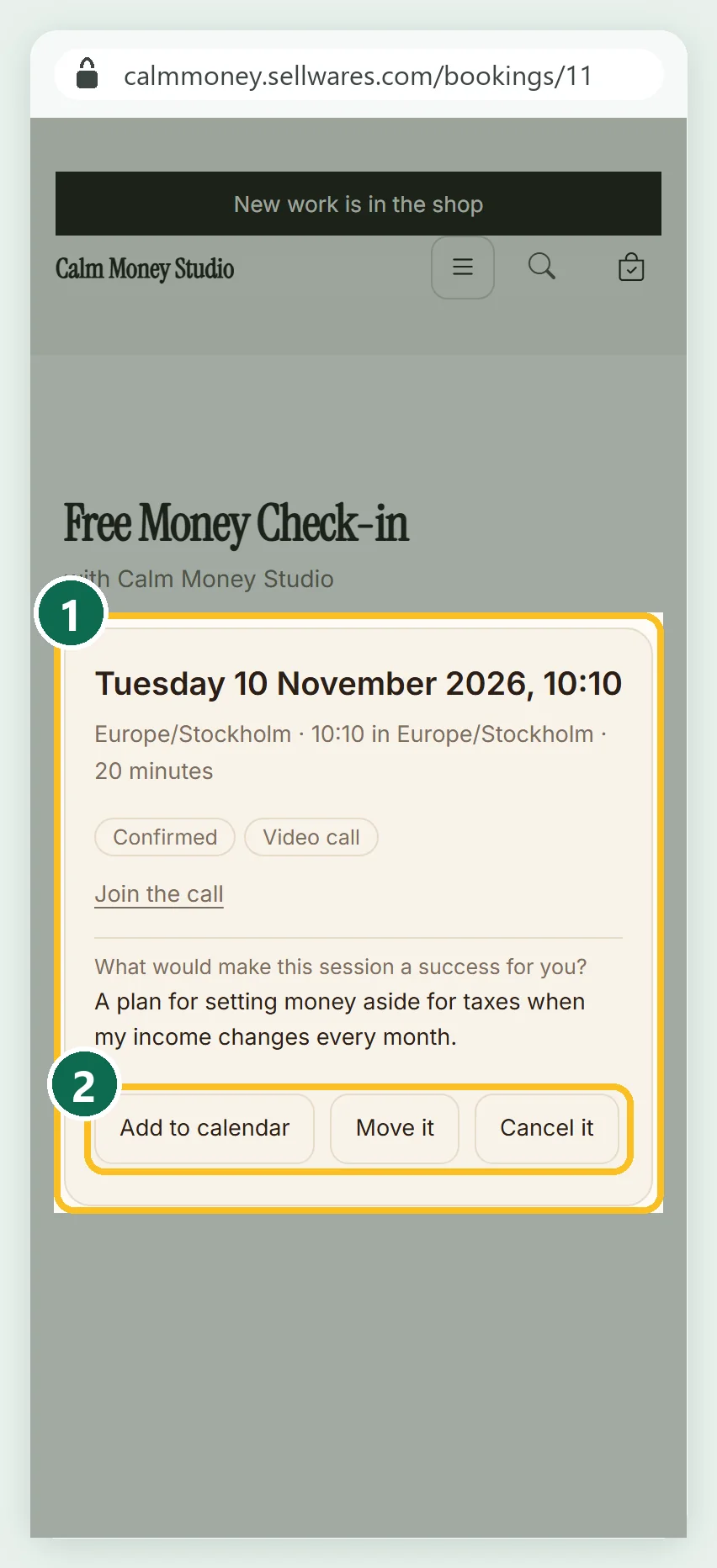
She landed on a confirmed page (1) with Join the call, Add to calendar, Move it and Cancel it (2). Her email, Booked: Free Money Check-in, arrived within seconds. The store's alert reached Lena about a minute later.
Run sessions from Clients and Bookings
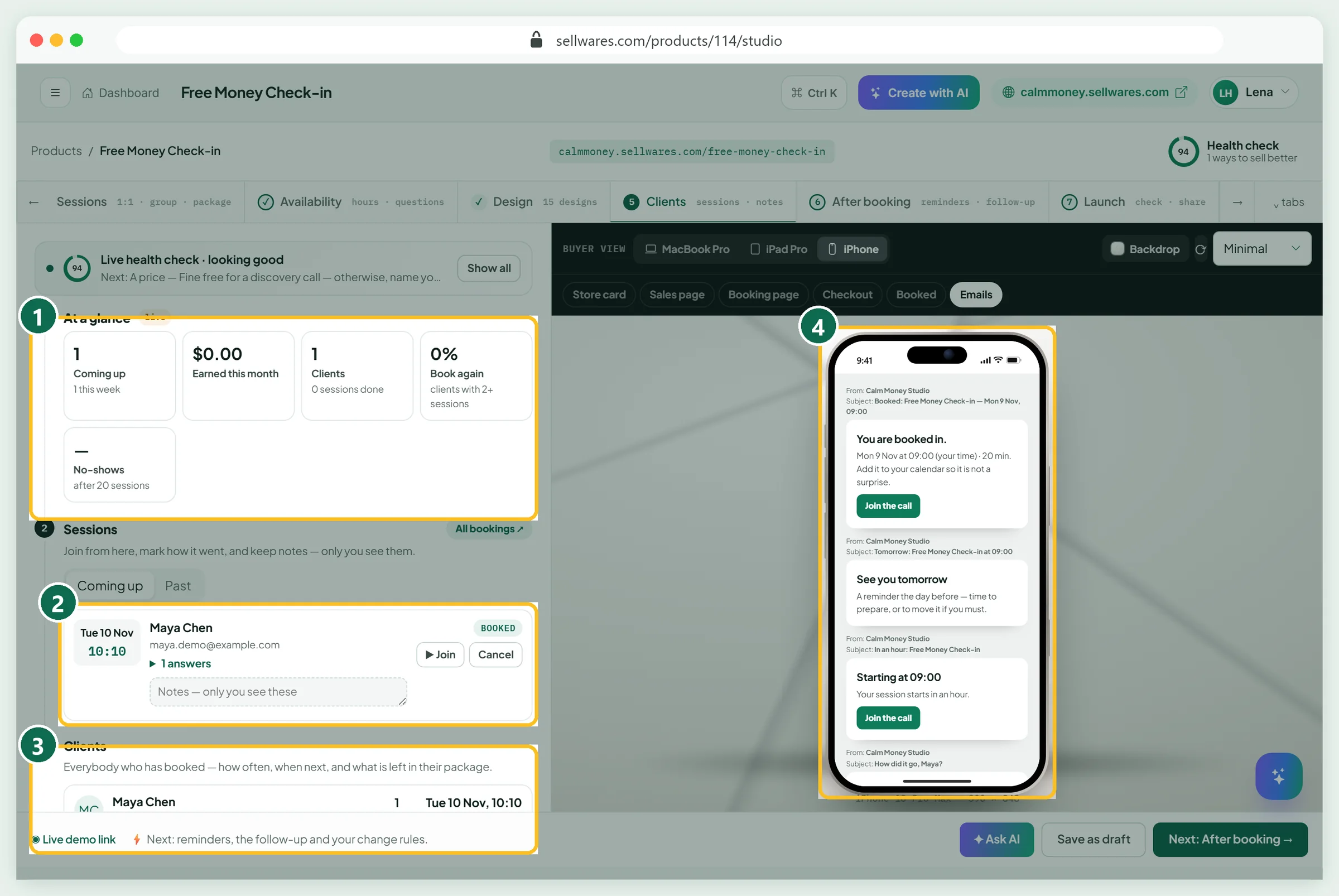
The Clients tab counts what is coming up (1). Each session (2) has Join, Cancel, answers and private notes. The client list (3) shows repeat bookings. The preview (4) shows the four emails a client gets.
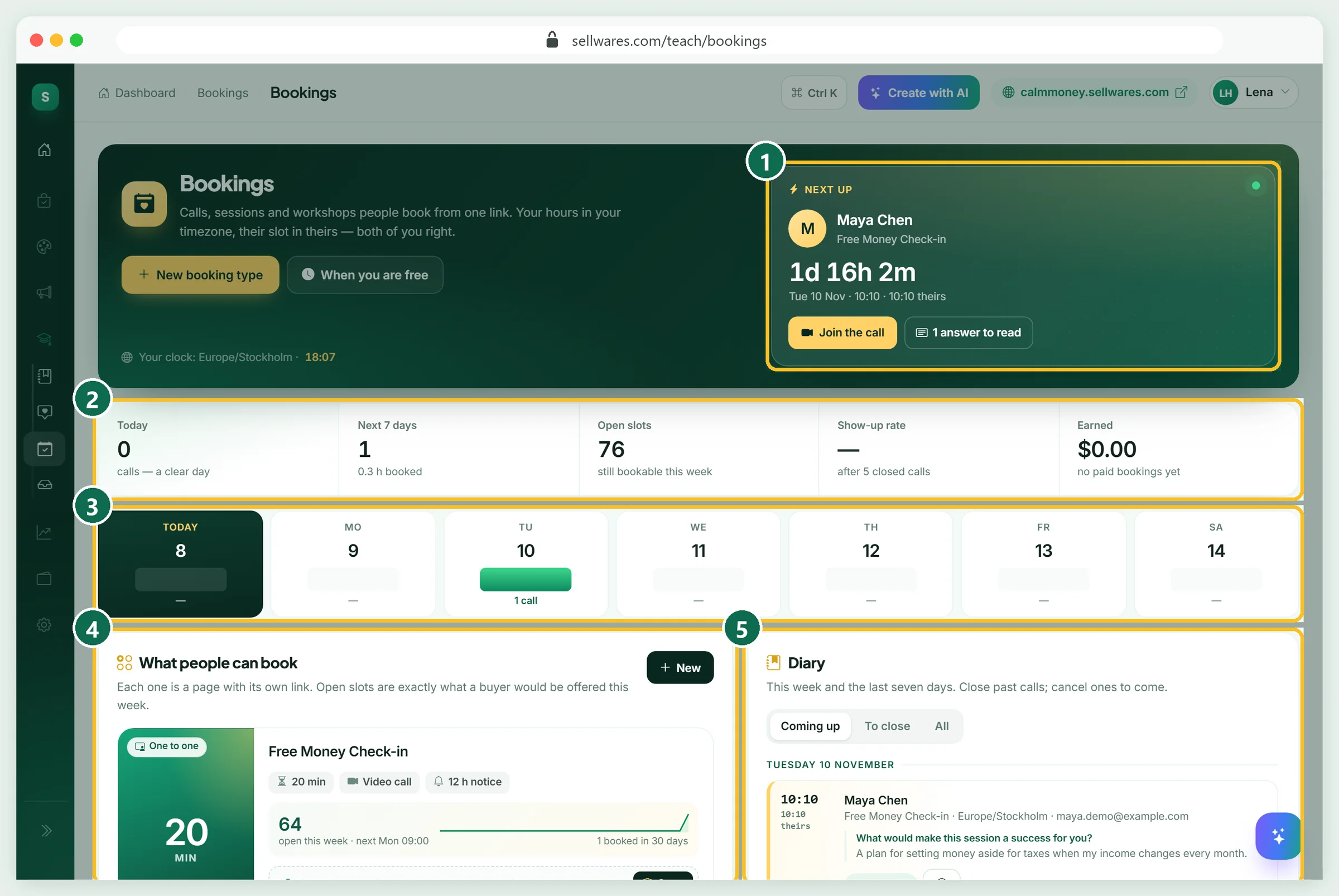
Teach › Bookings shows every session type. Next up (1) counts down to the call. The numbers (2) show calls, open slots and earnings, and the week strip (3) shows busy days. What people can book (4) lists each link, and the Diary (5) holds every booking.
Is a coaching business profitable? The real maths
Here is one $90 session, with fees we read on 8 November 2026.
| Line | Amount |
|---|---|
| Session price | $90.00 |
| PayPal Checkout, US: 3.49% + $0.49 | −$3.63 |
| Sellwares transaction fee | $0.00 |
| You keep | $86.37 |
Check other prices with our PayPal fee calculator. Now the limit. With 3 sessions a day on weekdays, our calendar holds at most 15 a week. The launch calculator starts at 100 sessions a month, so slide it to your real cap. Profit depends on how many clients you find.
How to grow your online coaching business
Knowing how to build an online coaching business is mostly about trust and repeat bookings. Offer the free call first, then the paid one. Once you have regular clients, a package of 4 to 6 sessions suits people who want steady help. Put your booking link in your link in bio and share what you know, as in our guide to building a personal brand.
If something goes wrong
| What you see | Why | Fix |
|---|---|---|
| Publish · fix the red items first stays grey | Payments connected is red on a paid session | Connect Stripe, PayPal, Mollie or Revolut in Payments |
| The booking page says not open for booking yet, it is still a draft | The session is not published | Publish it, or share the Live demo link to preview |
| The first free day is tomorrow, with only 3 times | Book at least a day ahead plus a daily cap of 3 | Lower the notice or raise Most sessions in a day |
| Google Meet or Zoom says Connect … first | No calendar or Zoom account is linked | Connect it, or use My own link |
| A free call shows an amber A price item | The check suggests a price | Ignore it for a discovery call; amber never blocks publishing |
| A 60-minute Zoom call ends at 40 minutes | Zoom Basic stops meetings at 40 minutes | Use a paid Zoom plan or another room link |
What we found in the top results
We read the pages Google ranks for "how to start an online coaching business" on 8 November 2026. A Reddit thread in r/personaltraining ranks near the top with first-hand stories. Luisa Zhou's long guide is strong on niche, offer and a 90-day program, but promotes her own programs. LiveWebinar covers offers, lead magnets and webinars and points to its own webinar tool. The ICF blog covers niche, results and copy, with no setup. None shows a real booking setup, the client's view on a phone, or fee maths on one session. So we built one, booked it, and showed the numbers.
Next steps
That is how to start an online coaching business: a free call today, a paid session once payments connect. To grow your list too, see our lead magnet examples.
Create your free Sellwares store and open your first coaching session this week.
Questions
What is the 70/30 rule in coaching?
It is a rule of thumb for sessions: the client talks about 70% of the time and the coach about 30%, mostly asking questions. Some coaches aim for 80/20. Questions asked before the session help, because you arrive prepared and can listen more.
Do I need a certification to start online coaching?
Check the rules where you live, above all if your topic touches health, therapy or regulated advice. The best-known coaching credentials come from the International Coaching Federation; its first level, ACC, asks for 60+ hours of education and 100+ hours of coaching experience.
Can I start an online coaching business from home?
Yes. You need a quiet room, a video link or phone, a booking page and a payment provider. Clients pick a time in their own time zone, so your home hours become bookable slots without any back-and-forth email.
How much should I charge for online coaching?
Start from the result, not the hour, and test a price you can explain. Work out what you keep: on a $90 session paid by PayPal Checkout in the US, the fee on 8 November 2026 was $3.63, so you keep $86.37 with Sellwares' 0% fee.
Does online fitness coaching work the same way?
The setup is the same: a session type, its length, price and hours, then a booking page. Fitness coaches often sell packages of sessions, paid once and booked as they go, so clients commit to several weeks.
Sources
Related
 BlogLife coach · 6 min readWhat Is a Life Coach? What They Do, Cost and EarnWhat is a life coach? What they do in a session, how coaching differs from therapy, what it costs ($234 an hour on average) and how coaches earn.
 Oliver BennettRead the post →
 Sell Digital Products Online with 0% FeesSell ebooks, templates, presets, music and more from your own store. Instant delivery, 0% transaction fee, paid…
 Janie BrooksTake a look →
 BlogEtsy shop ideas · 11 min read32 Etsy Shop Ideas for 2026: Costs, Fees and What You Keep32 Etsy shop ideas for 2026 with start cost, Etsy's exact fees on an example price and what you keep, plus a free…Oliver BennettRead the post →
 Guide20 min · 10 stepsHow to Sell PDFs Online (Step by Step, 2026)How to sell PDFs online: upload the file, set the price and checkout, connect payments, test the purchase, plus fees on…Janie BrooksFollow the guide →
 Comparison5 min readSubstack vs Patreon (2026): Fees, Payouts and Who WinsSubstack vs Patreon: both take 10% plus 2.9% + $0.30 per card payment. From 200 fans at $10 a month you keep $1,668 on…
 Alexa MorganRead it →