8 Lead Magnet Examples (and How to Set One Up)
8 lead magnet examples for creators and small businesses, then a real setup: a free PDF checklist, email capture, delivery email and tagged subscribers.

The best lead magnet examples are small, useful things people can use the same day: a checklist, a template, a cheat sheet, a mini course by email. Below are eight that work for creators and small businesses, then a full build of one, a free PDF checklist, in a demo store that sells digital products.

Photo: Zulfugar Karimov on Unsplash
We built it on 8 November 2026 in Calm Money Studio, our demo store for freelancers' budget templates. It went from Create Product to published in about five minutes, and the delivery email arrived under a minute after a test signup.
Lead magnet examples: the short answer
- A checklist for a task people repeat.
- A template they fill in instead of starting blank.
- A one-page cheat sheet.
- A mini course by email, one lesson a day.
- A short quiz that sorts people into groups.
- A swipe file of examples to copy.
- A calculator that answers one money question.
- A sample chapter of your book or course.
What is a lead magnet? A lead magnet is a free, useful thing you give in exchange for an email address. It solves one small problem fast, and it starts the relationship that leads to a sale.
8 lead magnet examples that work
Each lead magnet example below says who it suits and what a good one looks like. None of them needs a big audience.
1. Checklist. Suits anyone who teaches a process. A wedding planner's "30 questions to ask your venue" works because people print it and use it today. Keep it to one or two pages.
2. Template. Suits designers, coaches and freelancers. A lead magnet template saves hours: a client onboarding email, a content calendar, a budget sheet. Our free digital templates library, with planners and invoices, shows how one free template can sit next to paid ones.
3. Cheat sheet. Suits teachers of a skill. A language tutor's "50 phrases for your first trip" fits on one page and lives on the fridge.
4. Mini course by email. Suits coaches. Five short lessons over five days, such as "five days to a calmer inbox". Each email builds trust before you ask for anything.
5. Quiz. Suits coaches and shops with several products. "Which savings style are you?" sorts people, so your follow-up email can fit their answer.
6. Swipe file. Suits marketers and writers. Ten cold emails that got replies, or twenty bio lines, ready to adapt.
7. Calculator. Suits finance, fitness and pricing niches. A spreadsheet that works out a freelancer's day rate answers a question people already search for.
8. Sample chapter. Suits authors. The first chapter of your guide shows your writing and leads straight to the full book.
Good lead magnet templates share three traits: one problem, one quick win, and a clear link to what you sell. A tax checklist leads to a tax tracker; a free chapter leads to the book.
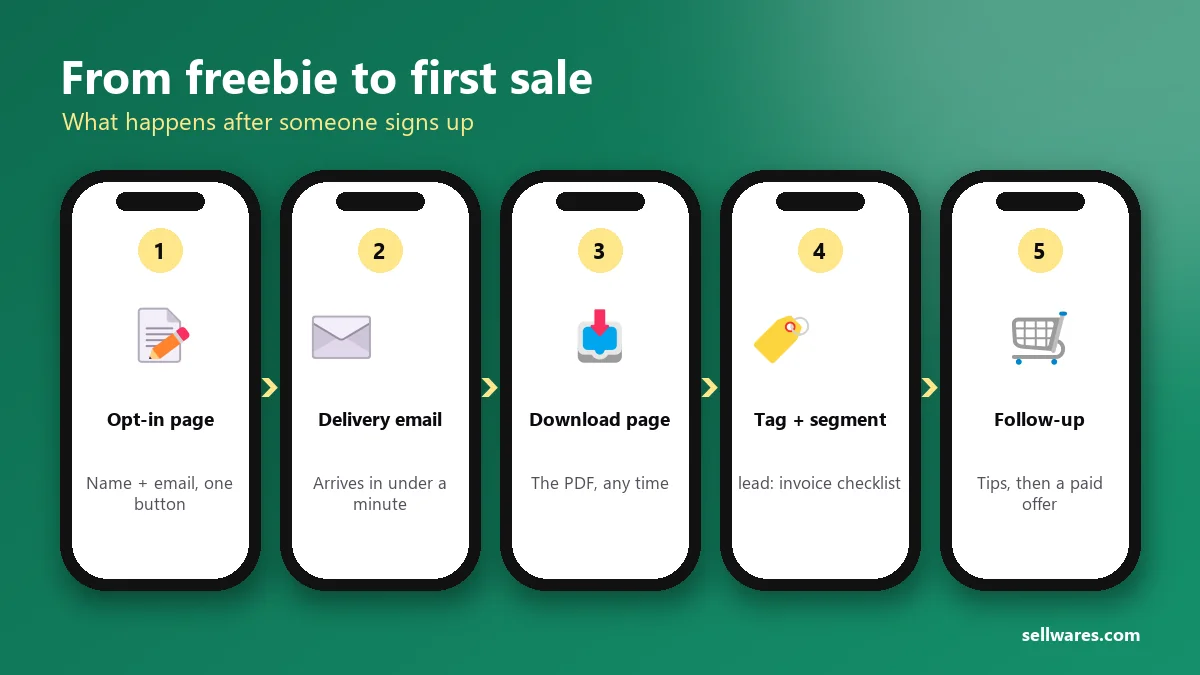
Before you start
You need a Sellwares account (Free works: €0, 3 products, no card) and your freebie as a file, such as a PDF made in Canva or Google Docs. A lead magnet counts as one of the Free plan's three products, drafts included. Free also covers 250 contacts and 1,000 emails a month; Creator (€29 a month) raises that to 5,000 contacts and 25,000 emails. No payment provider is needed, because nothing is charged. Time: about 15 minutes, including the test.
Build the Freelancer Invoice Checklist, step by step
On a phone, tap any screenshot to open it full size and zoom in.
Create the lead magnet
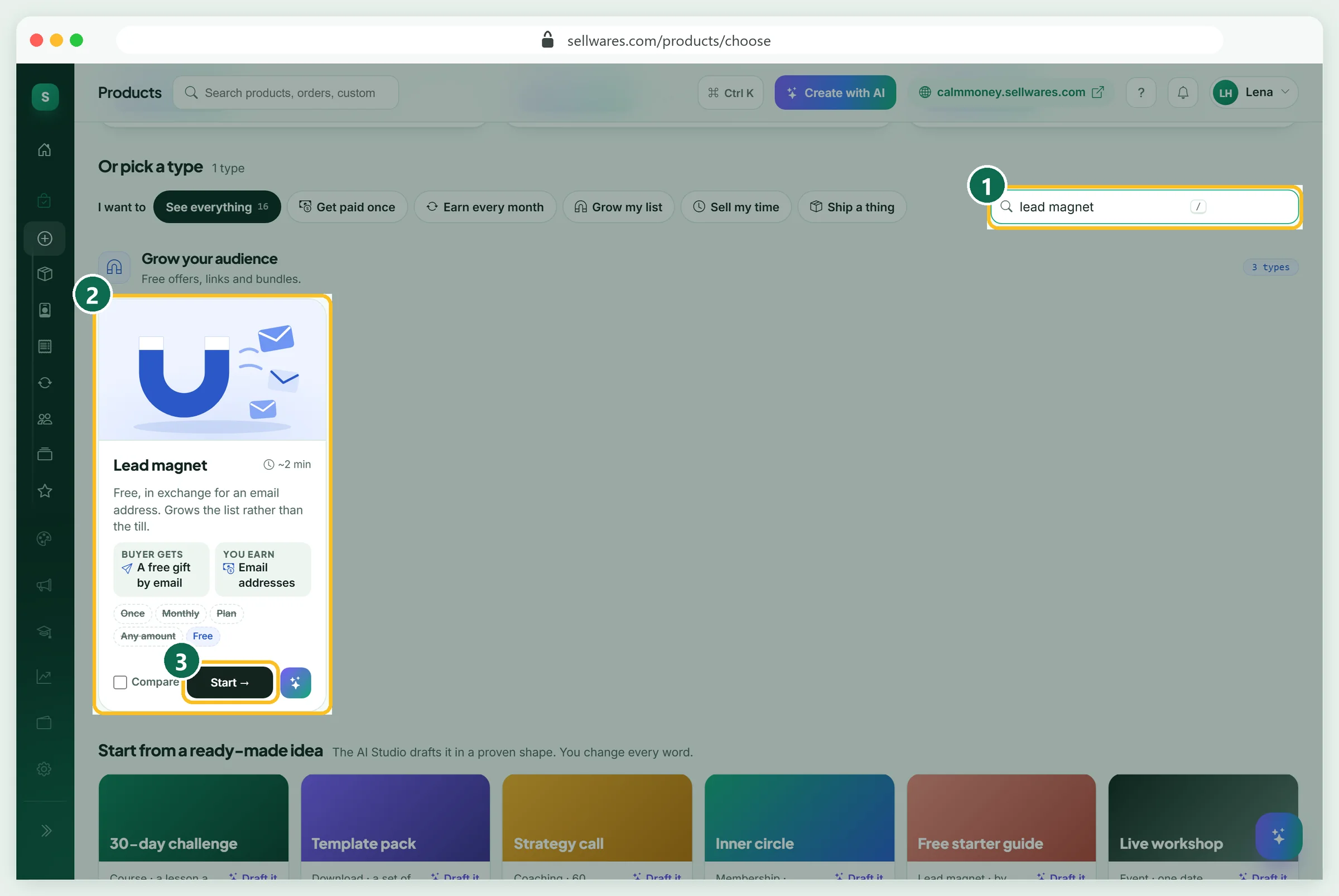
Open Create Product. Under Or pick a type, search "lead magnet" (1), check the card (2) and press Start (3). The card sums it up: the buyer gets a free gift by email, and you earn email addresses. The studio opens with seven tabs, from Thumbnail to Launch.
Name it and pick a cover (Thumbnail)
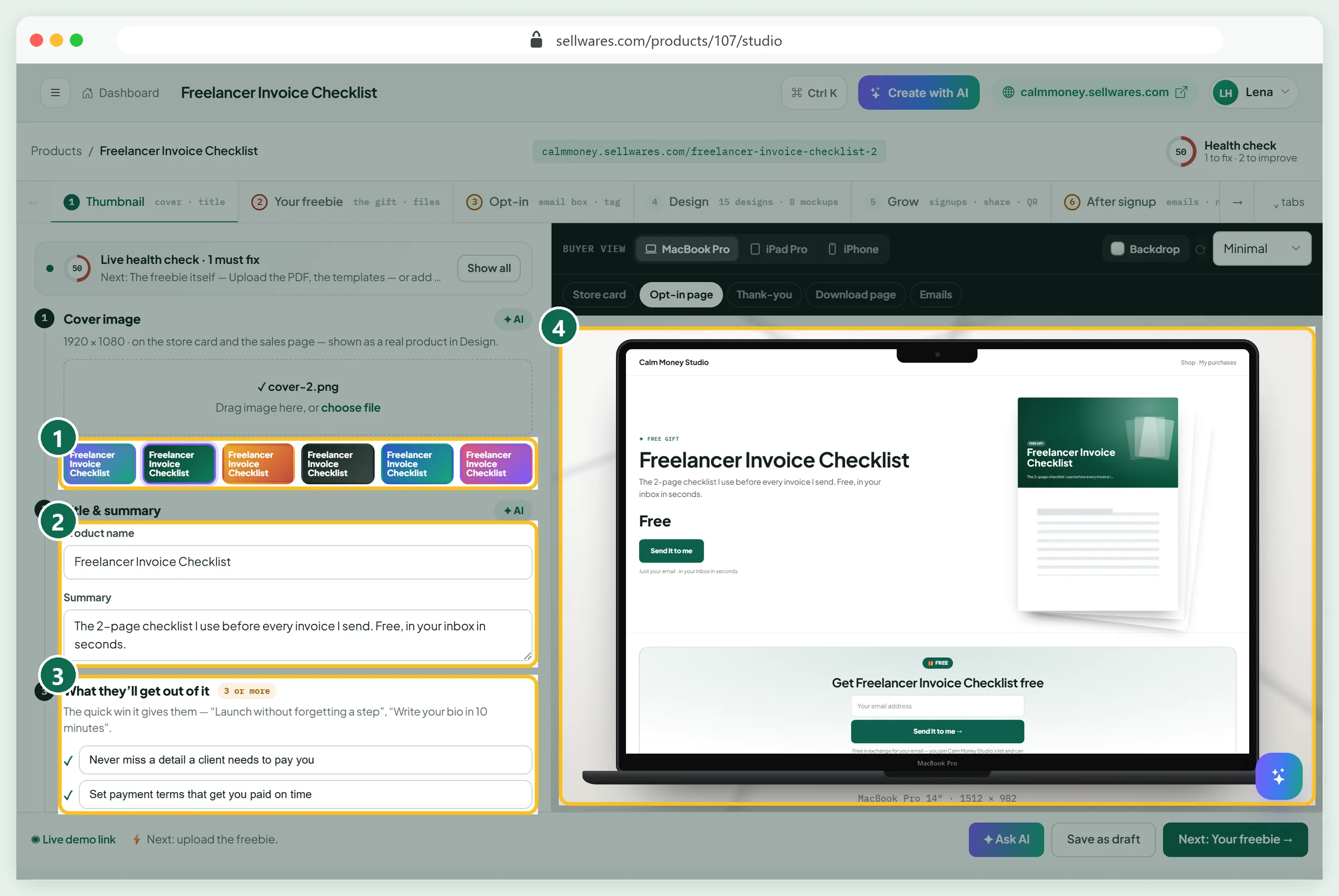
Pick a ready-made cover or drop in a 1920 × 1080 image (1). Type the Product name and a one-line Summary (2): ours is "The 2-page checklist I use before every invoice I send. Free, in your inbox in seconds." Then add three quick wins under What they'll get out of it (3). The preview on the right (4) updates as you type. Rename first, then pick the cover, because covers are drawn from the name.
Upload the freebie (Your freebie)
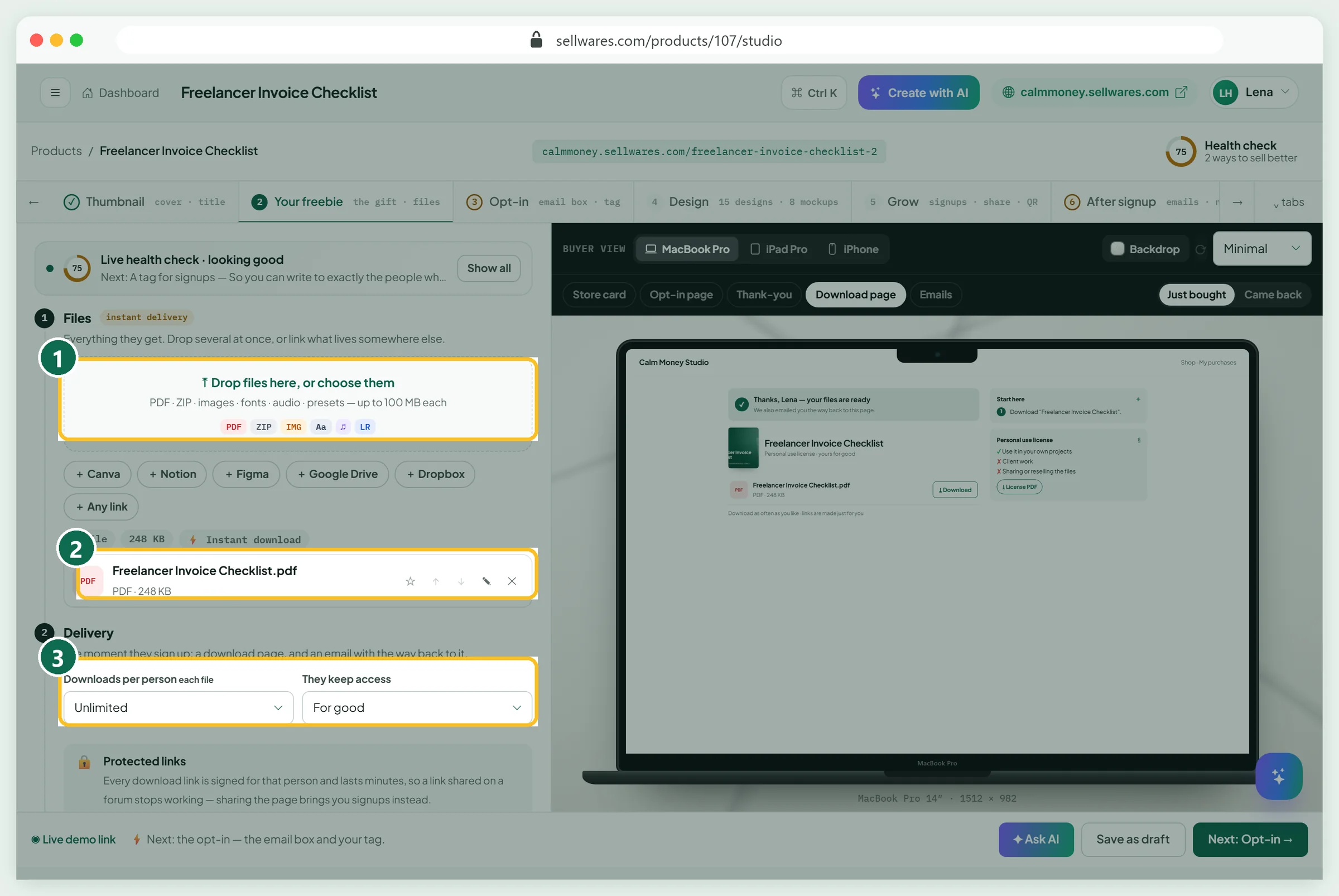
Drop your file in Files (1), or link it from Canva, Notion, Figma, Google Drive or Dropbox. Our 248 KB PDF showed up at once (2). Under Delivery (3) keep Unlimited downloads and access For good: it is free, so limits only annoy people. Download links are signed per person and expire after minutes, so a link shared on a forum stops working.
Set up the email capture (Opt-in)
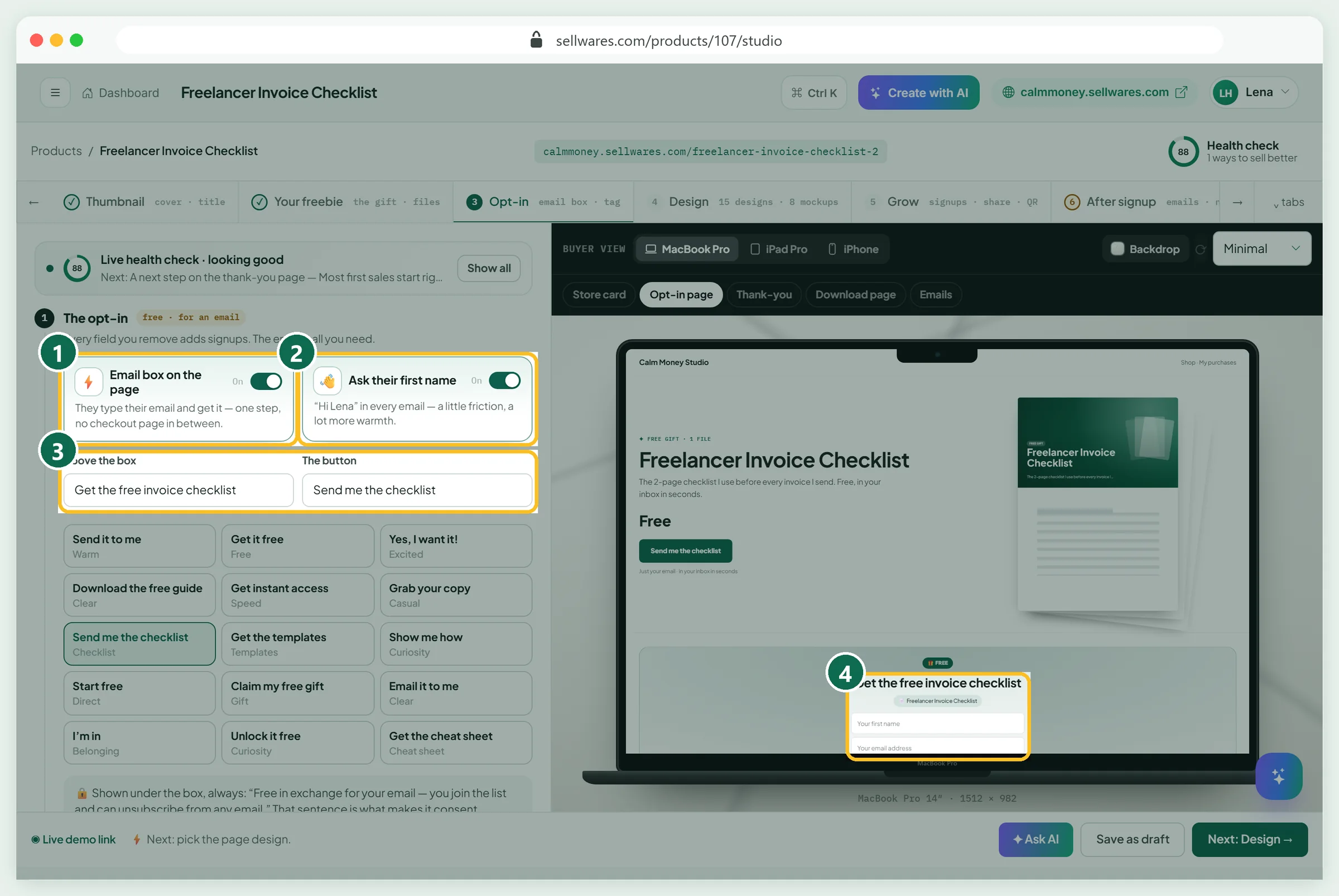
Keep Email box on the page on (1): visitors type their email and get the gift with no checkout page. Ask their first name (2) lets every email say "Hi Sam"; it adds a little friction, so leave it off if you want the most signups. Write the line Above the box and pick a button text (3); we chose "Send me the checklist". The preview shows the form (4).
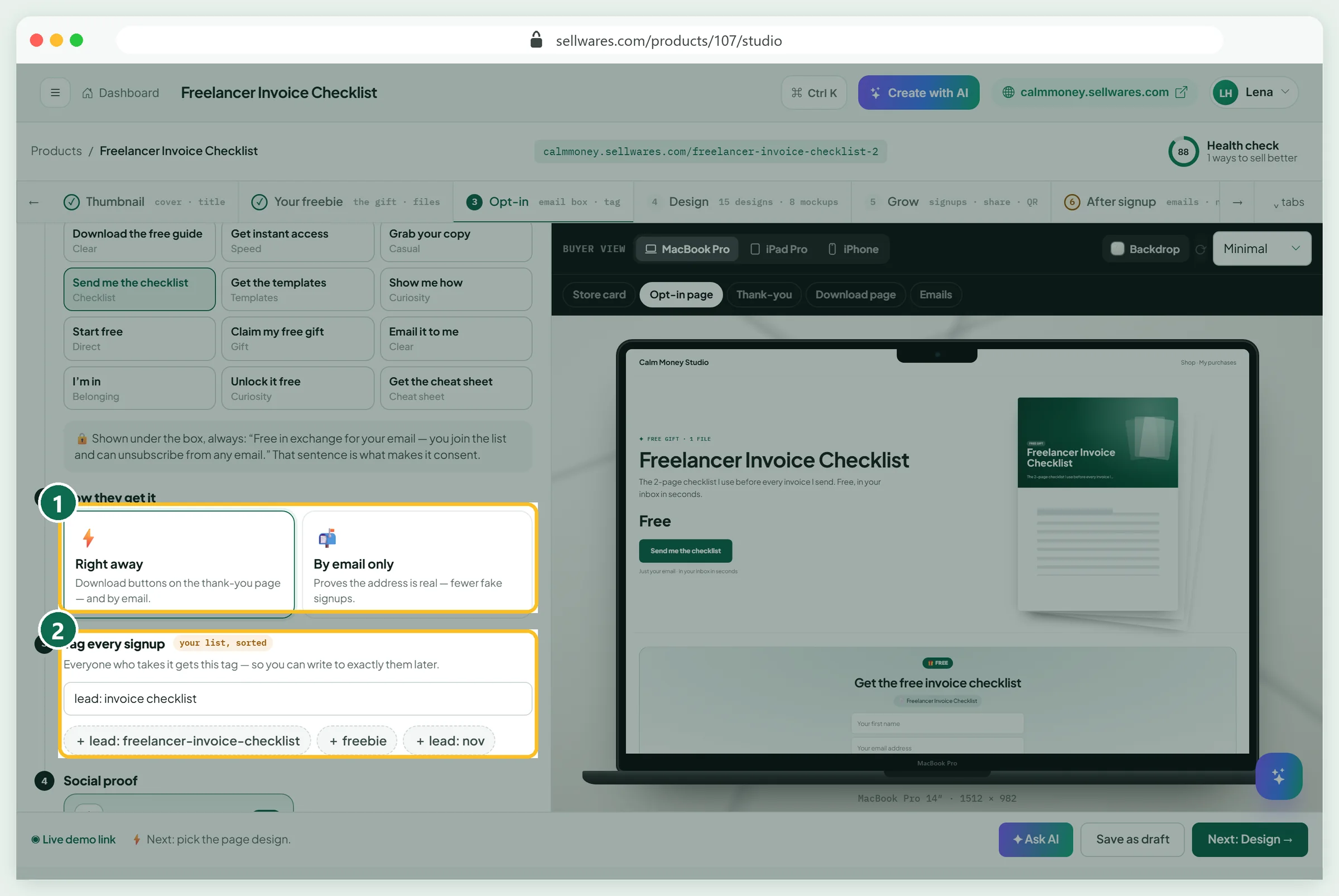
Under How they get it (1), Right away shows download buttons on the thank-you page and sends the email; By email only proves the address is real. Then Tag every signup (2): we used "lead: invoice checklist", so we can write to exactly these people later. The page always shows a consent sentence under the box. Leave it there: it is what makes the signup consent.
Choose the page design (Design)
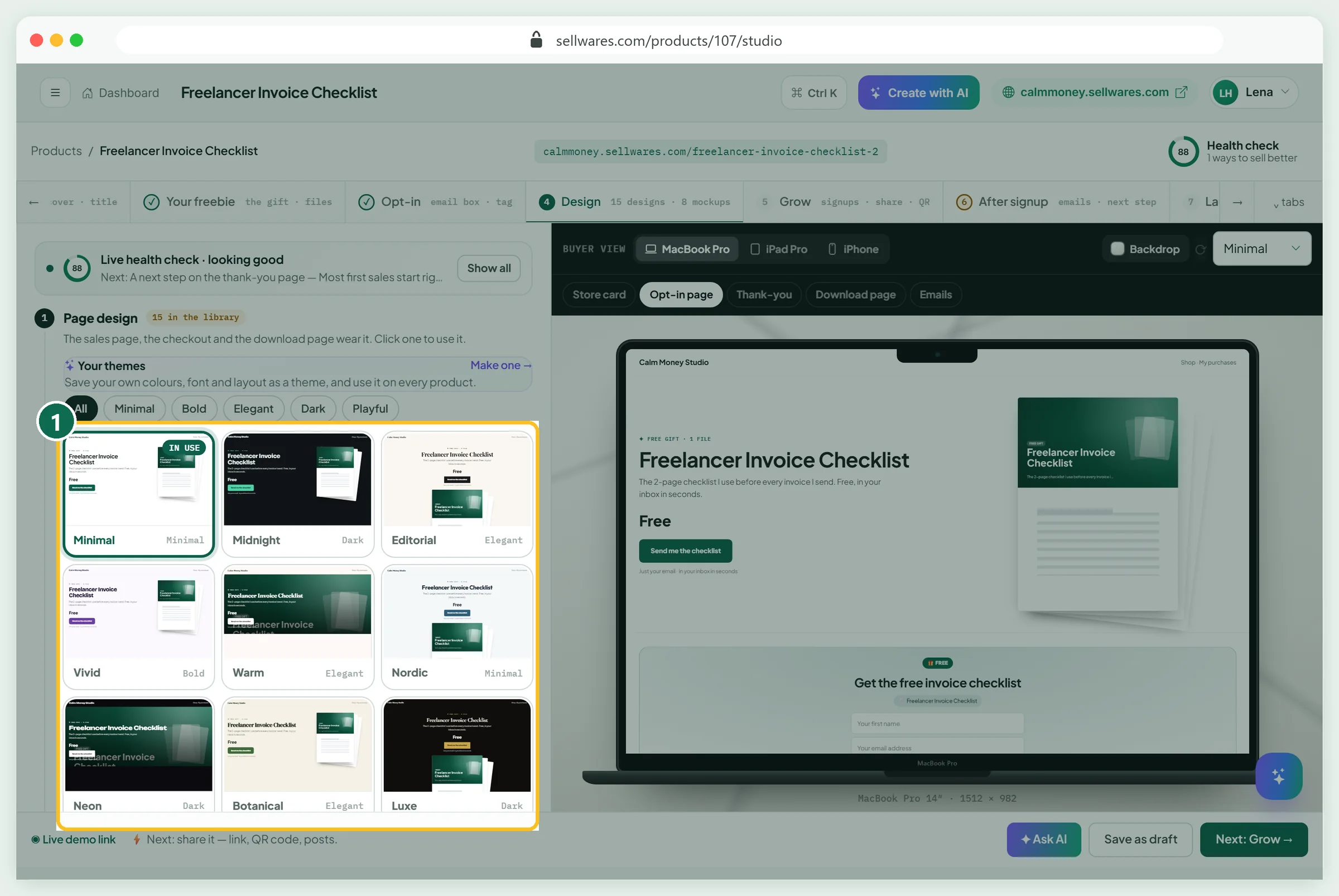
Pick one of 15 page designs (1), or save your own colors and fonts as a theme. The Design tab and the cover work the same way as for a paid download; our guide on how to sell PDFs online walks through both in detail.
Write what happens after signup (After signup)
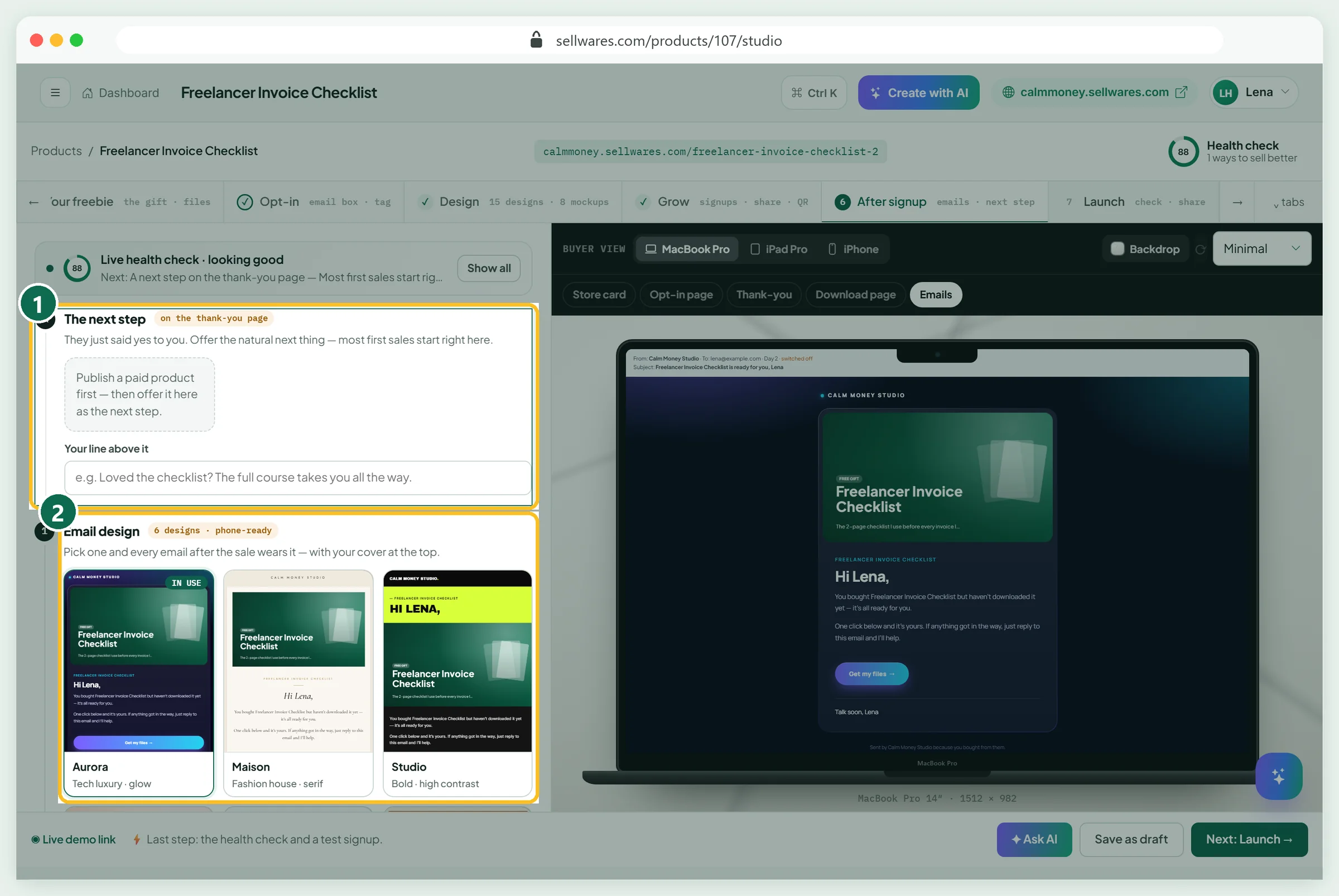
The next step (1) offers one paid product on the thank-you page. It stays empty until a paid product is published; add it later. Email design (2) sets the look of every email.
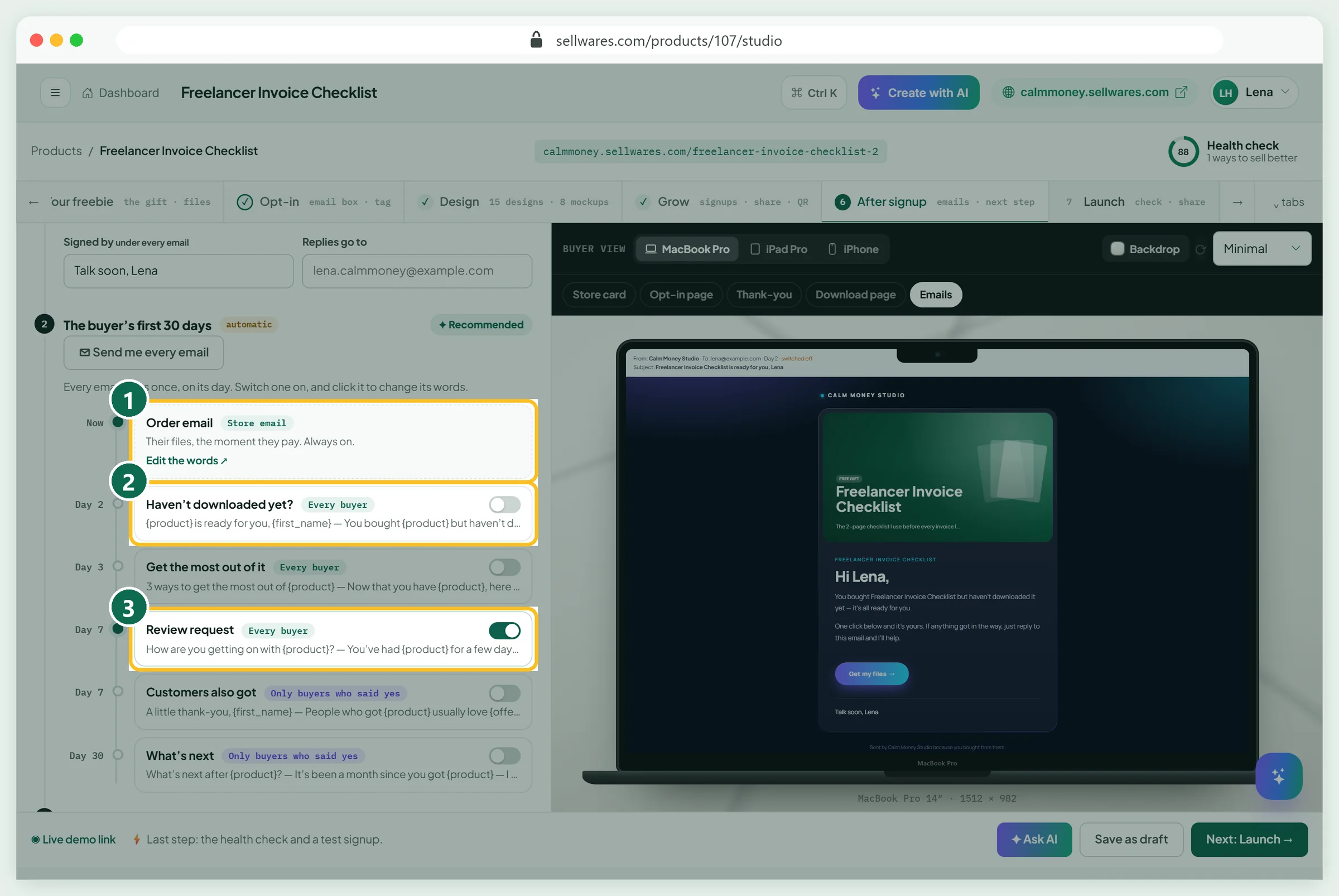
The Order email (1) delivers the file and is always on. We switched on Haven't downloaded yet? for day 2 (2). Review request (3) was already on from the store's settings. Click any email to change its words: the defaults say "You bought", which reads oddly for a gift. Add your sign-off and a thank-you note too.
Check and publish (Launch)
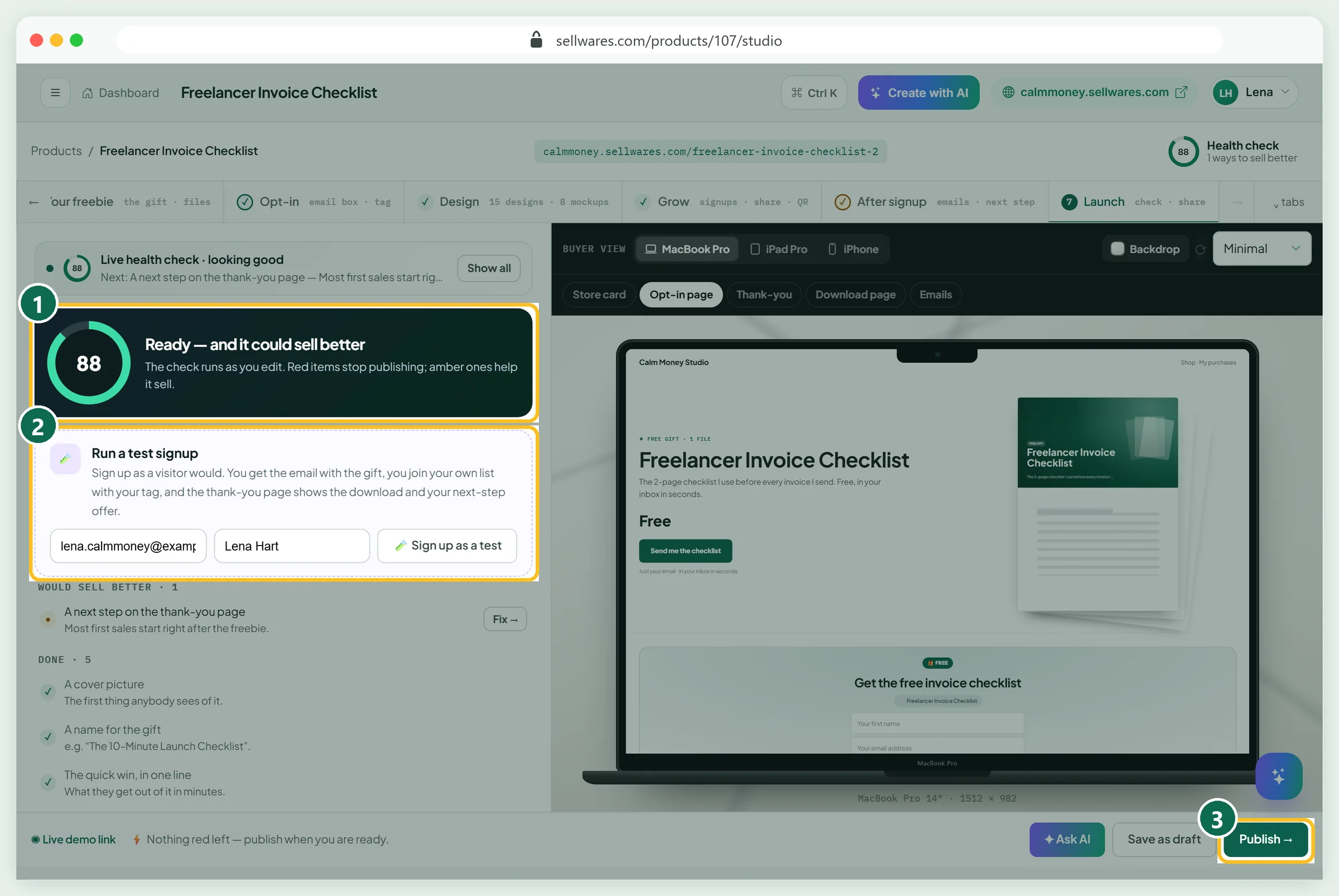
The health check (1) scored 88: nothing blocking, one tip (the next step). Run a test signup (2) sends you the real email and puts you on your own list, marked as a test so it stays out of your numbers. Press Publish (3). Free products can go live without Stripe or PayPal.
See the opt-in page as a subscriber
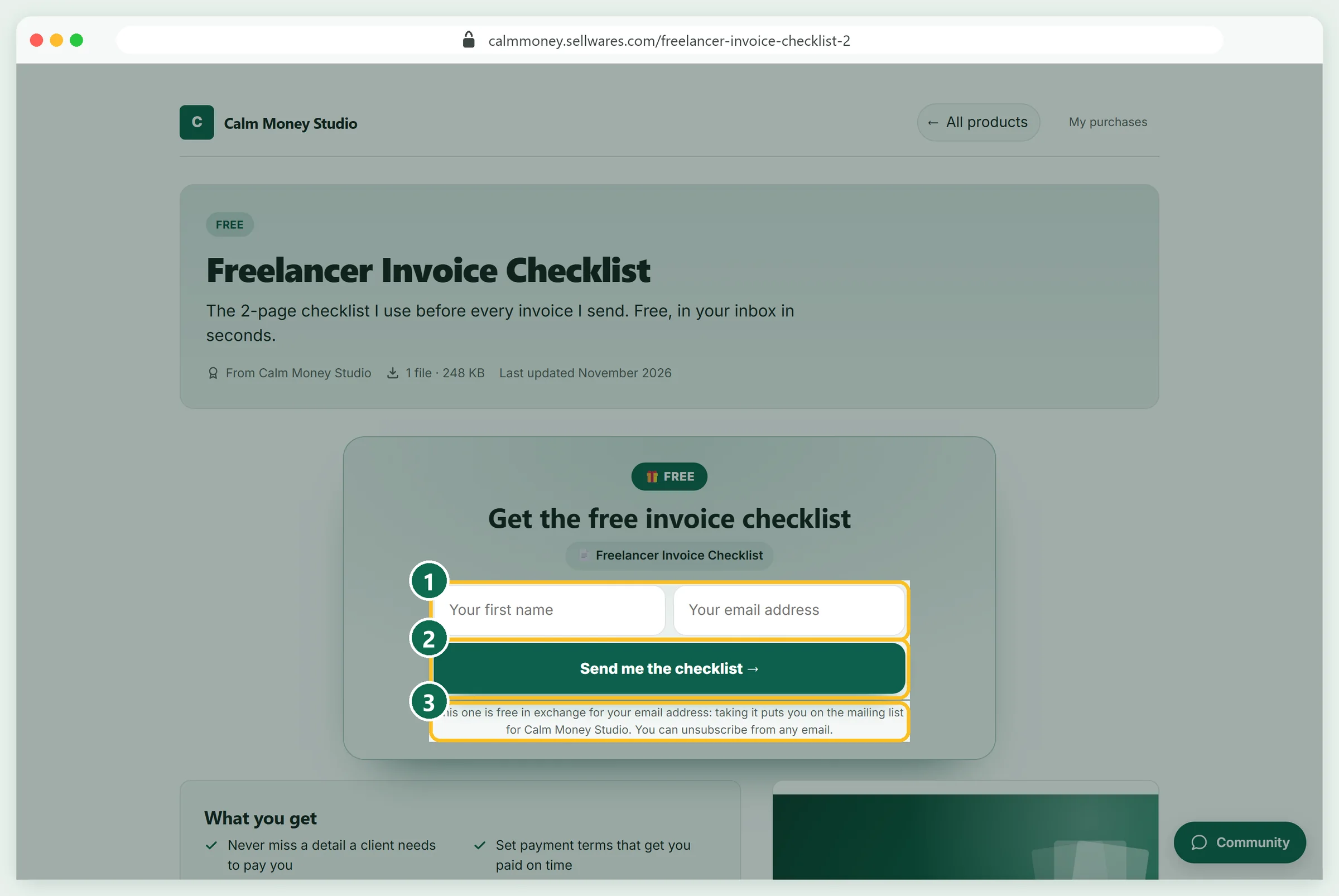
The page shows the name and email fields (1), your button (2) and the consent line (3): "taking it puts you on the mailing list for Calm Money Studio. You can unsubscribe from any email."
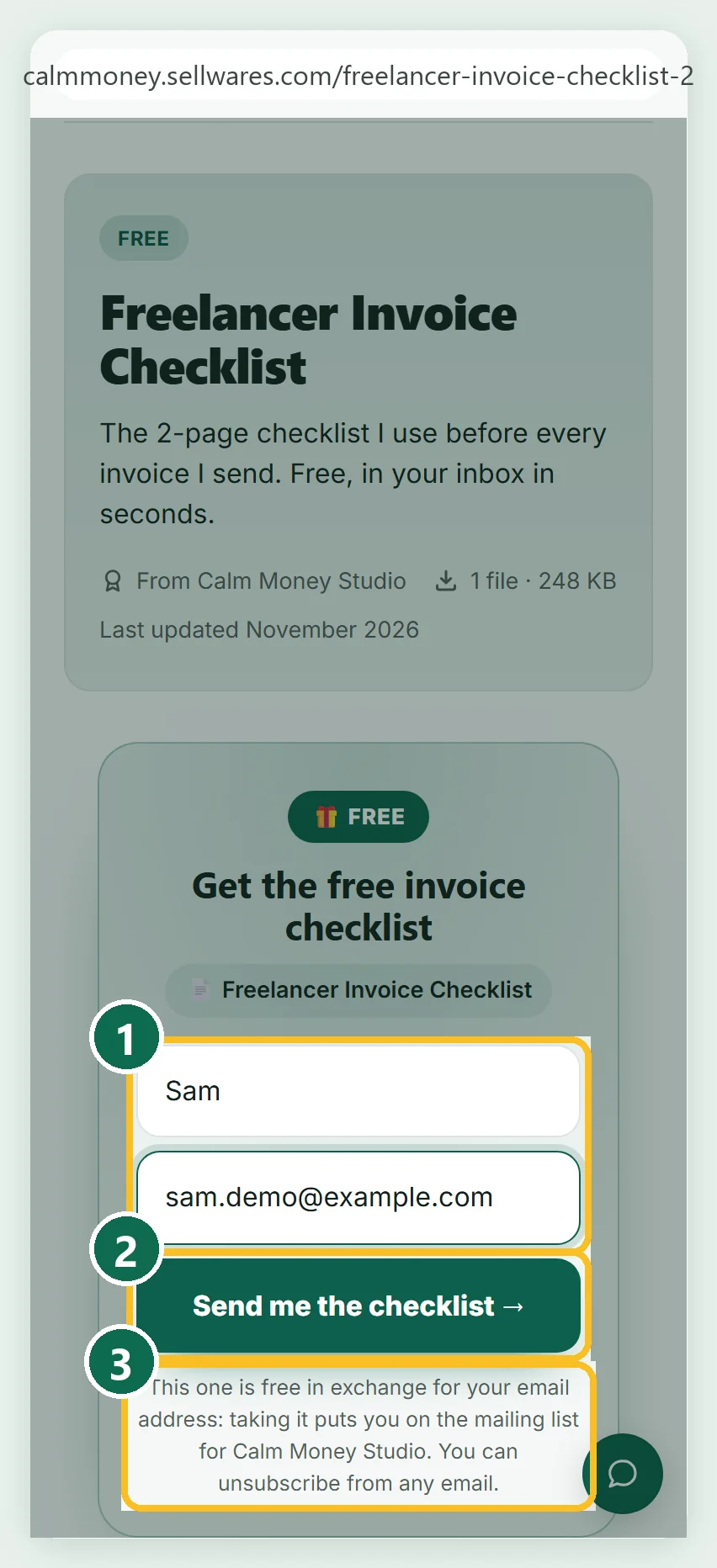
On a phone the form stacks into one column. We signed up as "Sam" with a test address.
The thank-you page, the email and the download
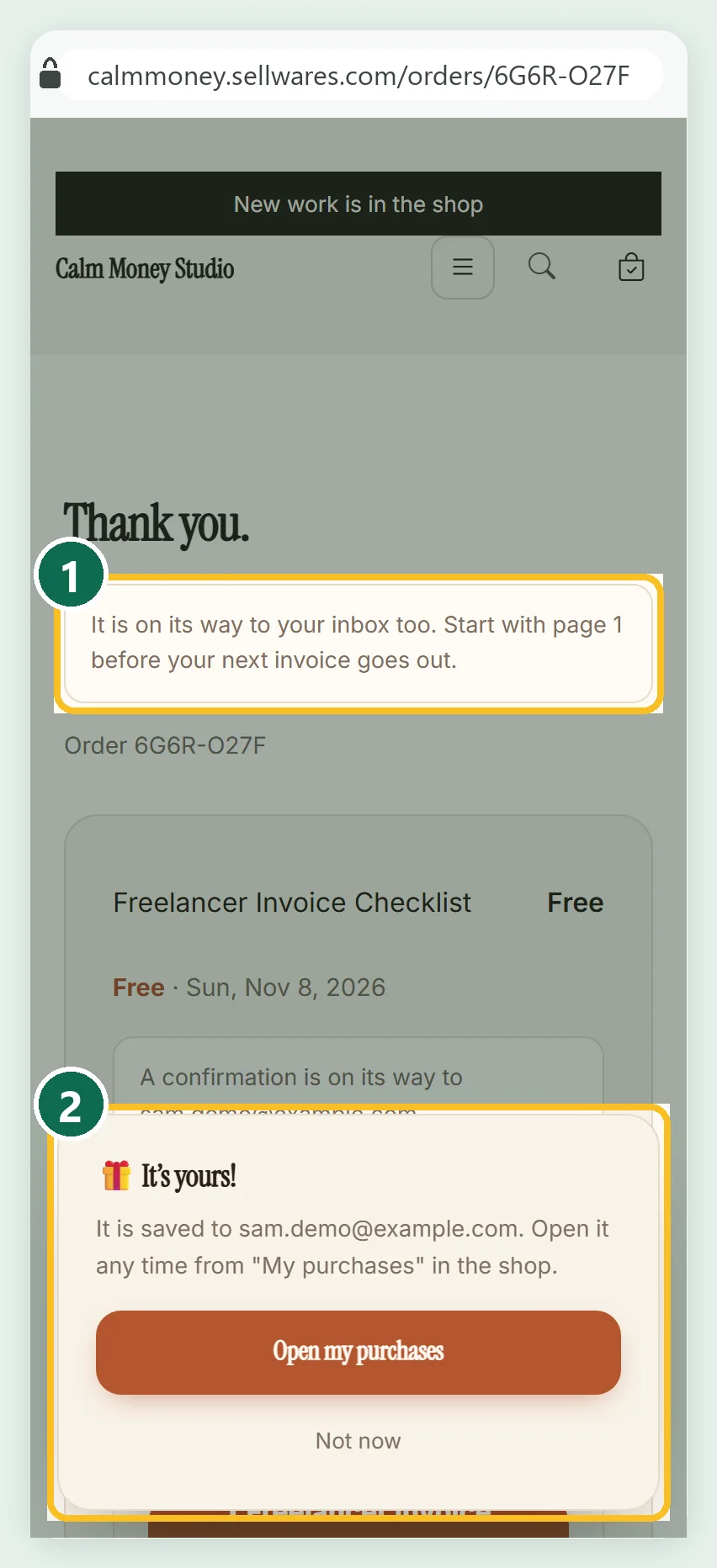
Sam lands on the thank-you page with our note (1) and an "It's yours!" box (2) pointing to My purchases. The email "Your order from Calm Money Studio is ready" arrived about 35 seconds later with an Open my purchase button.
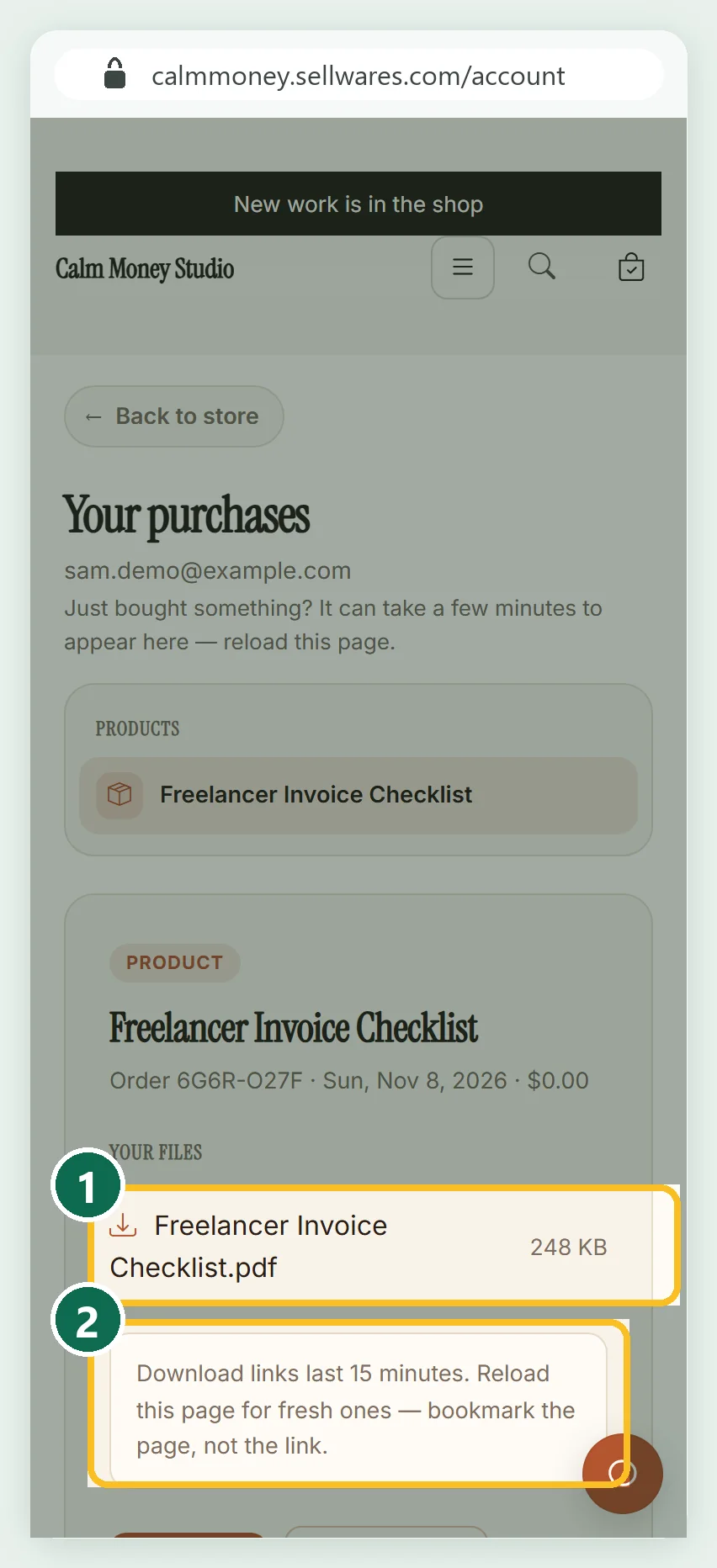
That button opens Your purchases with the PDF (1). Download links last 15 minutes (2); the page makes fresh ones on reload. The file downloaded intact: 254,412 bytes, the same as uploaded.
Share the link (Grow)
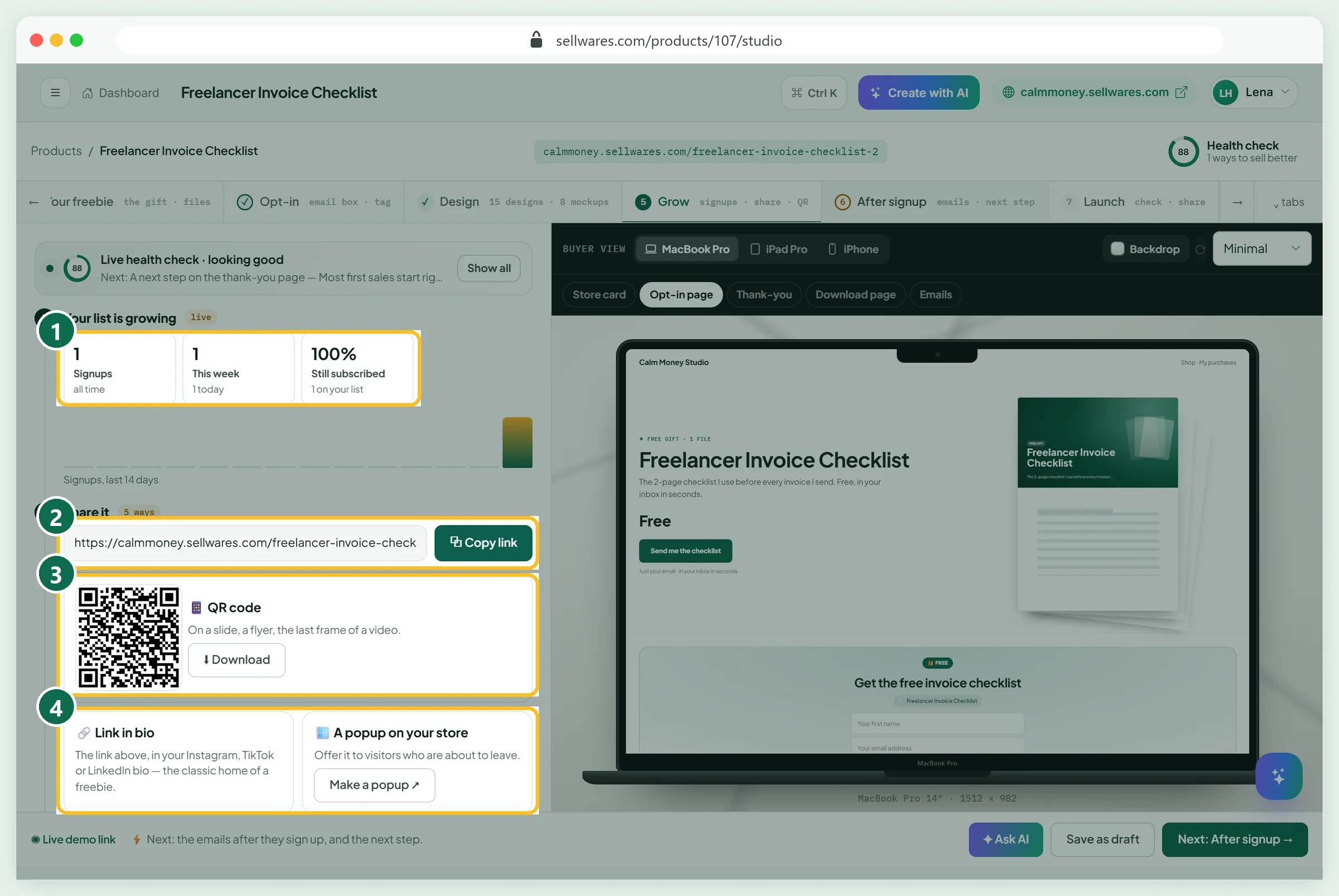
Grow counts signups (1). Copy the page link (2) or download a QR code (3) for slides and flyers. Put the link in your Instagram, TikTok or LinkedIn bio (4); see our link in bio guide for setting one up. You also get a store popup, an embed code and three ready-made posts.
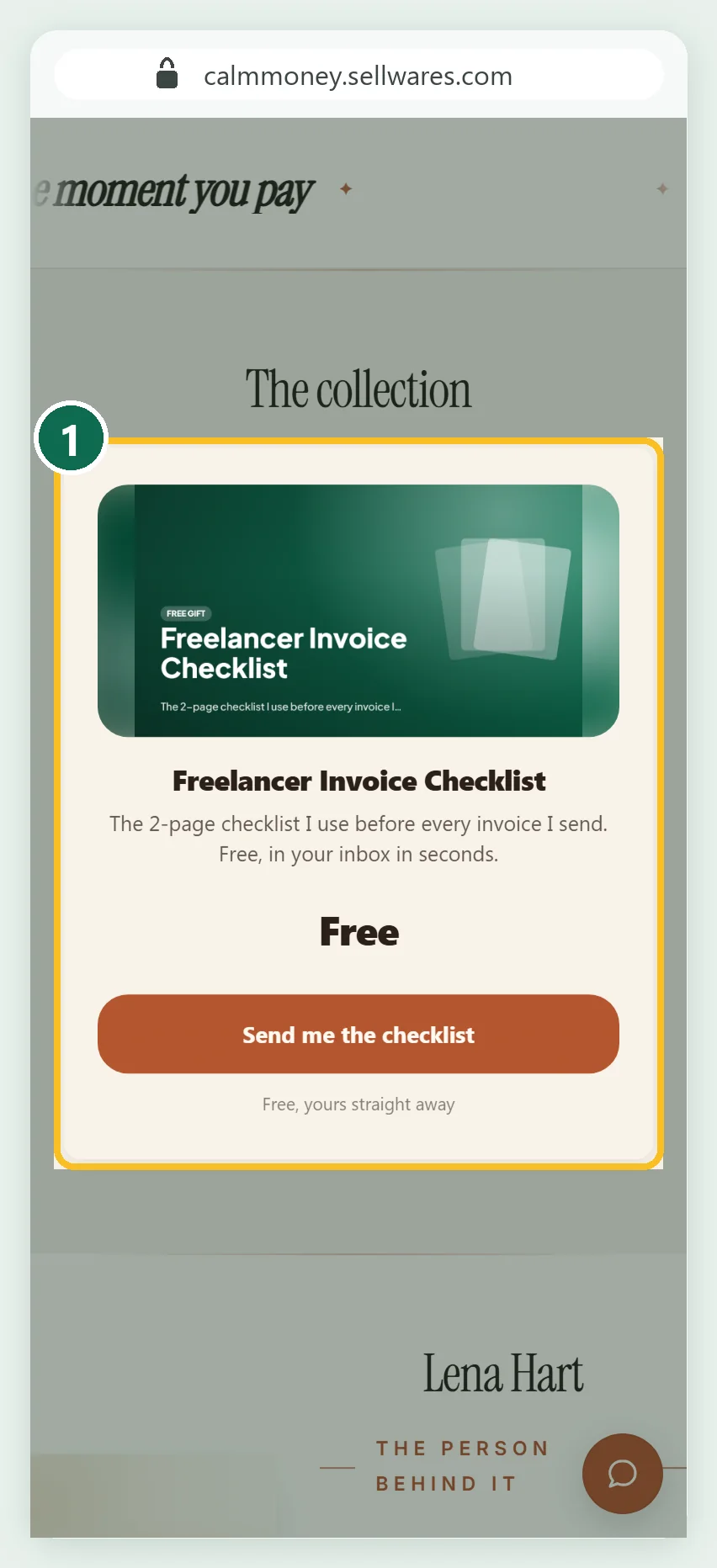
The freebie also appears on your store's home page as a card with the "Free" price.
Find subscribers in Contacts and build a segment
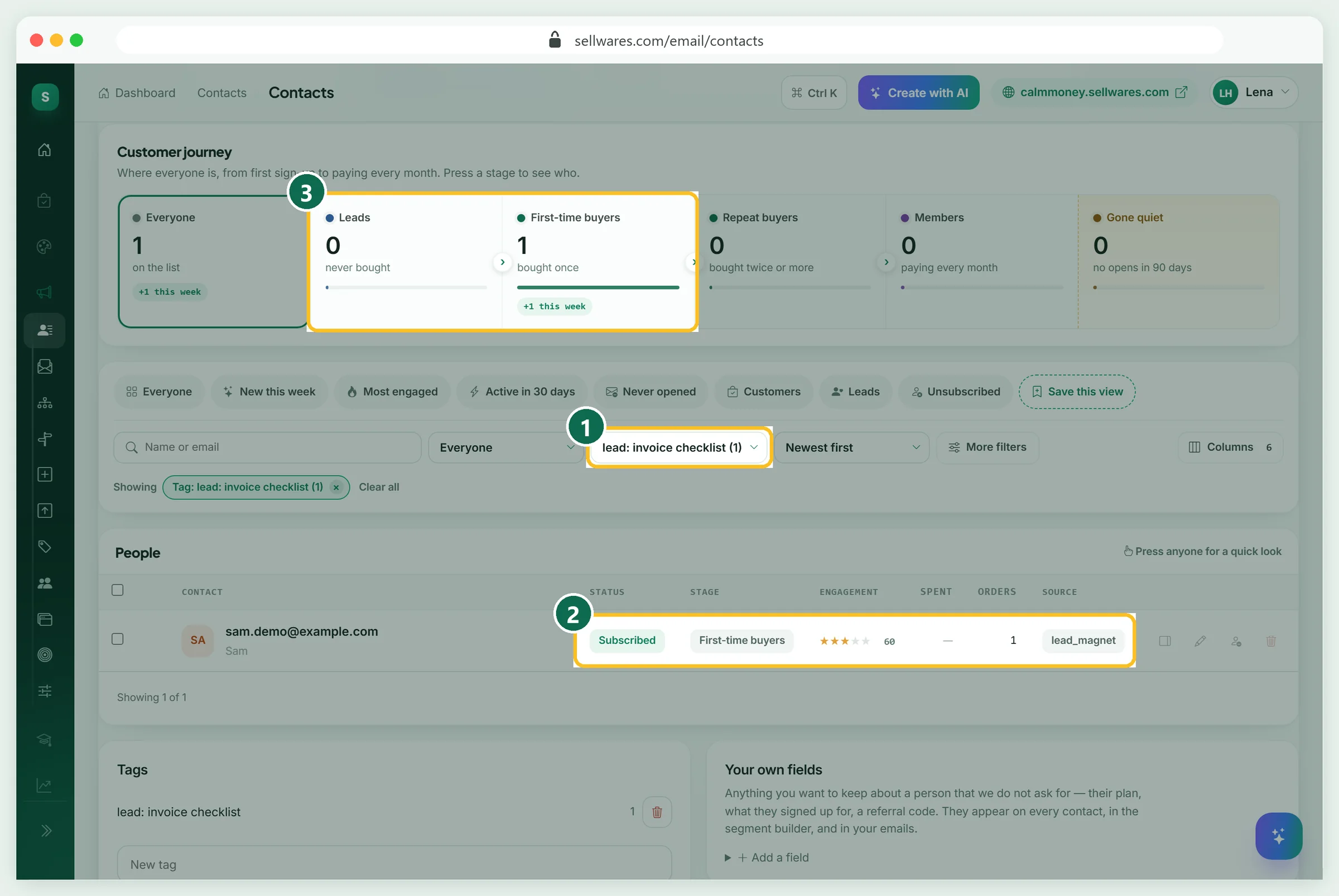
Open Contacts and filter by the tag (1). Sam is there: subscribed, source "lead_magnet" (2). Note the stage: a free signup is an order, so it counts under First-time buyers, not Leads (3).
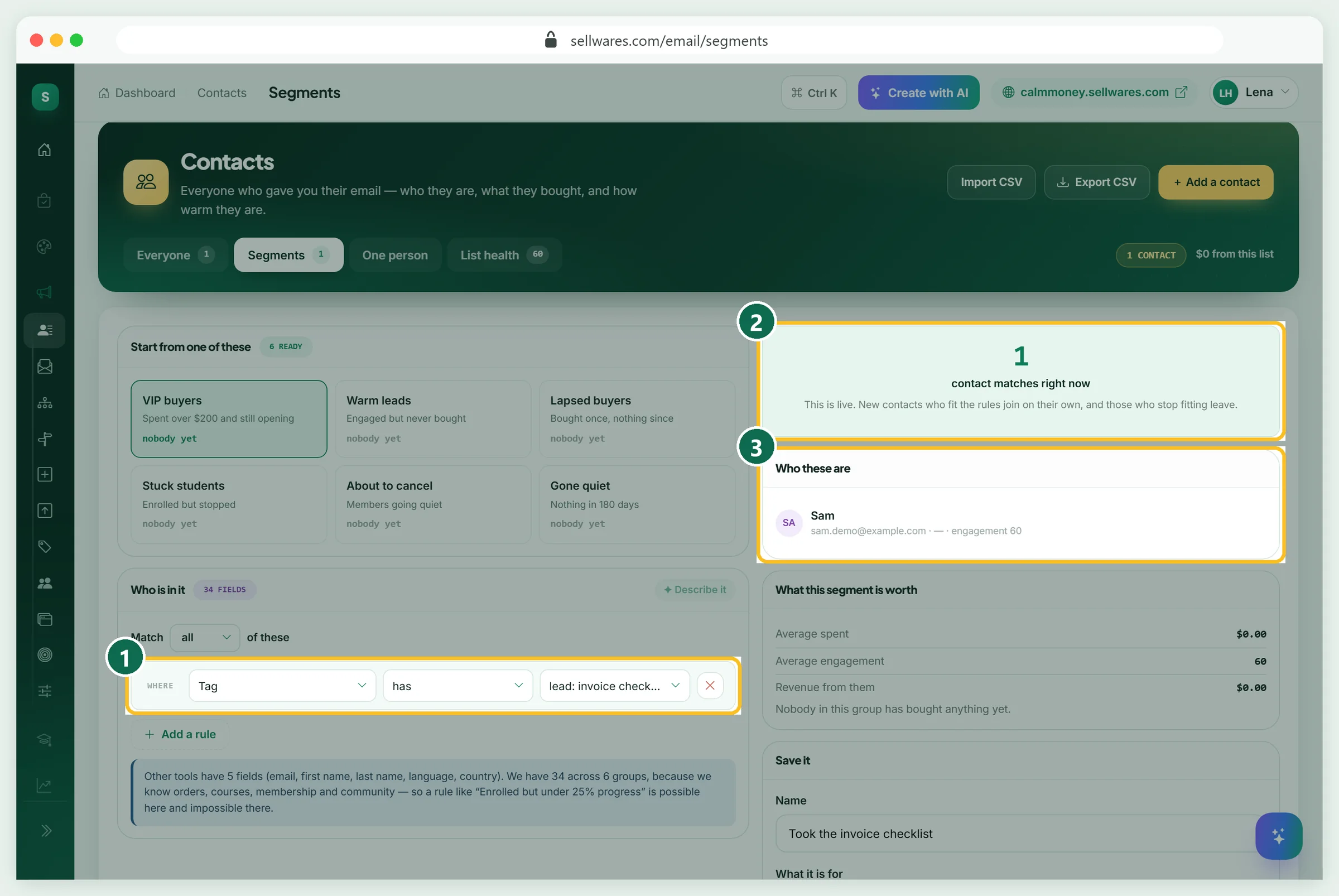
That is why segments should use the tag. In Segments set Tag has lead: invoice checklist (1). The live count showed 1 (2), and Sam (3).
Start an automation for new subscribers
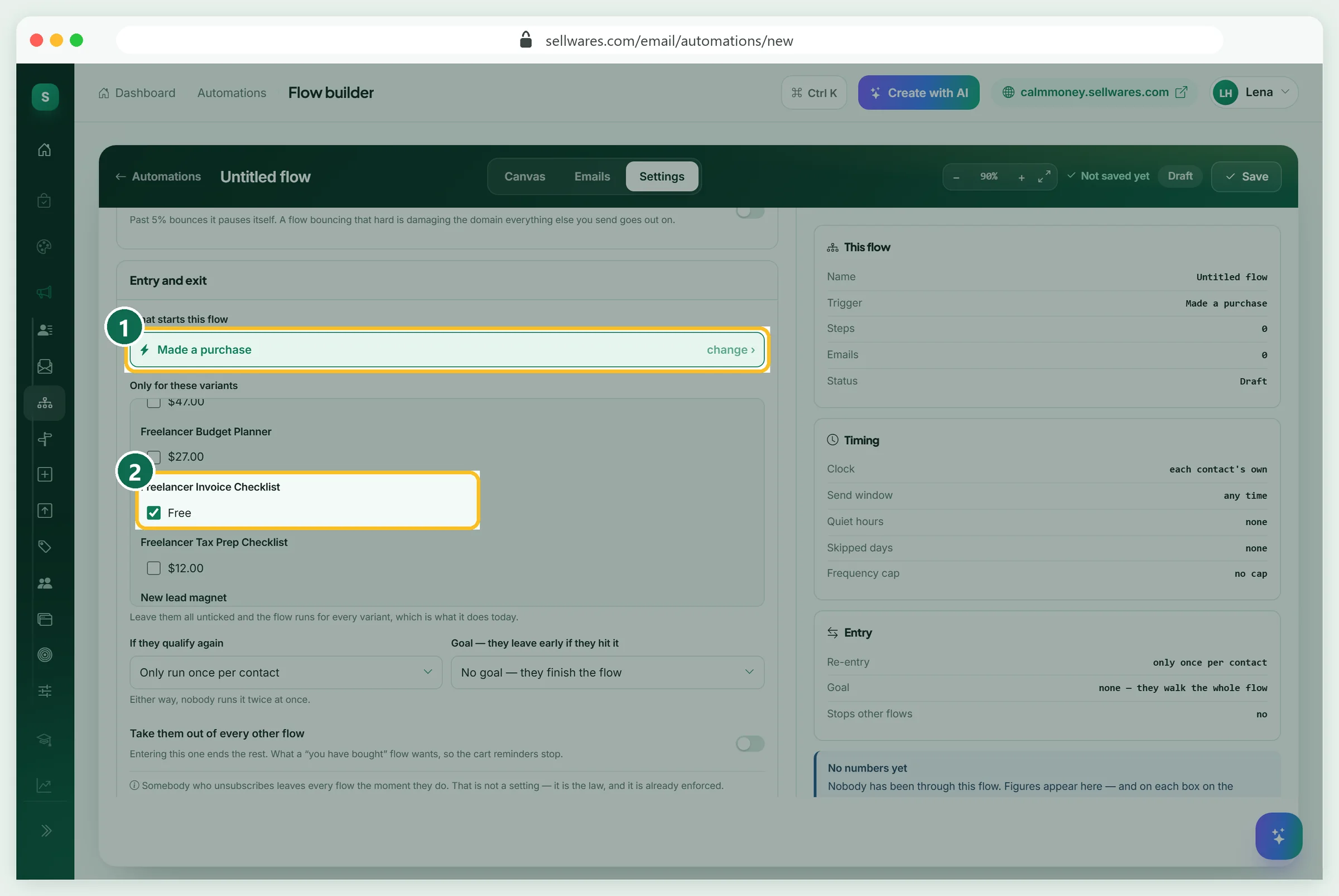
In Automations, build a flow that starts on Made a purchase (1). Under Only for these variants, tick the free checklist (2), so only its subscribers enter. Add a wait and an email, such as a day-3 tip that links to your paid product, then save. Signing up does not fire "Tag added", so start from the purchase instead.
What most lead magnet guides skip
Most guides stop at the idea. Three things matter after the click:
- Consent. The email is the price, so say so next to the button. Under GDPR Article 7, withdrawing consent must be as easy as giving it. The line under the box tells people they can unsubscribe from any email.
- US email rules. The FTC's CAN-SPAM guide says opt-outs must be honored within 10 business days, and each email needs a valid postal address.
- Where people land. A freebie signup shows up as a $0 order. Sort with tags, not with "leads" filters.
If something goes wrong
| What you see | Why | Fix |
|---|---|---|
| An empty "New lead magnet" draft in Products | Starting a type saves a draft at once; we started twice | Reuse it or delete it; drafts count toward the Free plan's 3 products |
| Name or summary not saved | We closed the page a second after typing | Wait for the save, or press Save as draft |
| Cover still says "New lead magnet" | The cover was picked before renaming | Rename first, then pick the cover again |
| Link ends in "-2" | Another product has the same name | Give each product its own name |
| The next step is empty | Only published paid products can be offered | Publish a paid product first |
| Segment shows 0 people | A sample rule ("Last opened an email") was still there | Remove every rule except the tag |
| Email link opens a sign-in page | The link works once | Type the email and press Send me a link |
What we found in the top results
We read the top pages for "lead magnet examples" on 8 November 2026. Wisepops lists 16 ideas with short brand examples. Schmidt Consulting Group breaks down 16 campaigns for agencies, with results from case studies dated 2011 to 2016. Heyflow and Infuse also rank on page one, next to a Reddit thread. None showed the delivery email, where subscribers land, or the consent line.
Next steps
Pick one example, make it in an afternoon, and publish it. Then connect it to a paid product with a short sales funnel.
Create your free Sellwares store and publish your first lead magnet today.
Questions
Do lead magnets still work?
Yes, when the freebie solves one real problem quickly and leads to what you sell. A vague ebook nobody finishes works less well than a one-page checklist people use the same day. Track signups and how many of them later buy, then improve the weakest step.
How do I create a lead magnet?
Pick one problem your buyers have, make the smallest useful fix (a checklist, template or cheat sheet), export it as a PDF, then put it behind an email box. In Sellwares: Create Product, Lead magnet, upload the file, set the opt-in and a tag, and publish. It took us about five minutes.
What are good lead magnet examples for coaches?
A mini course by email, a short quiz that sorts people by their goal, a self-assessment worksheet, or a recording of a short workshop. Each gives a quick win and shows how you work, which makes the paid coaching the natural next step.
Can a lead magnet be an ebook or a PDF?
Yes. PDFs are the most common format because they open on any device. Keep an ebook lead magnet short: a sample chapter or a 10-page guide gets read; a 60-page book often does not. Sellwares delivers it on the thank-you page and by email.
Is a lead magnet free for the person who signs up?
Yes. They pay with their email address, and the page should say so. Sellwares shows a fixed sentence under the box telling people they join the creator's list and can unsubscribe from any email.
Sources
Related
 BlogEmail marketing ideas · 6 min read16 Email Marketing Ideas With Subject Lines16 email marketing ideas for small businesses and creators, each with when to send it, a subject line to adapt and what it achieves, plus CAN-SPAM basics.
 Oliver BennettRead the post →
 Sell Digital Products Online with 0% FeesSell ebooks, templates, presets, music and more from your own store. Instant delivery, 0% transaction fee, paid…
 Janie BrooksTake a look →
 BlogEtsy shop ideas · 11 min read32 Etsy Shop Ideas for 2026: Costs, Fees and What You Keep32 Etsy shop ideas for 2026 with start cost, Etsy's exact fees on an example price and what you keep, plus a free…Oliver BennettRead the post →
 BlogEbooks · 7 min readHow to Write an Ebook (and Sell It) in 7 StepsHow to write an ebook in 7 steps: pick a topic, outline, write, design and export a PDF, then sell it, with what each…Oliver BennettRead the post →
 Guide10 min · 10 stepsBundle Pricing: Types, Formula and How to Set It UpBundle pricing explained: the four types, a simple formula with real numbers, brand examples, the legal question, and…Janie BrooksFollow the guide →