How to Sell PDFs Online (Step by Step, 2026)
How to sell PDFs online: upload the file, set the price and checkout, connect payments, test the purchase, plus fees on a $12 PDF across 5 platforms.

Here is how to sell PDFs online: make a short PDF that solves one problem, upload it as a digital download, set a price, connect a payment provider, test the purchase, then share one link. Below we do it for real in a demo store that sells digital products, with a screenshot of every screen.

Photo: Brooke Cagle on Unsplash
We built it on 8 November 2026 in Calm Money Studio, our demo store for freelancers: a real 2-page PDF priced at $12. Searches like how to sell a PDF online, how to sell PDF online or how to sell PDF files online all mean this same job.
How to sell PDFs online: the short answer
- Pick one problem and make a 2-10 page PDF that solves it.
- Create a Digital download product.
- Add a cover, a clear name and three results.
- Set the price and what the checkout asks.
- Upload the PDF and choose delivery and licence.
- Pick a page design and a mockup.
- Switch on reviews, follow-up emails and a thank-you note.
- Run the health check and a test purchase.
- Connect Stripe, PayPal, Mollie or Revolut, then publish.
- Share the link and check what buyers see.
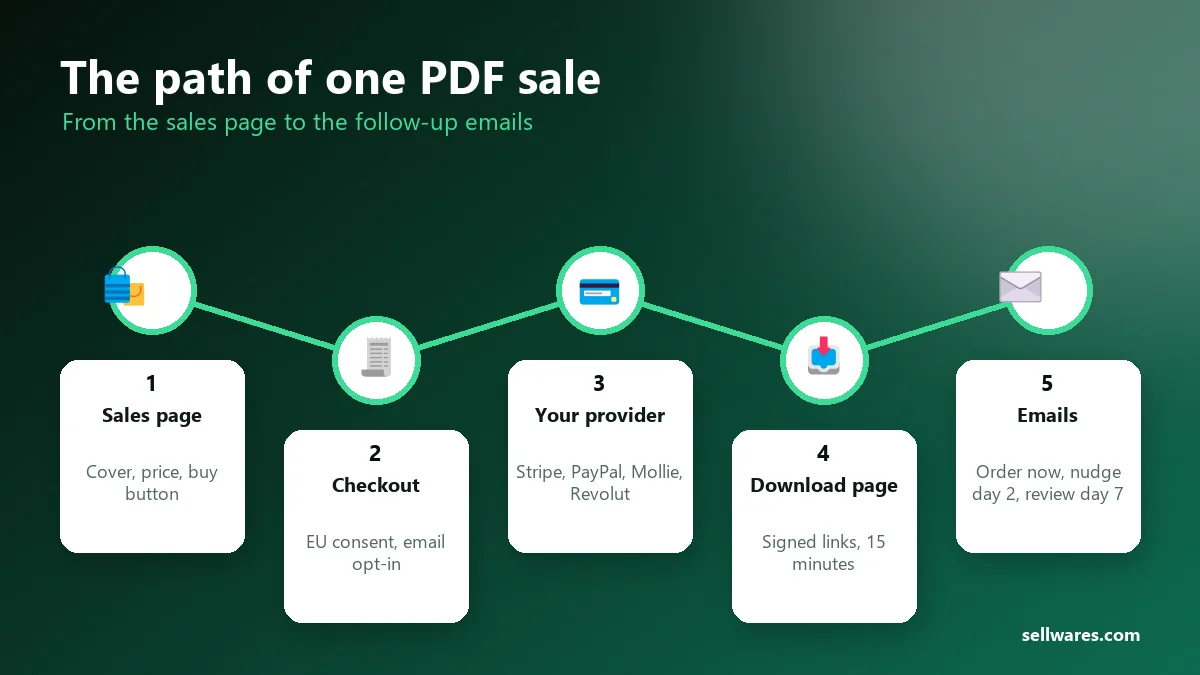
What is a PDF digital download? A PDF digital download is a file a buyer pays for and gets at once, with no shipping. The shop takes the payment, shows a download page and emails a link back to it. Common examples are checklists, planners, workbooks, guides, patterns and ebooks.
Before you start
What kind of PDFs can I sell? Anything you made that saves someone time: a checklist, planner, workbook, pattern or short guide. Skip other people's copyrighted work.
How to create a PDF to sell online: write it in Google Docs, Word or Canva and export it as PDF. Keep it short; ours is two pages. For a longer book, see how to write an ebook. You also need a 1920 × 1080 cover and three lines on what the buyer can do with it.
Plan: to sell PDF online free of monthly fees, start on Free. The Free plan is €0, needs no card, and holds 3 products and 1 GB of files. Every tab in this guide works on it, except the order bump, one-click offers and affiliates, which need Creator (€29 a month, or the 14-day trial). Sellwares takes a 0% transaction fee on every plan.
Time: it took us 7 minutes 31 seconds from Create Product to a test purchase, with the PDF, cover and words ready beforehand. Allow 20 minutes the first time.
How to sell PDFs online step by step
Every screenshot is from the real product studio. On a phone, tap any screenshot to open it full size and zoom in.
Create a Digital download
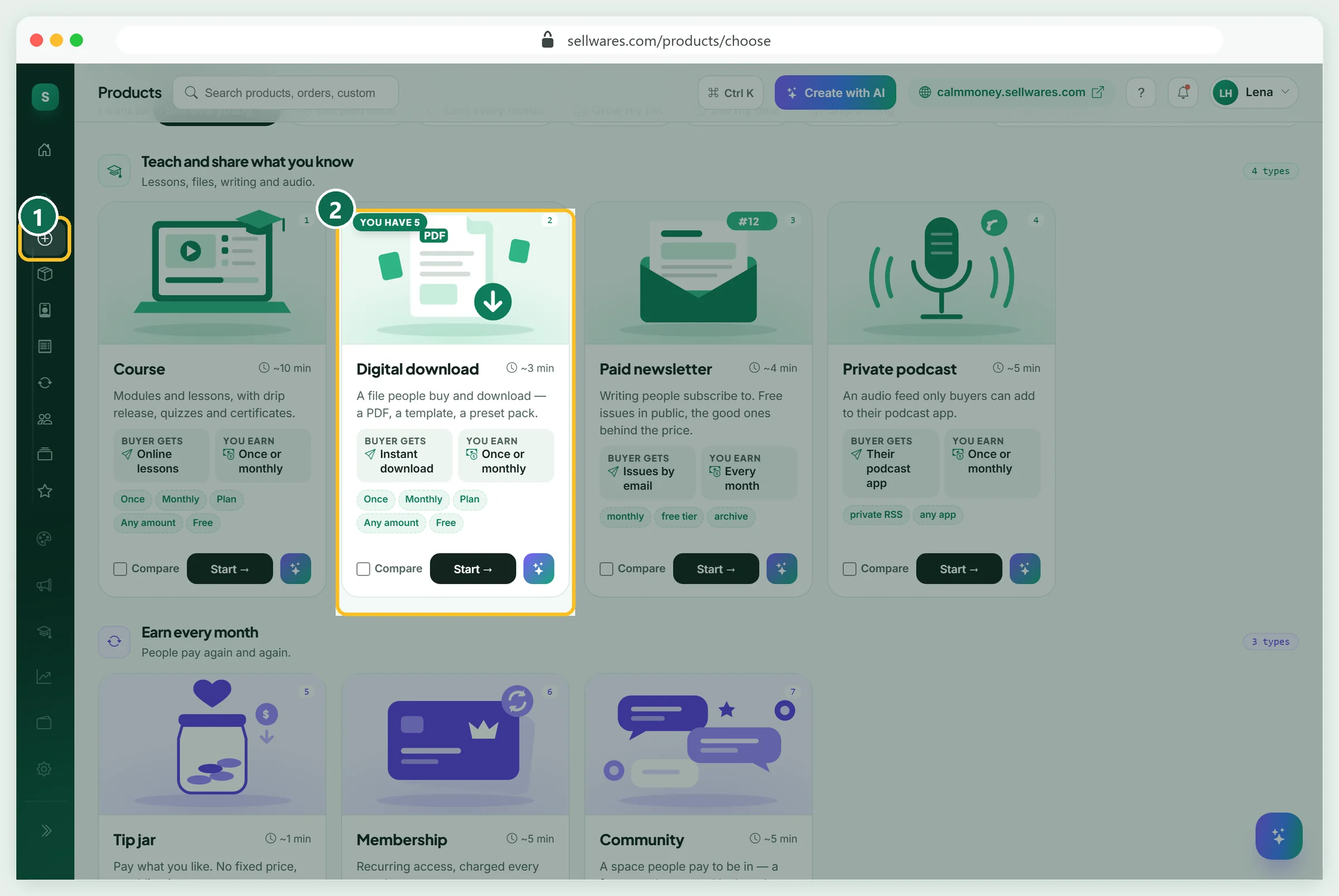
Open Create Product (1). AI can draft a product from an idea, but for a file you already have, press Start on Digital download (2). The studio opens as a draft: nothing is public until you publish. Seven tabs run along the top, with a live buyer preview on the right.
Thumbnail: cover, name and why
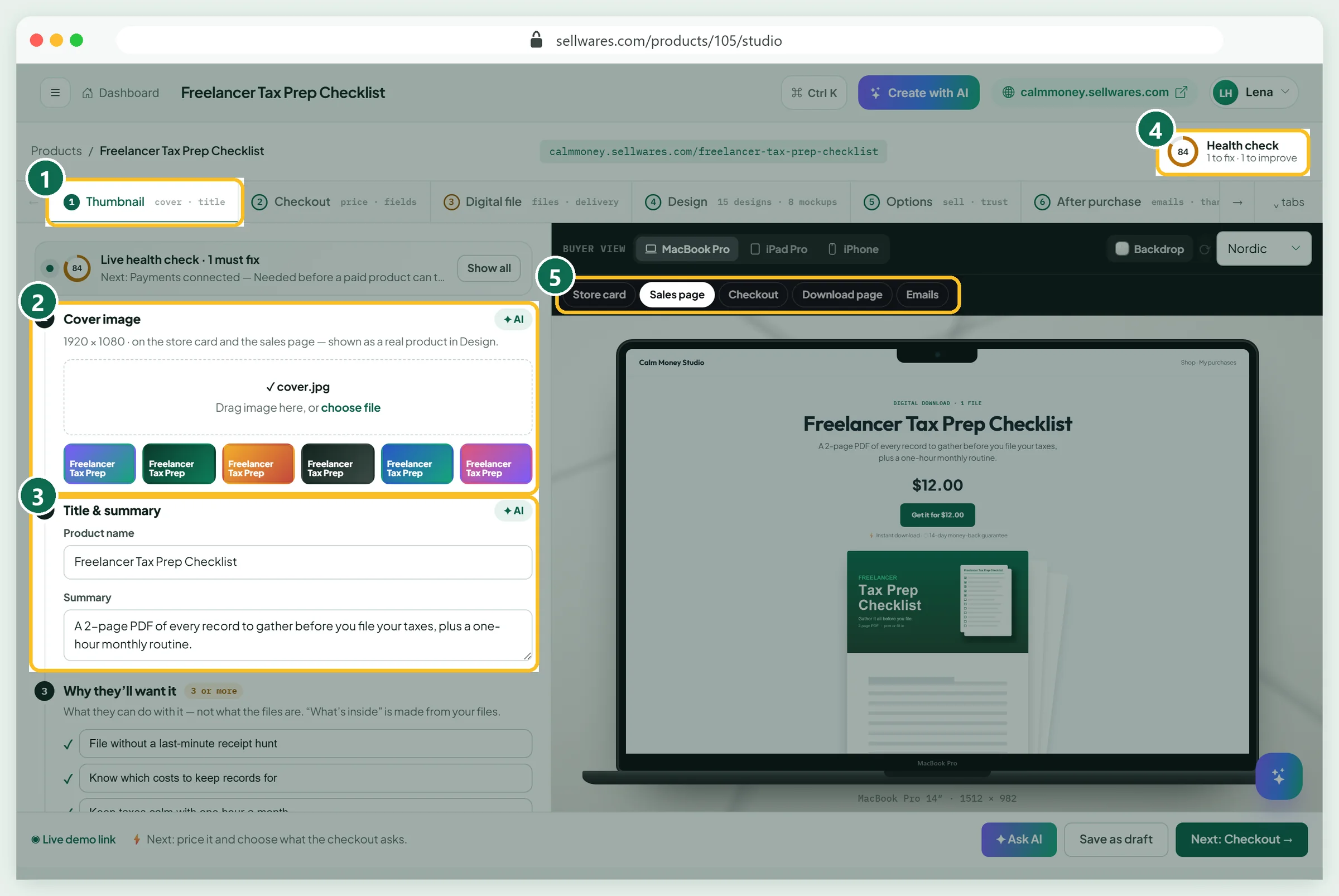
The Thumbnail tab (1) holds what a stranger sees first:
- Cover image (2): drop a 1920 × 1080 image, or pick one of the six coloured covers made from your title.
- Product name (3): say what it is, in 8-60 characters. Type the final name first: the link is made from the first name you save, and a later rename keeps the old link.
- Summary: one or two lines on what it is and who it is for.
The Health check (4) scores it as you type. The preview tabs (5) switch between store card, sales page, checkout, download page and emails.
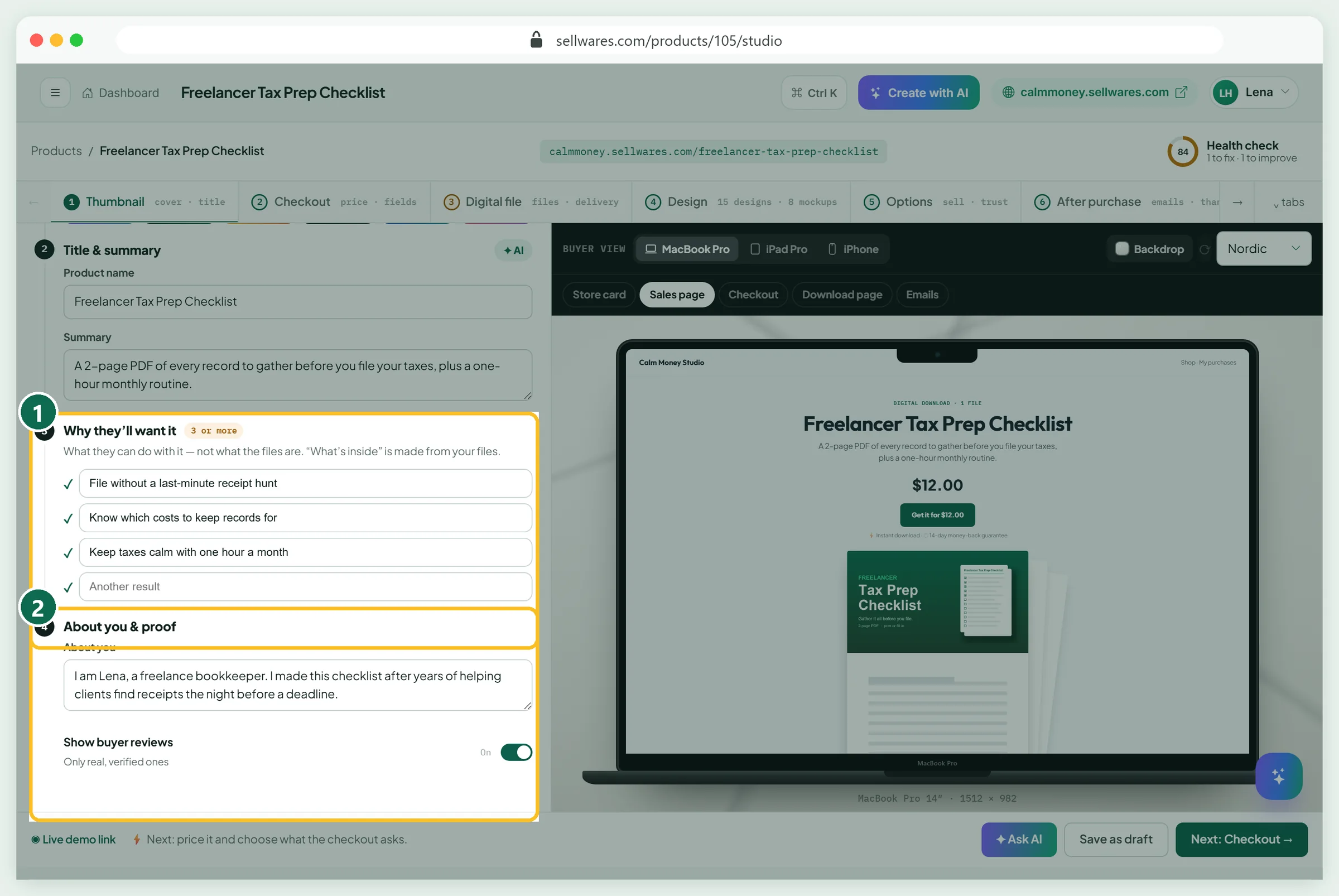
In Why they'll want it (1), write three results, not file contents: File without a last-minute receipt hunt. About you & proof (2) says who made it; reviews shown there are verified only.
Checkout: price, button and questions
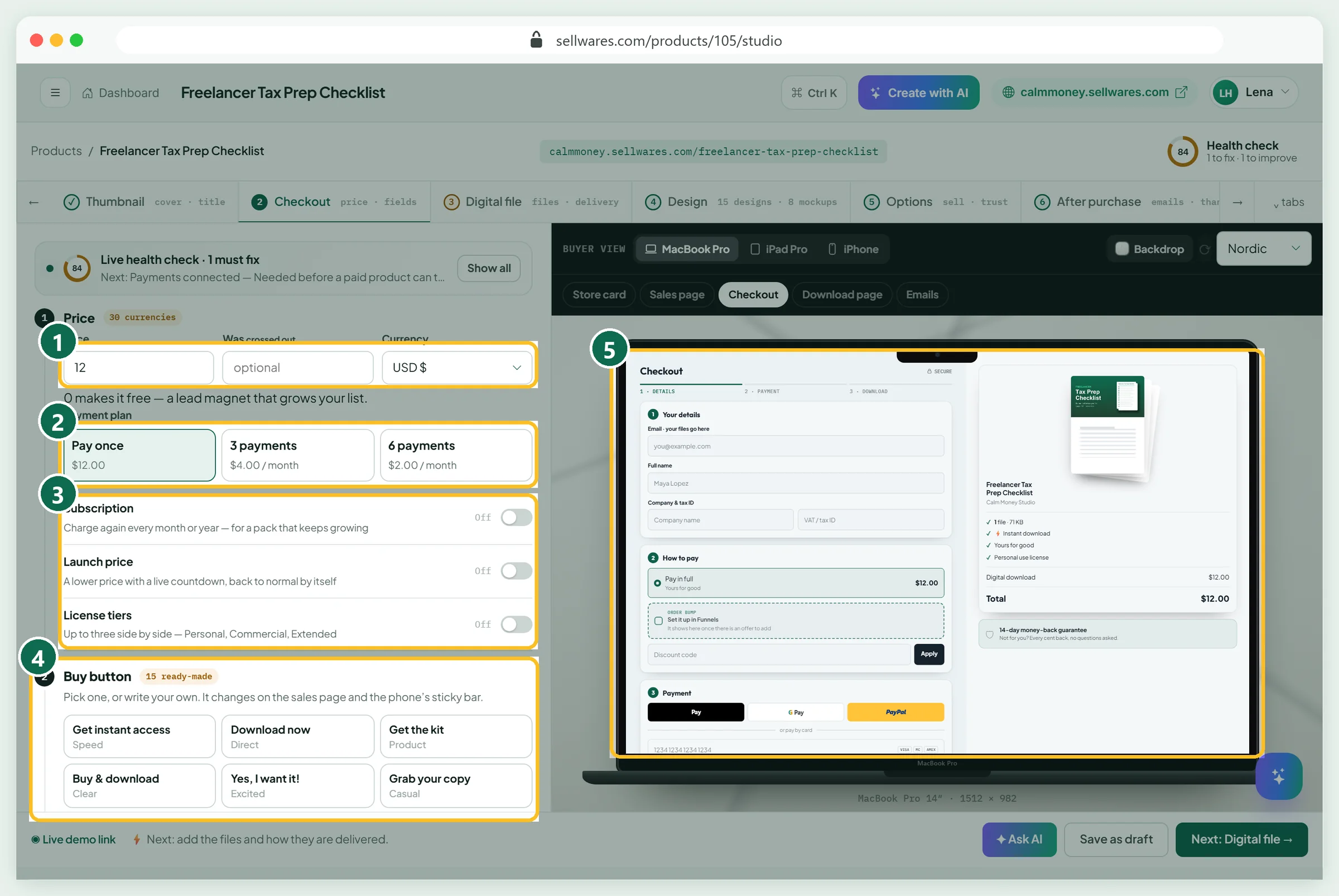
Open Checkout. Type the Price (1); 0 turns it into a free lead magnet. The currency list has 30 choices. Payment plan (2) can split it into 3 or 6 payments. Subscription, Launch price and License tiers (3) are off; leave them off for a first PDF. Under Buy button (4), pick one of 15 ready-made labels or write your own; we chose Get it for {price}. The checkout preview (5) updates with every change.
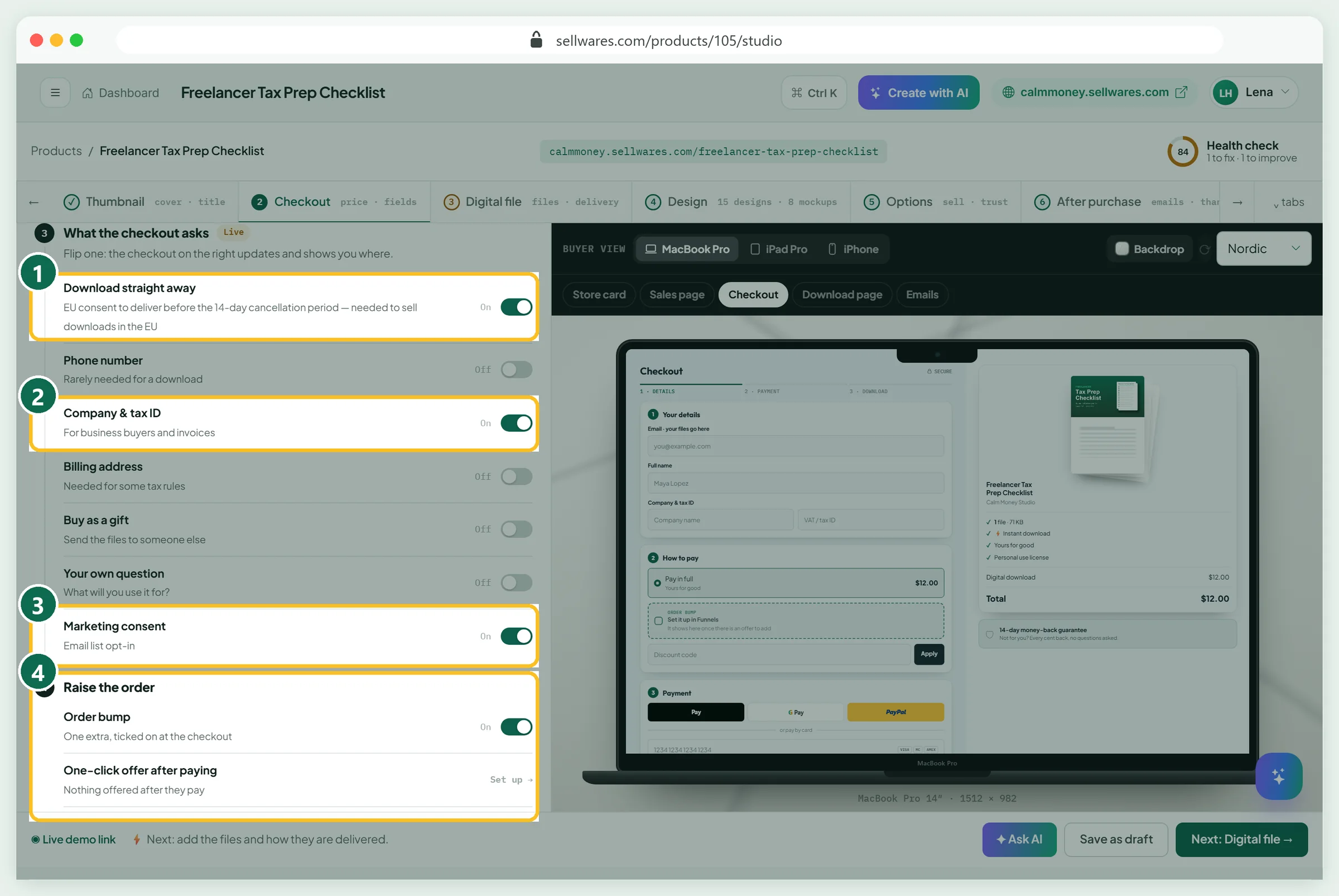
What the checkout asks lists every field a buyer may see. Our beginner settings:
- Download straight away (1): on. It is the EU consent to deliver before the 14-day cancellation period ends.
- Company & tax ID (2): on, because freelancers buy for their business.
- Phone, billing address, gift, own question: off.
- Marketing consent (3): on, so buyers can join your list.
Raise the order (4) holds the order bump, one-click offer, discount codes and guarantee badge. A bump shows only once you create its offer.
Digital file: upload, delivery and licence
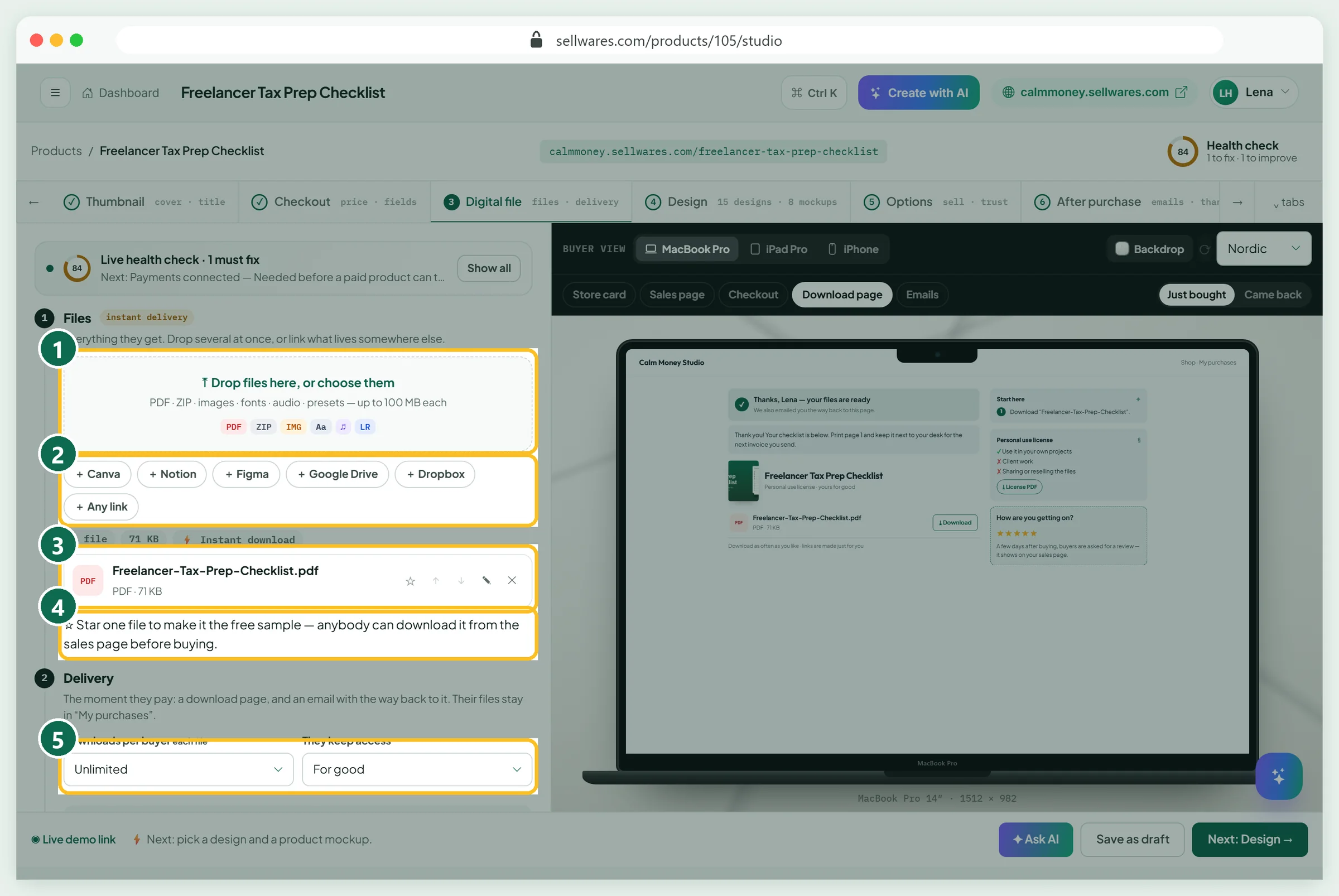
Drop the PDF on the box (1): files up to 100 MB each. Canva, Notion, Drive or Dropbox files can be added as links (2). Ours showed as one 71 KB PDF (3) and passed the virus scan. A starred file (4) becomes a free sample; for a long ebook, upload a short excerpt and star that.
Under Delivery (5), we kept Unlimited downloads and access For good. Every link is signed for one buyer and lasts minutes, so a shared link stops working. A refund takes the files back.
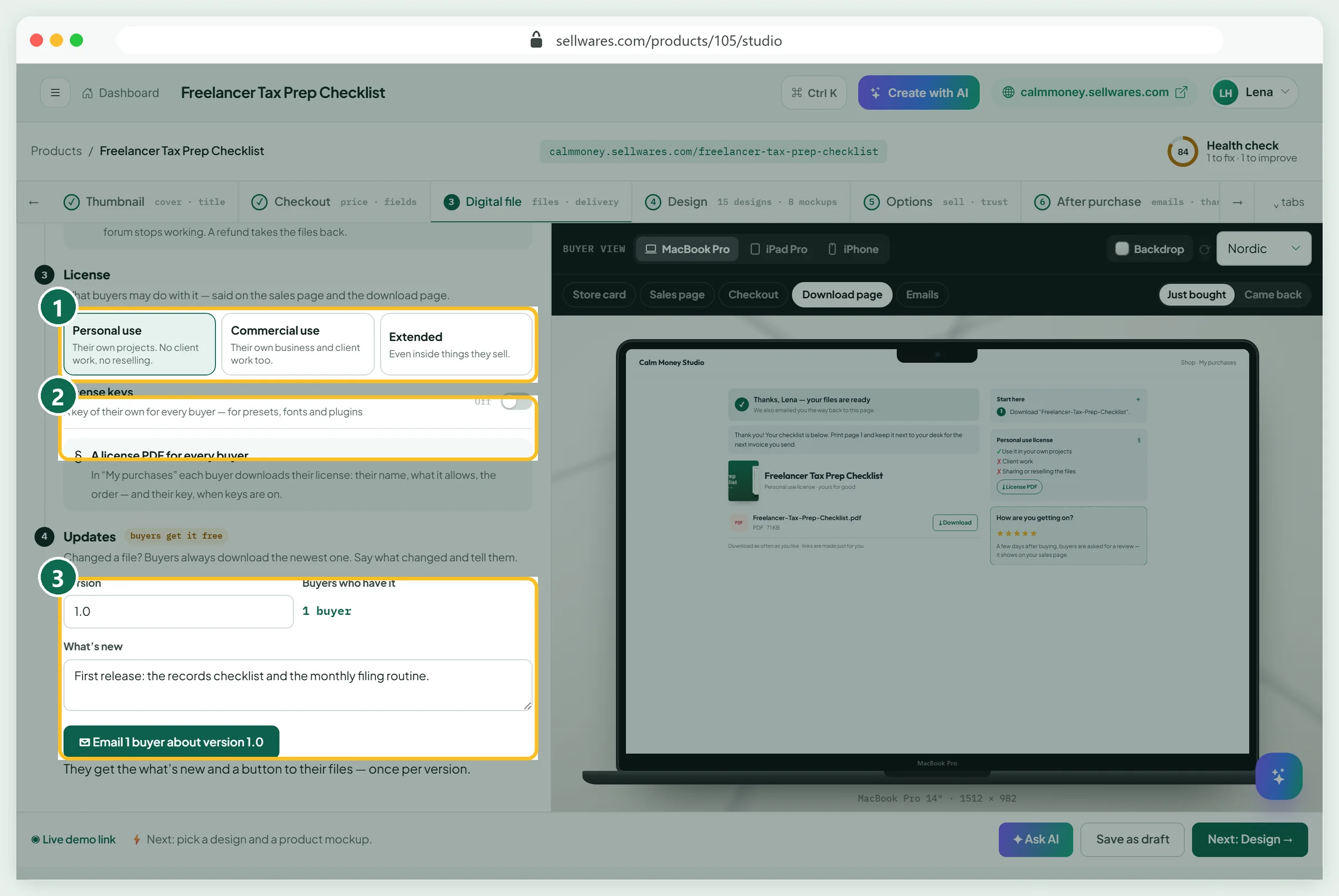
License (1): Personal use suits a printable. License keys (2) are for presets and plugins; leave them off. Updates (3) holds a version and a note; buyers always get the newest file, and one button emails them about it.
Design: page look and mockup
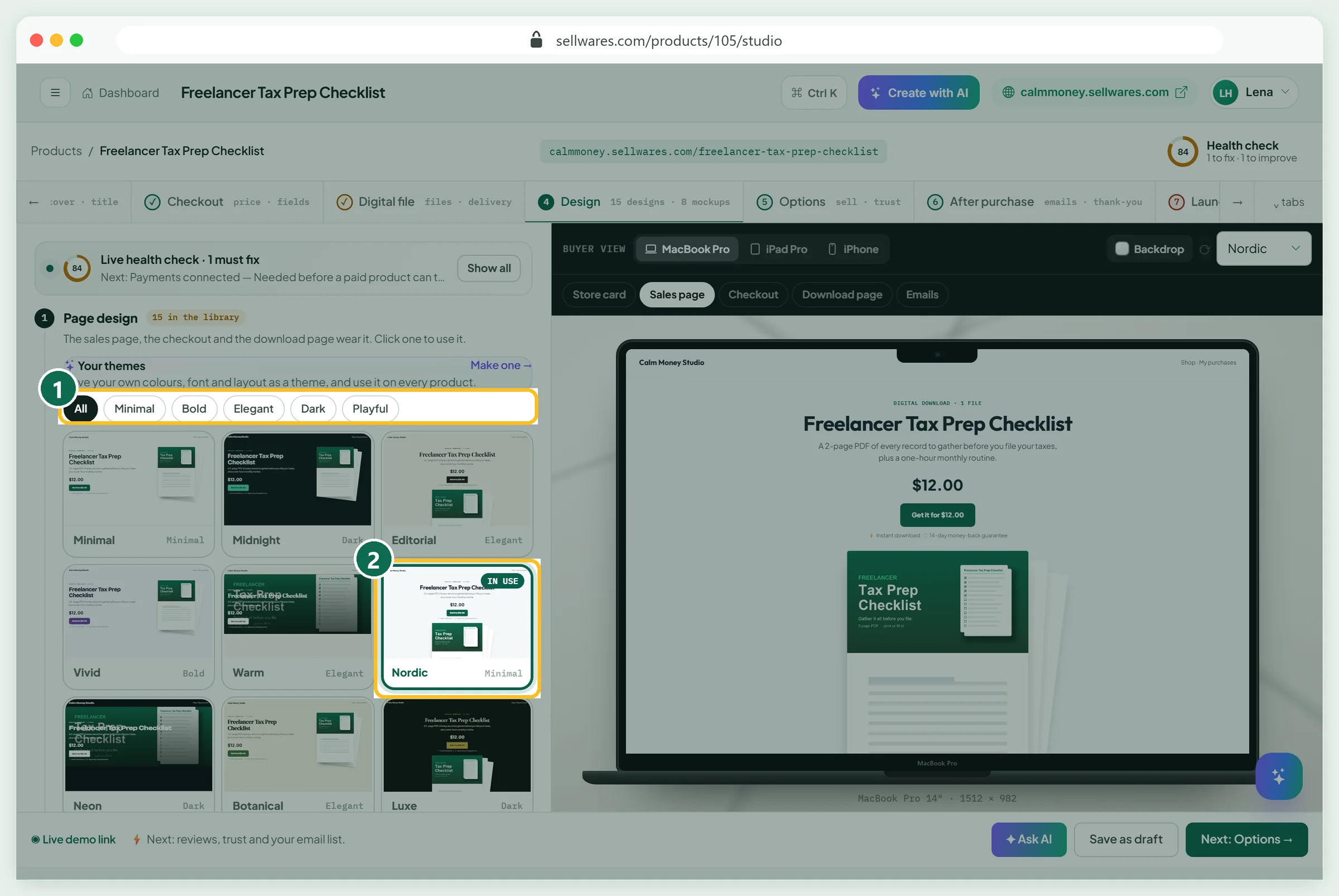
Design has 15 page designs (1), worn by the sales page, checkout and download page. We picked Nordic (2).
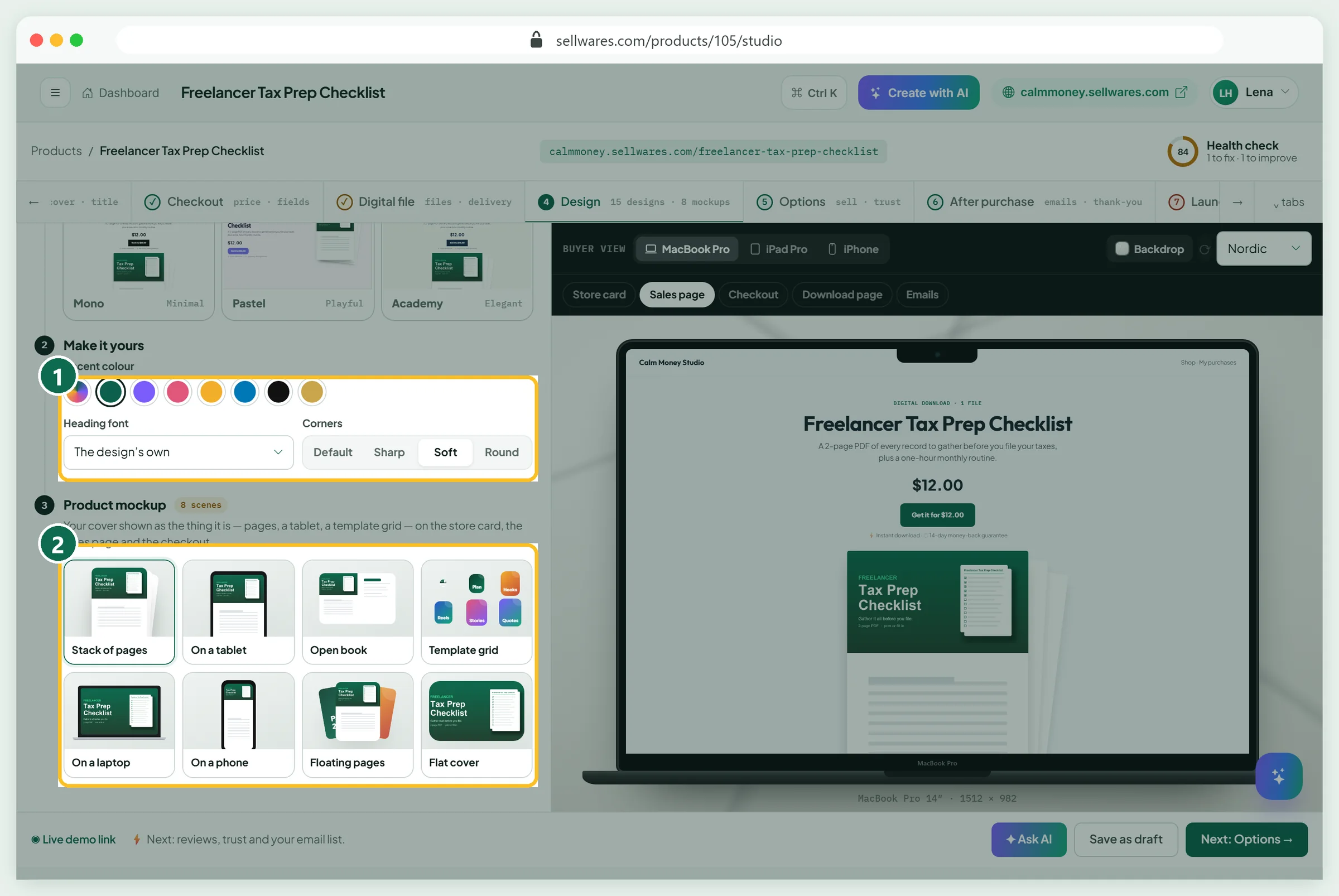
Make it yours (1) sets colour, font and corners. Product mockup (2) shows the cover as a real object; Stack of pages suits a PDF.
Options: sell more, trust and your list
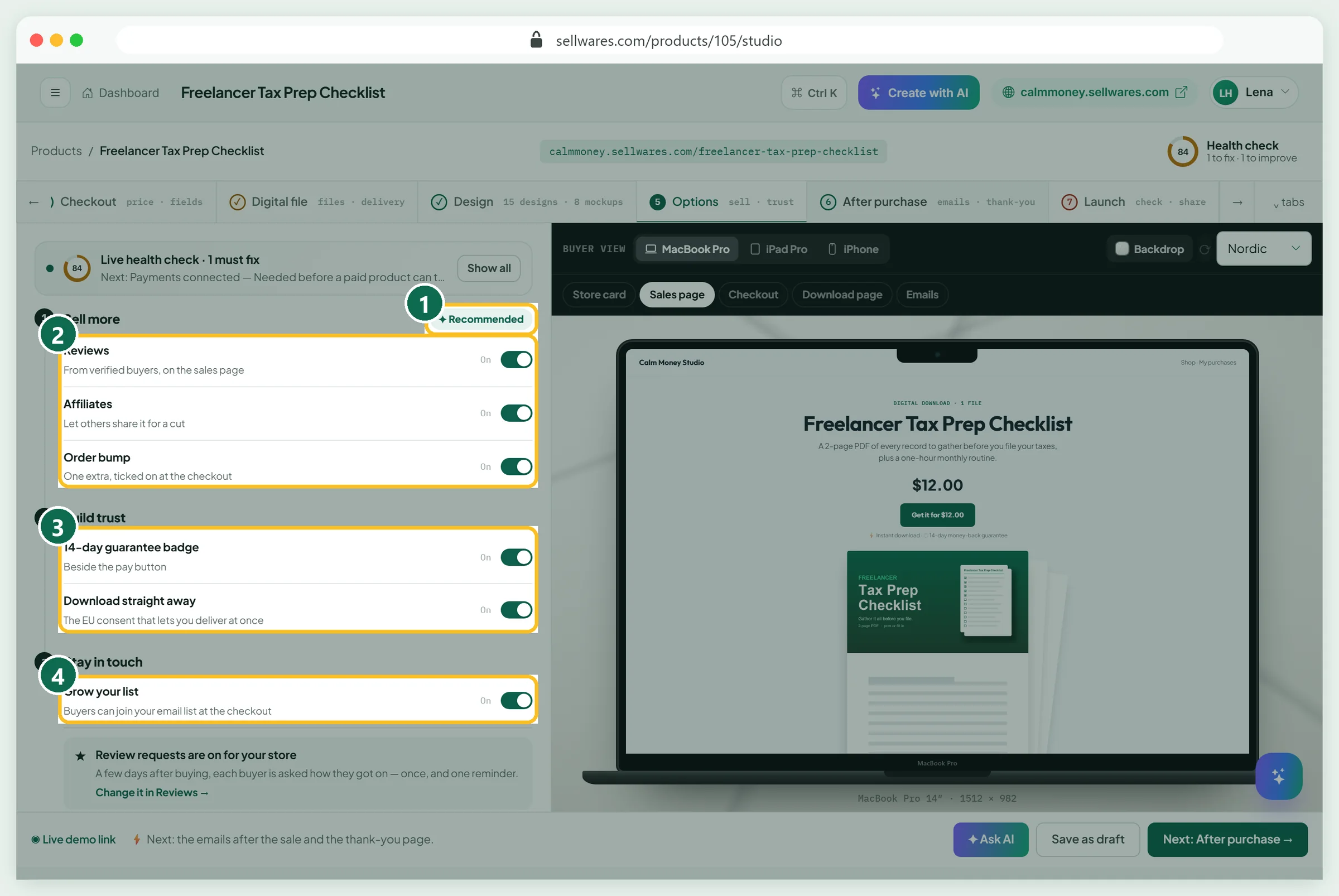
Recommended (1) switches on the usual set. Sell more (2) holds reviews, affiliates and the bump. Build trust (3) holds the 14-day guarantee badge; keep it only if you will refund. Grow your list (4) adds the email opt-in.
After purchase: emails and thank-you page
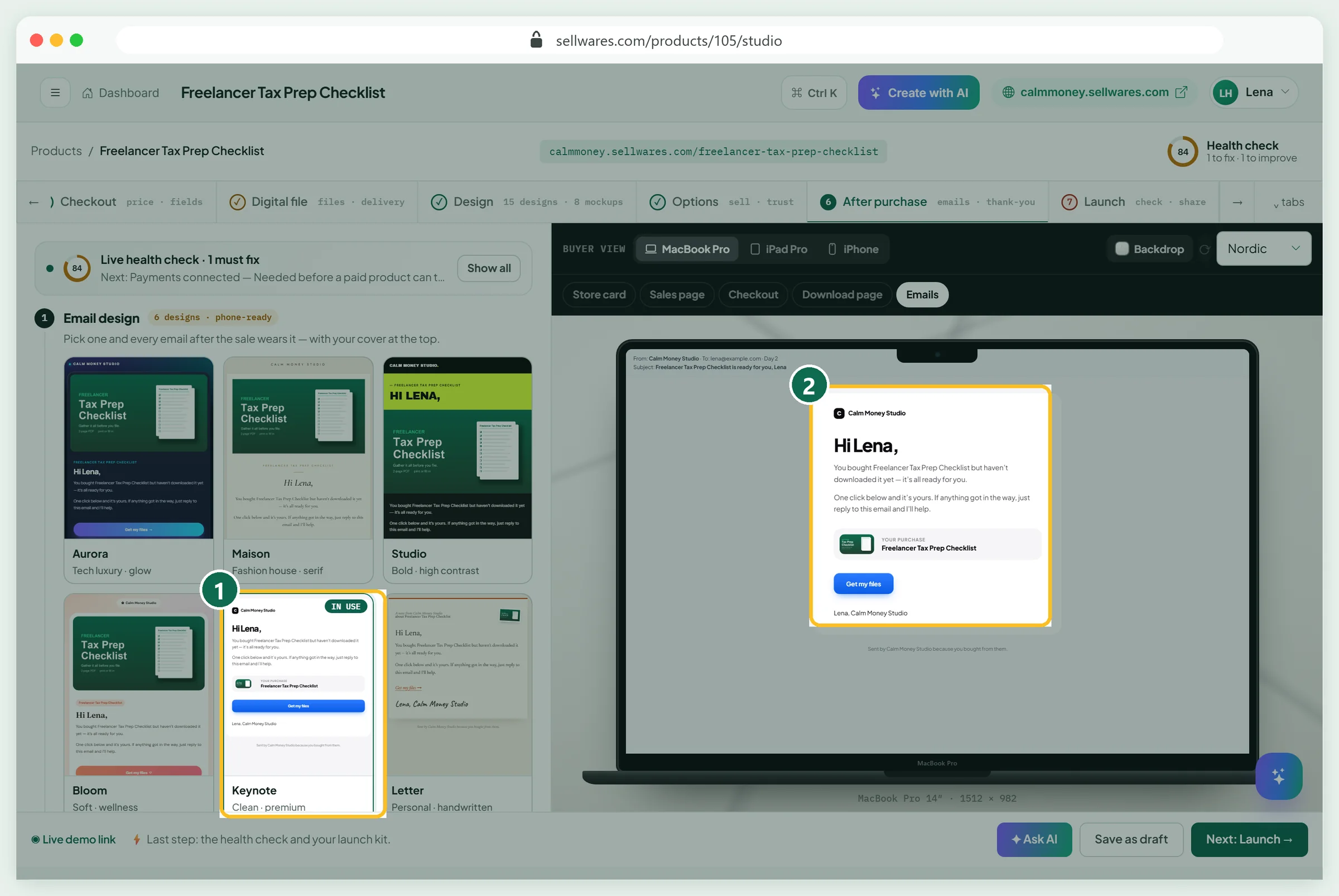
Pick one of six email designs; we chose Keynote (1). The preview (2) shows the order email with your cover.
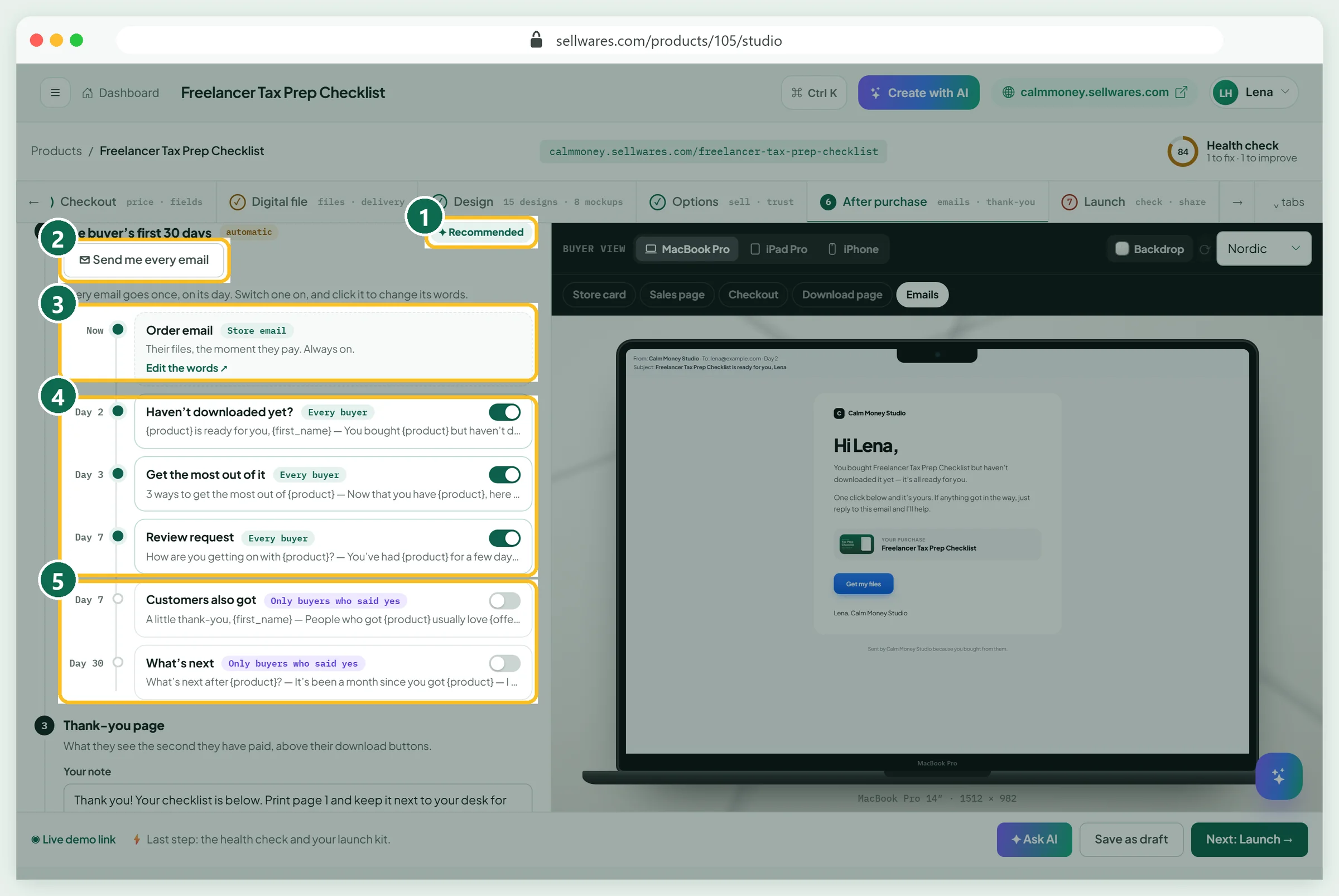
Recommended (1) switched on our emails, and Send me every email (2) sends you copies. The order email (3) is always on. Day 2 Haven't downloaded yet?, day 3 tips and a day 7 review request (4) go to every buyer. Selling emails (5) go only to buyers who ticked marketing.
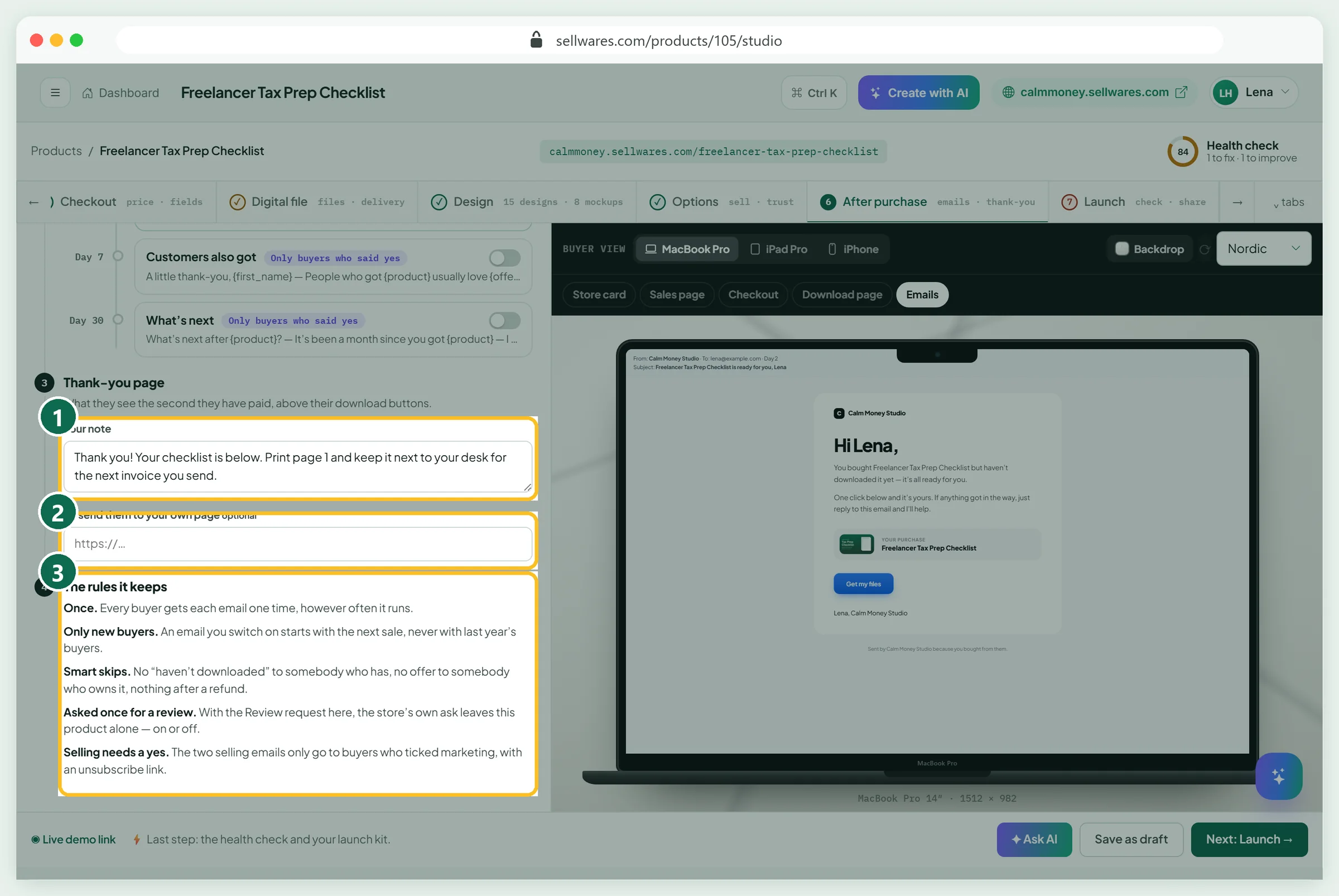
Your note (1) sits above the download buttons, or send buyers to your own page (2). The rules (3): each email goes once, only to new buyers, never after a refund.
Launch: health check and test purchase
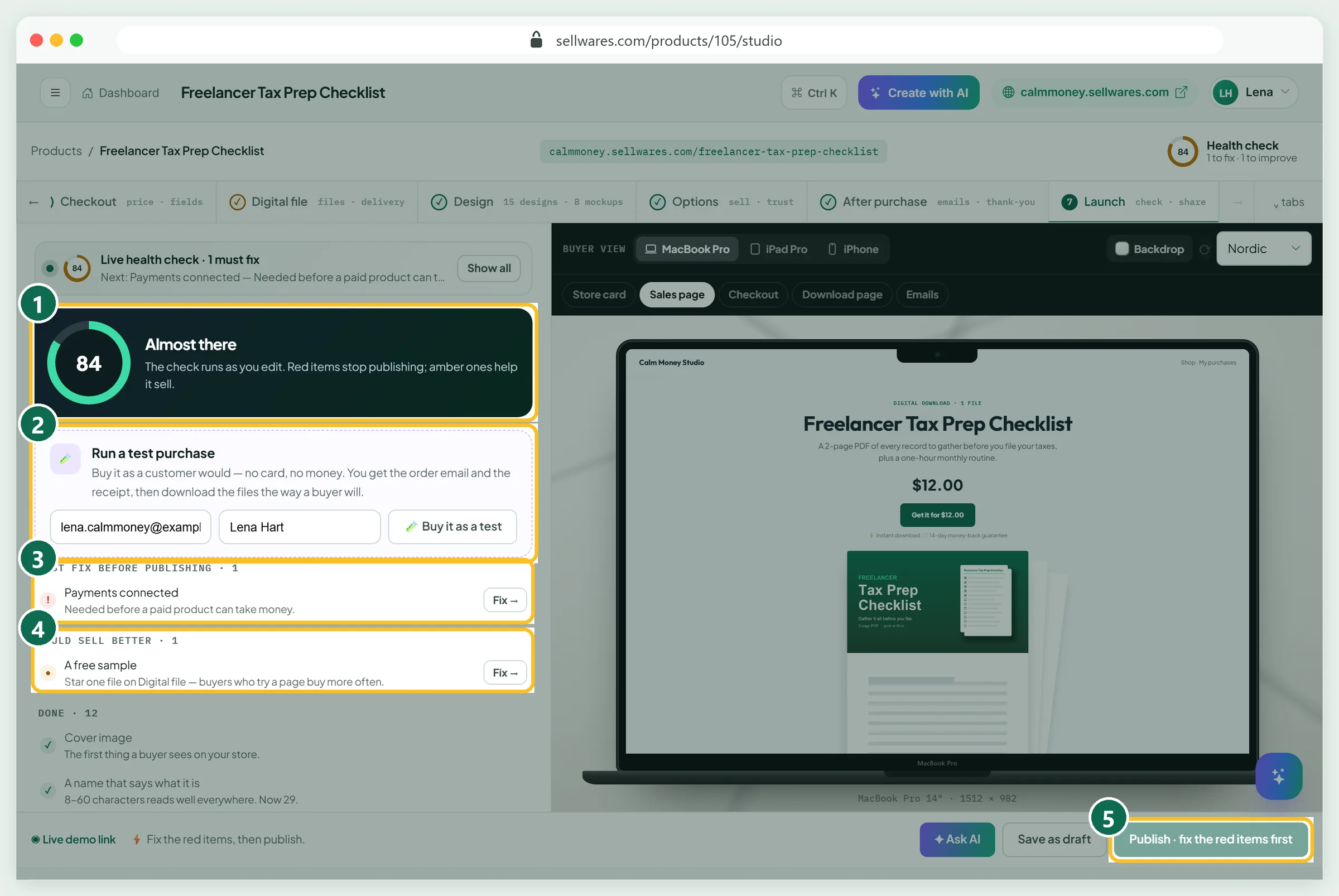
Launch shows the full health check (1). Ours scored 84: Must fix had one item, Payments connected (3), and Would sell better suggested a free sample (4). Red items keep Publish greyed out (5).
Run a test purchase (2) before anything else. It costs nothing and moves no money. Ours, order DFHK-HGIK, sent three emails within about two minutes: the order email, a receipt and the store's sale alert.
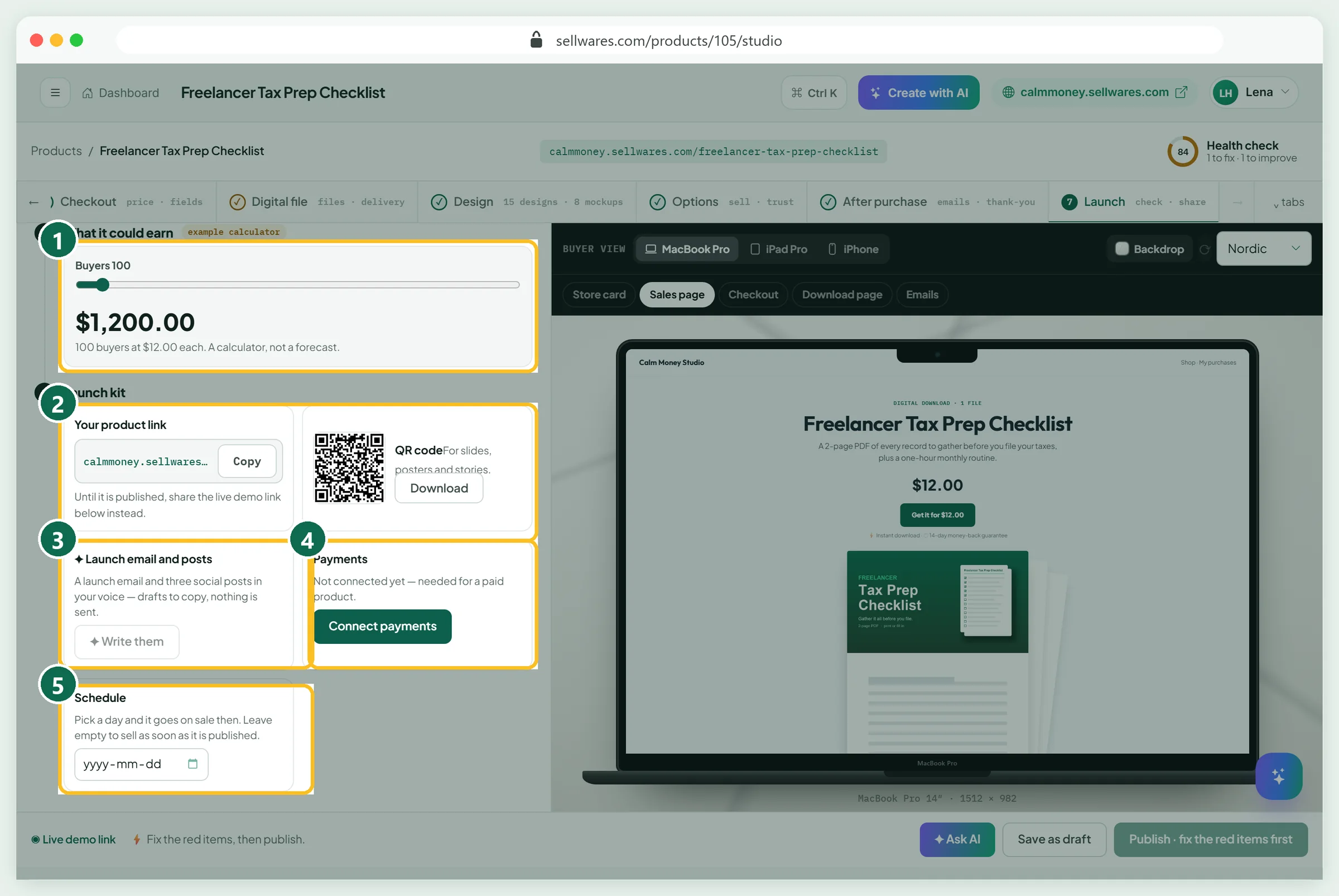
Below: an earnings calculator (1), your link and QR code (2), launch post drafts (3), Connect payments (4) and a Schedule date (5).
Connect payments
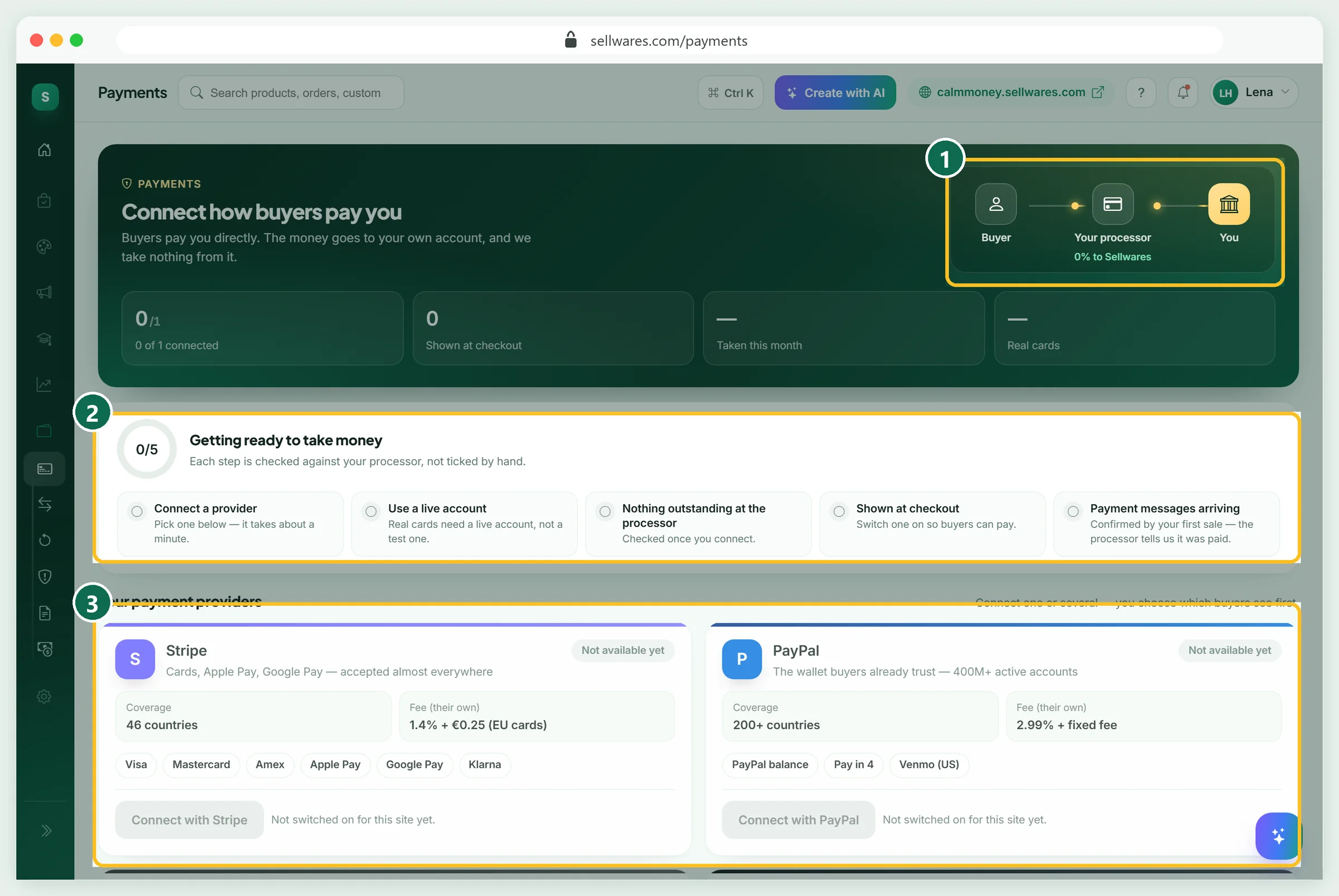
A paid PDF cannot be published until a payment provider is connected. Our demo store is on the test site, where providers are not switched on, so Publish stayed grey. That is the real state you will see before you connect.
Open Payments. Buyers pay into your own account; Sellwares takes 0% (1). Connect Stripe, PayPal or Mollie with their sign-in, or paste a Revolut Merchant API key. Five checks then run (2), from a live account to payment messages arriving. Each card (3) lists the provider's own fee.
Check what buyers see
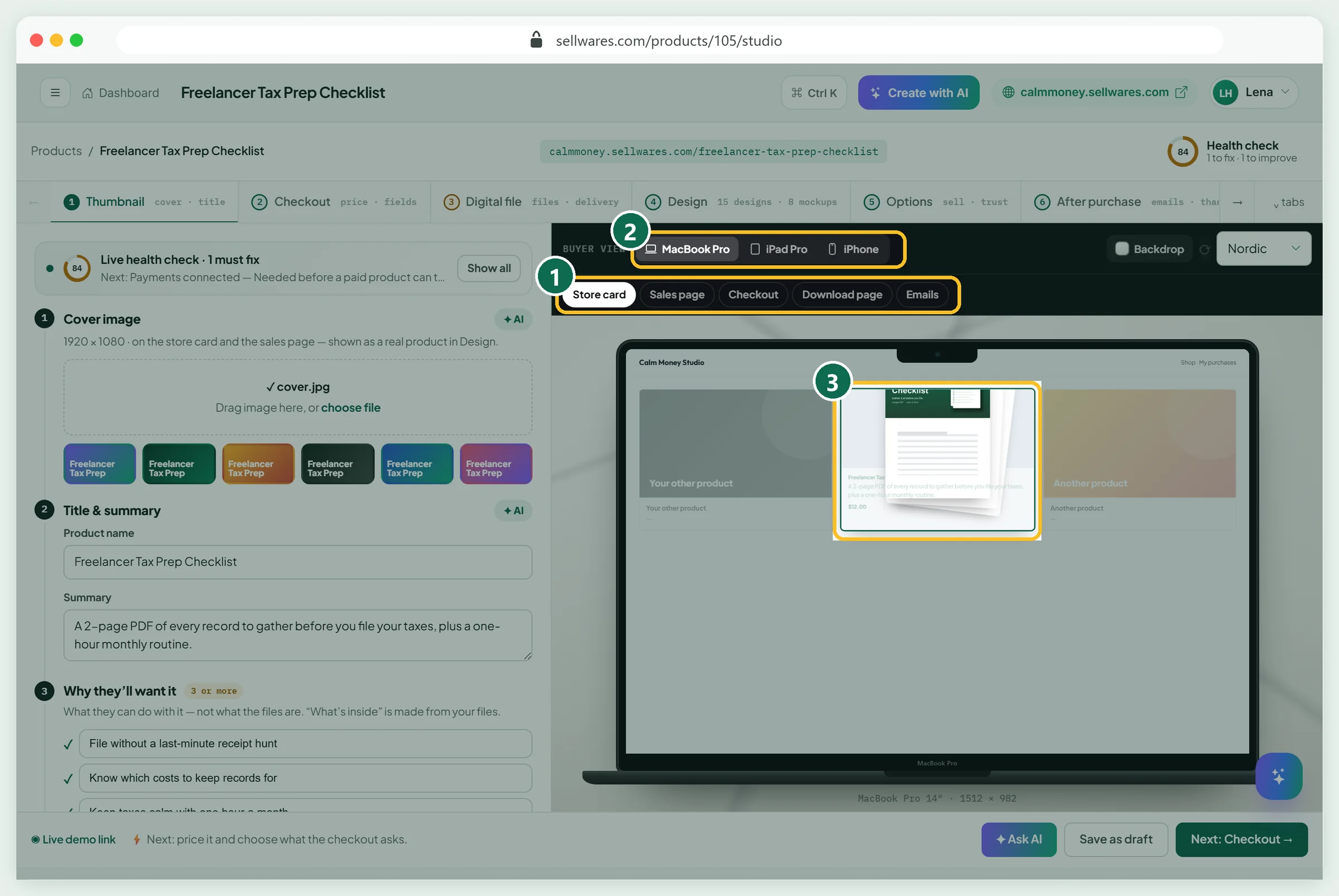
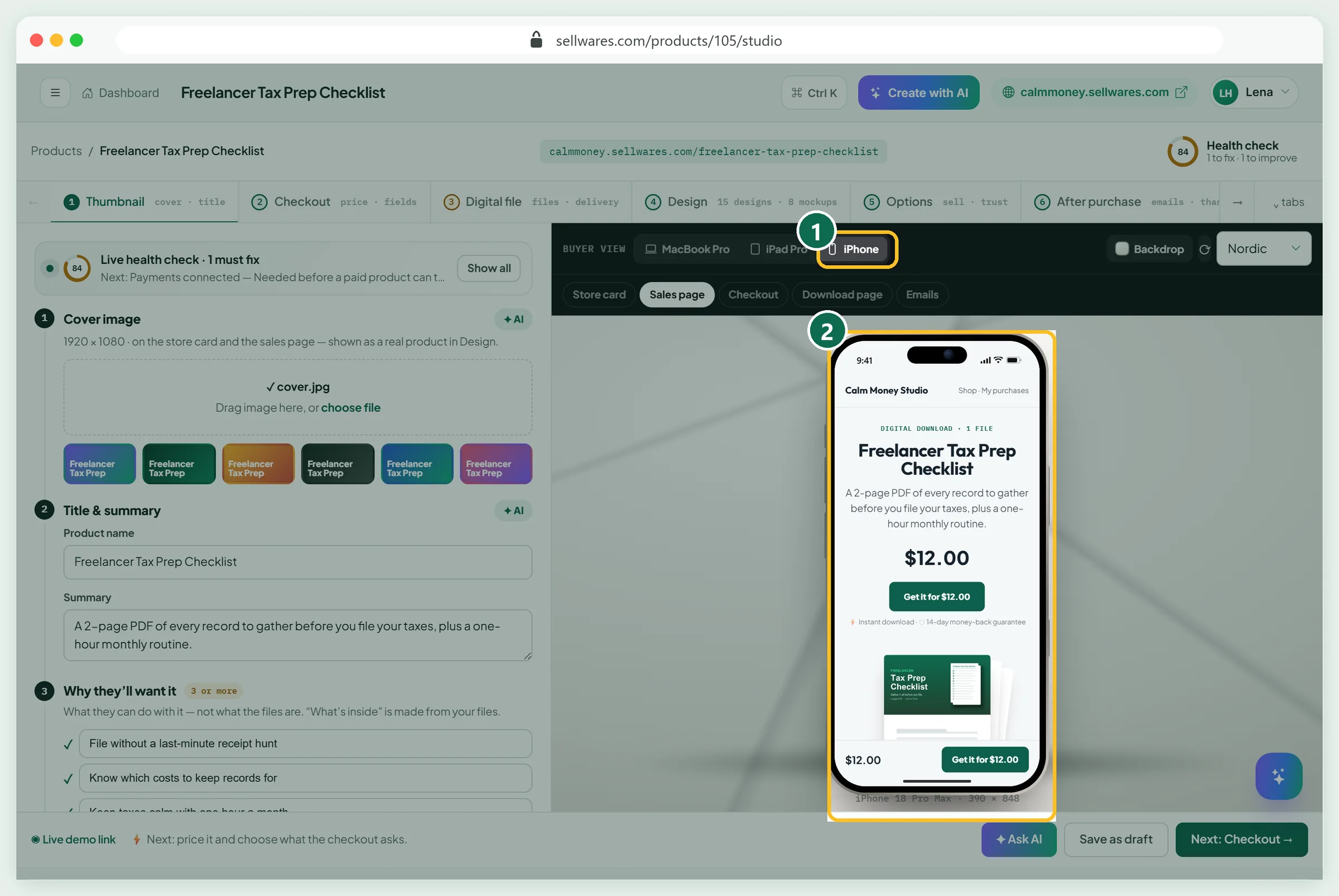
The preview (1) shows every buyer screen on a MacBook, iPad or iPhone (2), including the store card (3).
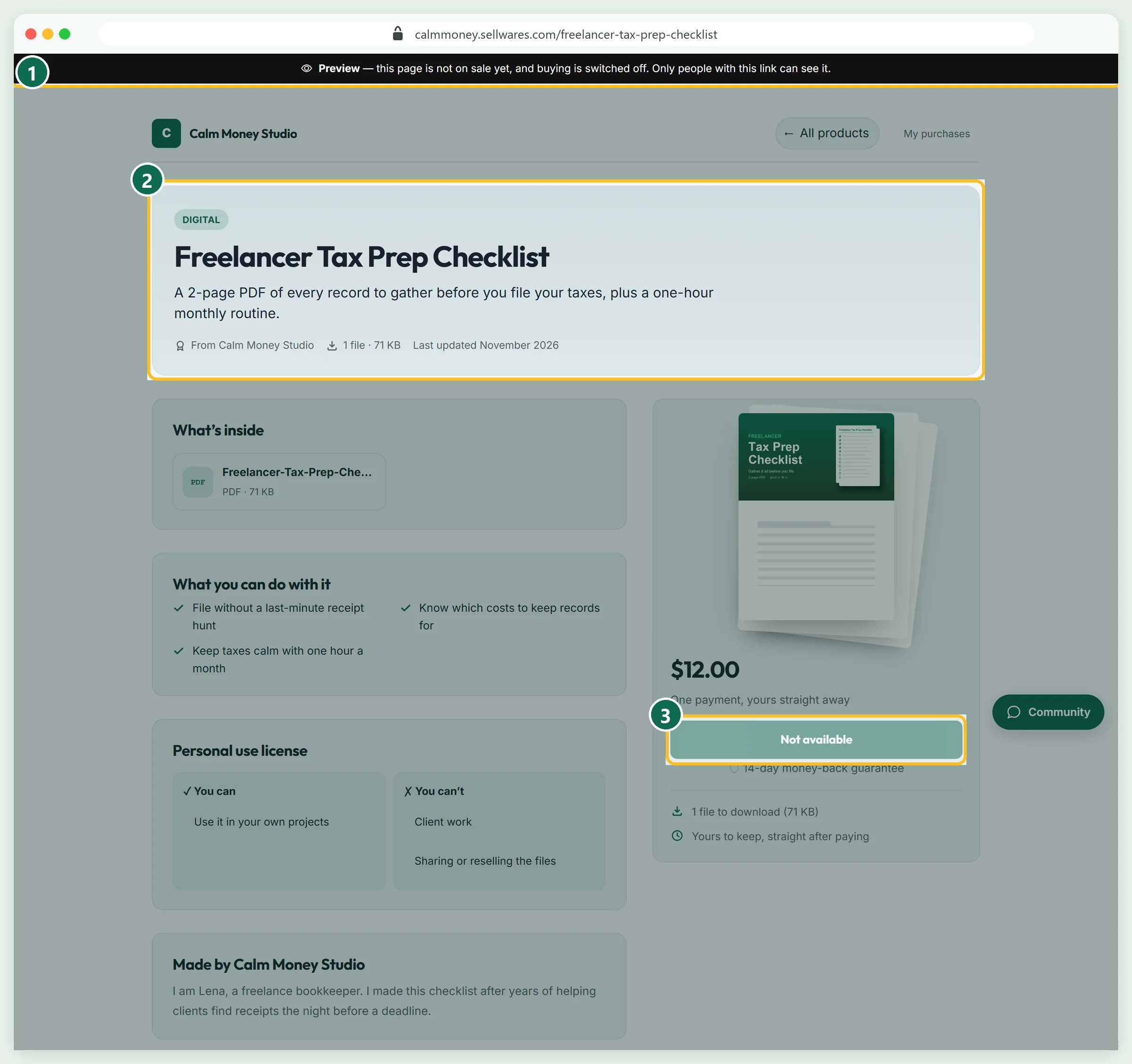
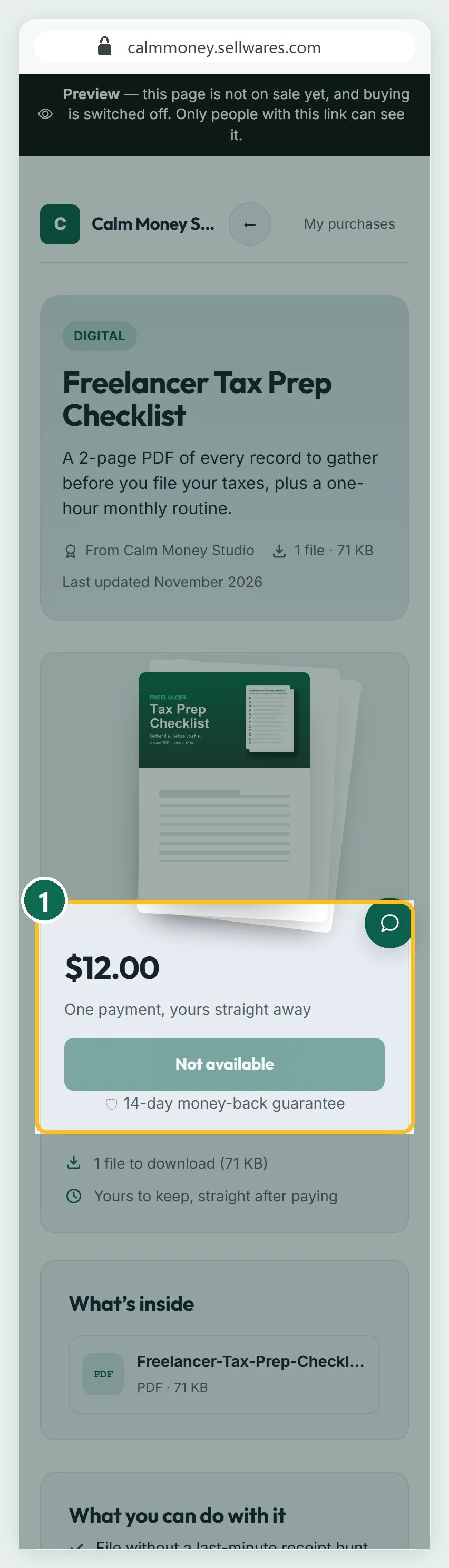
The Live demo link opens the real sales page with a preview banner (1). The buy button reads Not available (3) until payments connect.
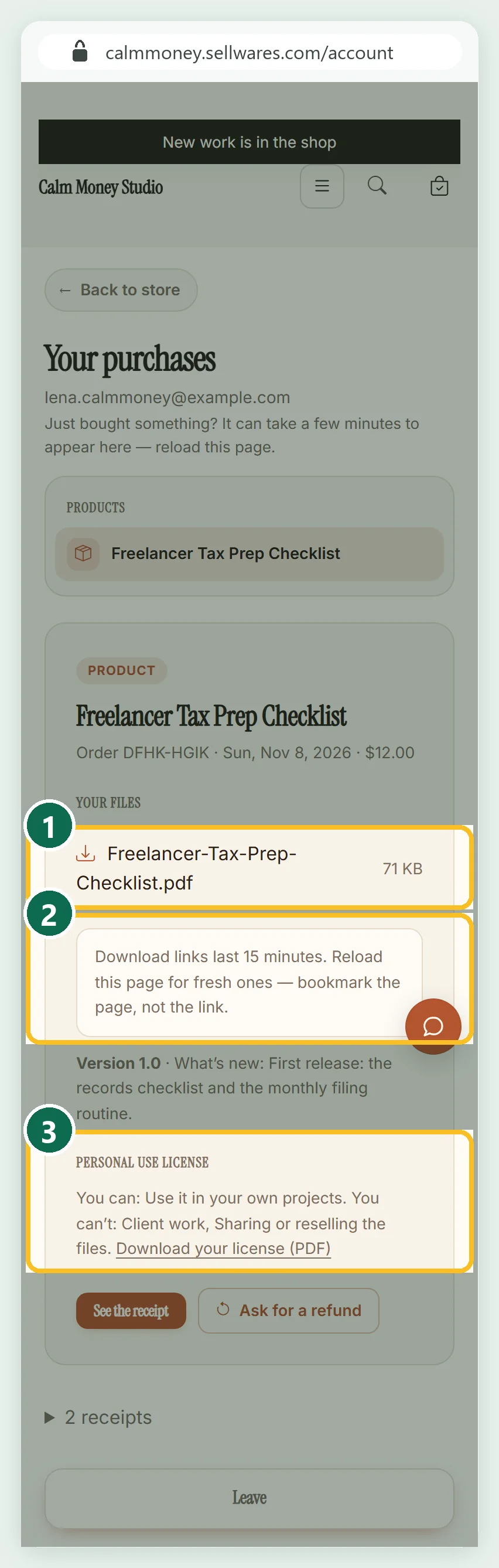
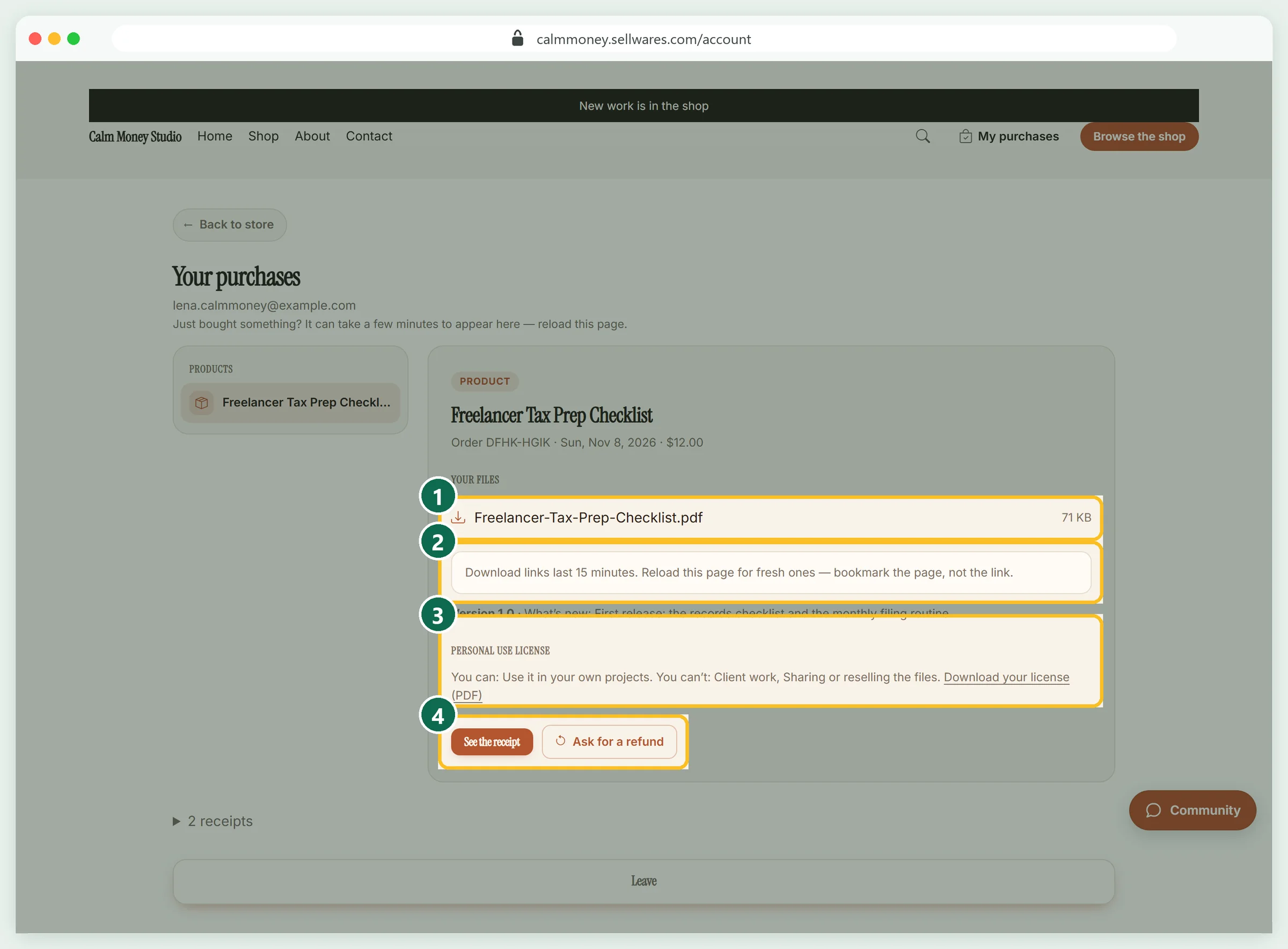
The order email's Open my purchases button signed us in without a password. The page shows the file (1), a note that links last 15 minutes (2) and the licence PDF (3). Our download was the same 72,516-byte file.
Where to sell PDFs online: fees on a $12 PDF
Most top pages skip the maths. We opened each platform's own fee page on 8 November 2026 and worked out the fee on one $12 sale to a US buyer.
| Where | What their page says | Fee on a $12 PDF |
|---|---|---|
| Etsy | $0.20 per listing, 6.5% transaction fee, 3% + $0.25 processing (US); 15% Offsite Ads fee on ad sales | $1.59, or $3.39 with an Offsite Ad |
| Gumroad | 10% + 50¢ direct; 30% via Discover | $1.70 direct |
| Payhip | Free plan 5%; Plus $29/mo 2%; Pro $99/mo 0%; PayPal and Stripe charge their standard rates | $0.60 + processor |
| SendOwl | Launch $39/month, up to $10,000 sales a year | $39 a month + processor |
| Sellwares | 0% on every plan, Free plan €0 | $0 + processor |
Your payment processor's fee applies on most of these. Work yours out with our PayPal fee calculator, and see every Etsy line in our Etsy fees breakdown.
Can you sell PDFs on Amazon? Yes, as a Kindle eBook through KDP, which accepts PDF manuscripts. Buyers read it in Kindle rather than downloading your file. KDP pays 70% of the list price minus delivery costs, or 35%. It suits books, not printables.
Own store or marketplace? Marketplaces bring browsers and charge for it; your own store keeps the margin and the email. Comparing tools? See our Gumroad alternatives.
If something goes wrong
| What you see | Why | Fix |
|---|---|---|
| Publish · fix the red items first stays grey | Payments connected is still red | Connect Stripe, PayPal, Mollie or Revolut in Payments |
| Two PDFs in What's inside after a new upload | A new upload adds a file; it does not replace one | Press ✕ on the old file and confirm Remove |
| The link still shows the old name | The link comes from the first saved name; renames keep it so shared links work | Type the final name before anything else |
| Checkout shows Set it up in Funnels under the order bump | The bump is on but has no offer | Create an offer in Order bumps, or switch the bump off |
| The order email has not arrived | Emails go out a minute or two after the test purchase | Wait two minutes, then check spam |
| Buyer says the download link expired | Links last 15 minutes by design | Reload My purchases for fresh links; bookmark the page, not the link |
What we found in the top results
We read the pages Google ranks for "how to sell pdfs online" on 8 November 2026. Most come from PDF tool makers: SendOwl, easy.tools, Tentary, ThriveCart and Payhip. ThriveCart's guide is strong on promotion; Tentary publishes its fees; Payhip states its 3-download default. None put several platforms' fees on one sale side by side, most use mockups, and few show the buyer's download page. So we show a real product, a real test order and real fee maths.
Next steps
Make one PDF, set it up as above and run a test purchase. Then connect payments, publish, and put the link in your bio. When it sells, a free checklist can grow your list, and a bundle can raise each order.
Create your free Sellwares store and sell your first PDF this week.
Questions
Can I sell PDFs online without paying anything upfront?
Yes. The Sellwares Free plan costs €0, needs no card and takes a 0% transaction fee, so you only pay your payment provider's fee when a sale happens. Gumroad and Payhip's free plan also have no monthly fee but take a share of each sale.
How do I sell PDFs on Etsy?
Create a listing, mark it as a digital item and upload your PDF; Etsy delivers it after payment. On 8 November 2026 Etsy's help pages listed $0.20 per listing, a 6.5% transaction fee and, in the US, 3% + $0.25 for payment processing.
How much money can you make selling PDFs?
It depends on your audience, price and traffic, so nobody can promise a number. As a plain calculation, 100 buyers at $12 is $1,200 before payment fees. Start with one PDF, measure, then add more.
How do I stop people from sharing my PDF?
You cannot stop a buyer forwarding a file, but you can limit it. Sellwares signs every download link for one buyer and makes it expire within minutes, can cap downloads per buyer, states the licence on every page, and takes the files back after a refund.
What is the best platform to sell PDFs?
A marketplace such as Etsy brings browsers but charges per sale. Your own store keeps the margin and the buyer's email, but you bring the traffic. Many sellers use both: a marketplace to be found, and their own store for their audience.
Sources
Related
 BlogEbooks · 7 min readHow to Write an Ebook (and Sell It) in 7 StepsHow to write an ebook in 7 steps: pick a topic, outline, write, design and export a PDF, then sell it, with what each platform keeps from a sale.
 Oliver BennettRead the post →
 Sell Digital Products Online with 0% FeesSell ebooks, templates, presets, music and more from your own store. Instant delivery, 0% transaction fee, paid…
 Janie BrooksTake a look →
 BlogEtsy shop ideas · 11 min read32 Etsy Shop Ideas for 2026: Costs, Fees and What You Keep32 Etsy shop ideas for 2026 with start cost, Etsy's exact fees on an example price and what you keep, plus a free…Oliver BennettRead the post →
 Comparison5 min readSubstack vs Patreon (2026): Fees, Payouts and Who WinsSubstack vs Patreon: both take 10% plus 2.9% + $0.30 per card payment. From 200 fans at $10 a month you keep $1,668 on…
 Alexa MorganRead it →
 Comparison4 min readEtsy Alternatives: 5 Sites Compared on Fees (2026)The best Etsy alternatives compared on fees, monthly cost and buyers: Amazon Handmade, Shopify, Big Cartel, Payhip and…Alexa MorganRead it →