Bundle Pricing: Types, Formula and How to Set It Up
Bundle pricing explained: the four types, a simple formula with real numbers, brand examples, the legal question, and how to build a bundle step by step.

Bundle pricing means selling two or more products together for one price, usually lower than buying each one on its own. The buyer gets more for less, and you get a bigger order. Below we explain the types and a simple formula, then build a bundle in a demo store that sells digital products, with a screenshot of every screen.

Photo: Olivia Bollen on Unsplash
We built it on 8 November 2026 in our demo store, Calm Money Studio, which sells budget templates to freelancers. Every number below comes from its three real products.
Bundle pricing: the short answer
- Pick products that are used together, or bought by the same people.
- Add up what they cost on their own.
- Take 20-40% off that total.
- Keep the bundle above the price of the most expensive item.
- Show the saving honestly: the real total, crossed out.
- Deliver every file the moment the buyer pays.
- Watch what sells, and change one thing at a time.
What is bundle pricing? Bundle pricing is selling several products as one package at one price. The usual bundle pricing definition adds that the package costs less than the parts bought separately, so the saving gives people a reason to buy more at once.
The four types, and a formula
Most guides list four bundle pricing strategies:
- Pure bundling: the items are only sold together. Nobody can buy one alone.
- Mixed bundling: each item is sold alone and in the bundle. This is the most common choice for creators.
- Complementary (cross-sell) bundling: items that work together, like a planner and a rate calculator.
- Volume (multi-buy) bundling: more of the same, or a reward for spending more, such as "25% off orders over 150".
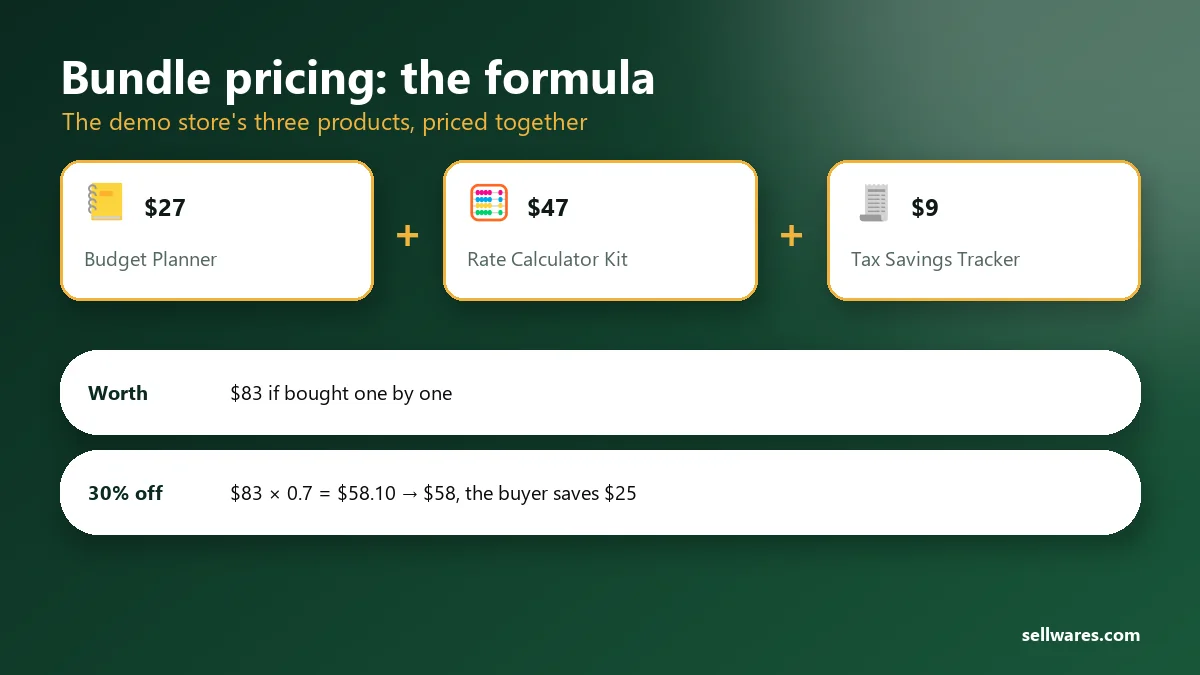
The formula is short: bundle price = sum of the separate prices × (1 − discount).
Here is a product bundle pricing example from our demo store. The Freelancer Budget Planner is $27, the Client Rate Calculator Kit is $47 and the Tax Savings Tracker is $9. Together they are worth $83. With 30% off, $83 × 0.7 = $58.10, so the bundle sells for $58 and the buyer saves $25.
Now check the floor. The bundle must cost more than the dearest item ($47), or nobody buys that item alone. At $58, a buyer who came for the rate kit pays $11 more and gets two extra templates. That $11 is your gain on that order.
Bundle pricing examples from big brands
These are mixed bundles: each part is also sold alone.
- Apple One: iCloud+, Apple TV, Apple Music and Apple Arcade for $21.95 a month. On its Apple One page, Apple lists the separate prices at $34.96 and says "Save 31%".
- Disney+, Hulu and HBO Max: the bundle with ads costs $21.99 a month, and the page claims a 38% saving, or $13 a month.
Each example of bundle pricing works the same way: one checkout, a visible total, and a saving the buyer can check.
Advantages of bundle pricing, and the risks
The advantages of bundle pricing are simple. Orders get bigger. Slow sellers ride along with a favourite. Buyers decide once instead of three times. With digital products, an extra copy costs you nothing to make, so the discount is the only cost.
The risks are real too. Buyers who would have bought everything now pay less. Too many items make the offer hard to judge. A "worth" figure nobody ever paid misleads people.
When not to bundle: when the items do not belong together, when most buyers already buy everything, or when one product has no real price of its own yet.
Is bundle pricing illegal?
Generally, no. Selling things together at a discount is an ordinary pricing choice. The legal problem is tying: forcing buyers to take a second product to get the one they want. The FTC's page on tying the sale of two products says this can break antitrust law when the seller has enough market power in the first product. It raises questions when it restricts competition without benefits to consumers.
A mixed bundle, where each item is also sold alone, is not forcing anyone. The other rule is honesty: the FTC's guide on former price comparisons expects a crossed-out price to be a real price you actually offered. This is general information, not legal advice; ask a lawyer about your own case.
Before you start
You need a Sellwares account and at least two products that already have files and prices. Bundles work on every plan, but a bundle counts as a product: the Free plan holds 3 products, so 2 products plus 1 bundle. The Creator plan (€29 a month, 14-day trial) has no product limit and adds order bumps and upsells. Sellwares takes 0% of each sale on every plan.
Time: the bundle itself took us about 5 minutes. Fixing what our first test purchase showed took 4 more.
How to create a bundle, step by step
On a phone, tap any screenshot to open it full size and zoom in.
Start a bundle
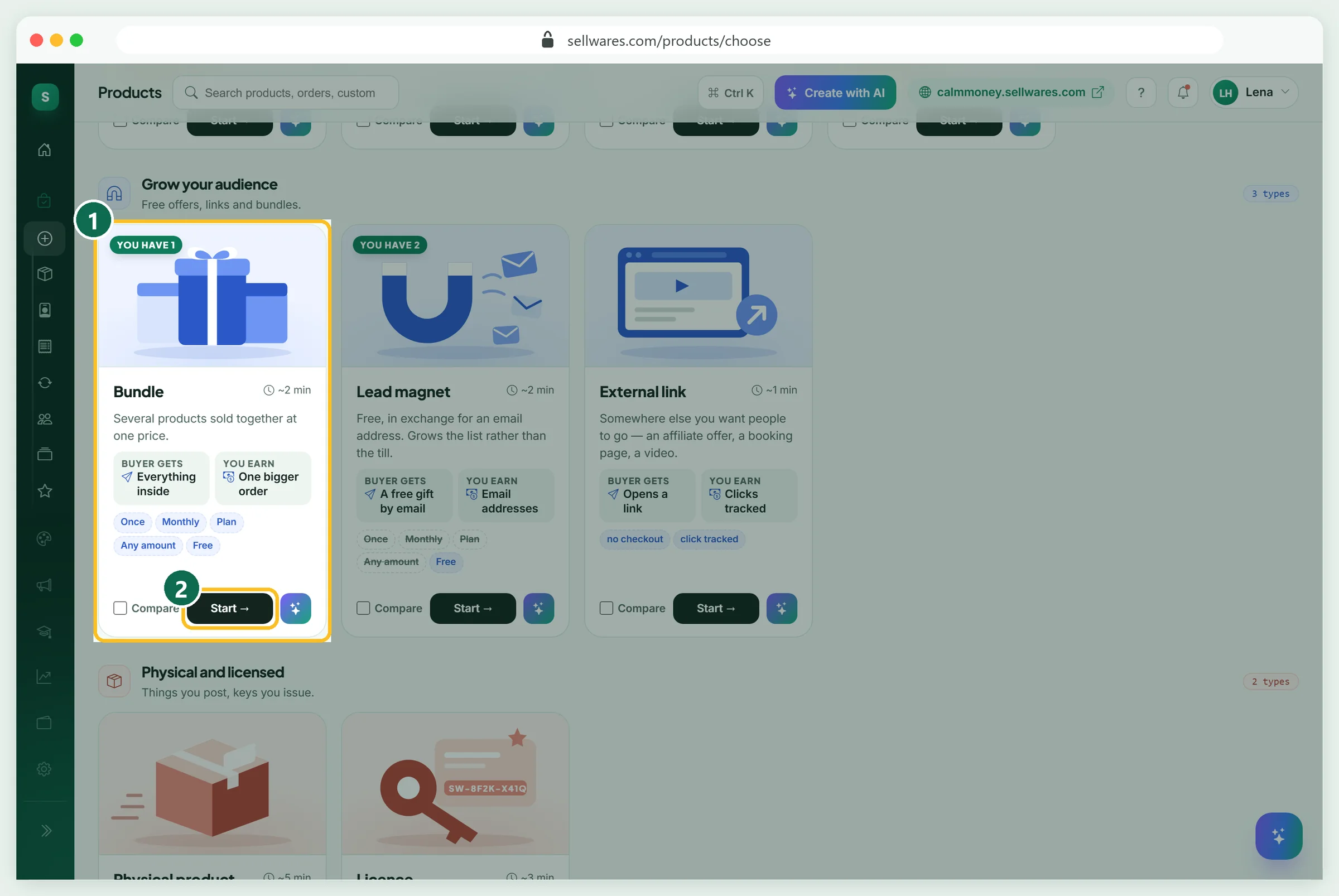
Open Create Product. Under Grow your audience, find the Bundle card (1): "Several products sold together at one price". Press Start (2). A draft named "New bundle" is made at once and the bundle studio opens on its seven tabs.
Name it and say why the set
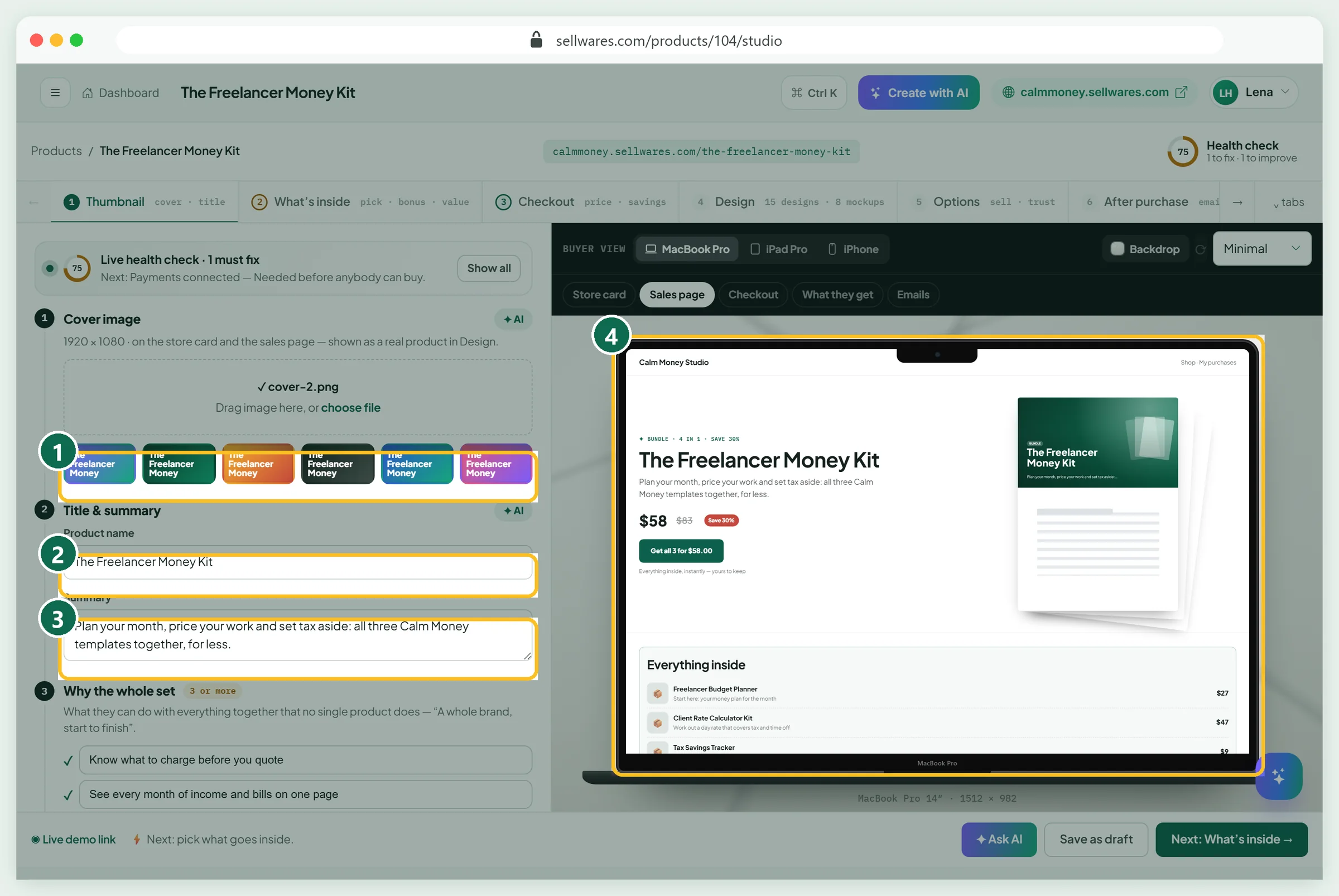
On Thumbnail, pick a cover colour or upload a 1920 × 1080 image (1). Then write:
- Product name (2): ours is The Freelancer Money Kit.
- Summary (3): one line on what the whole set lets them do.
- Why the whole set: three results no single product gives, such as Know what to charge before you quote.
- About you: one line on who made it.
The sales page preview on the right (4) changes as you type.
Choose what goes inside
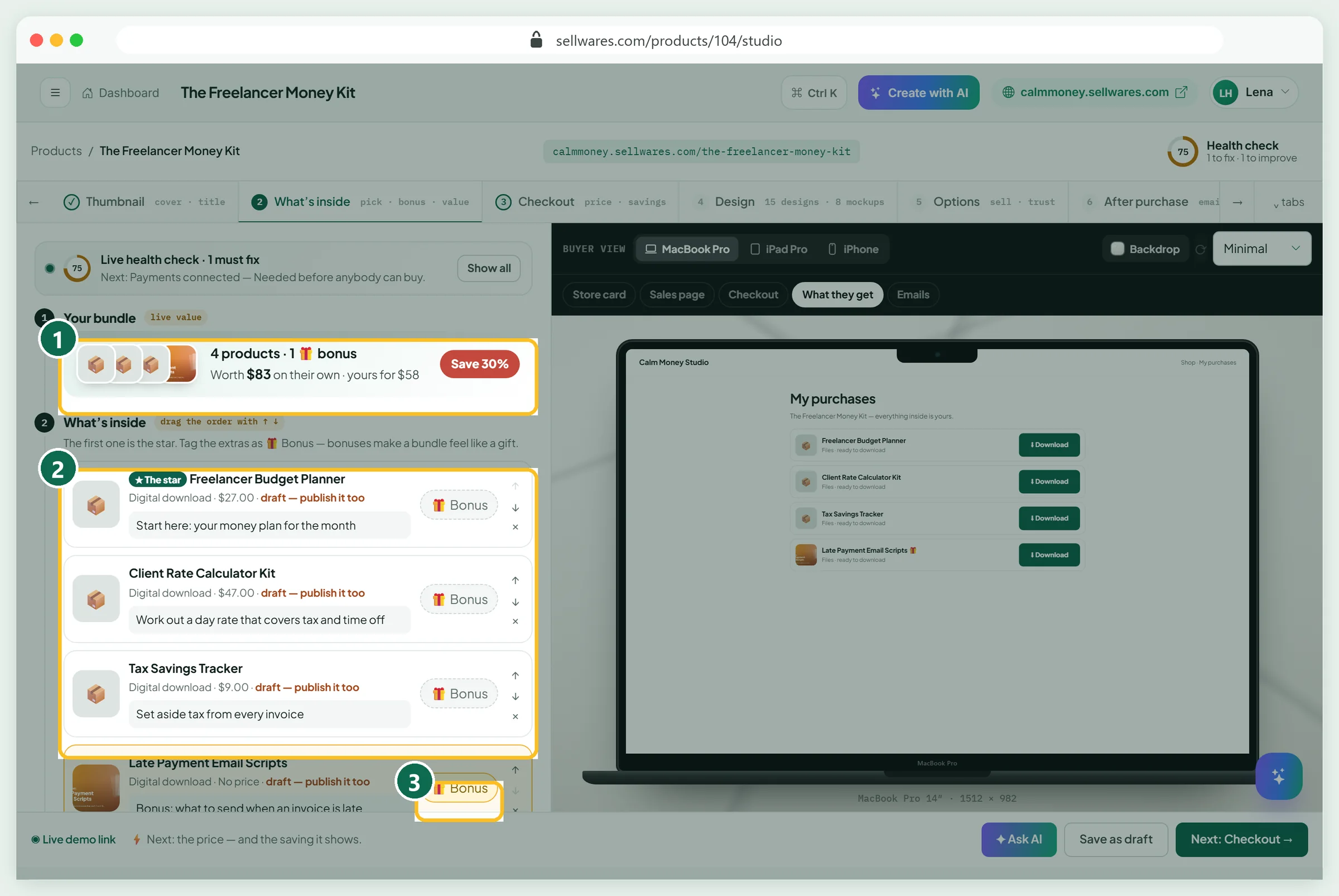
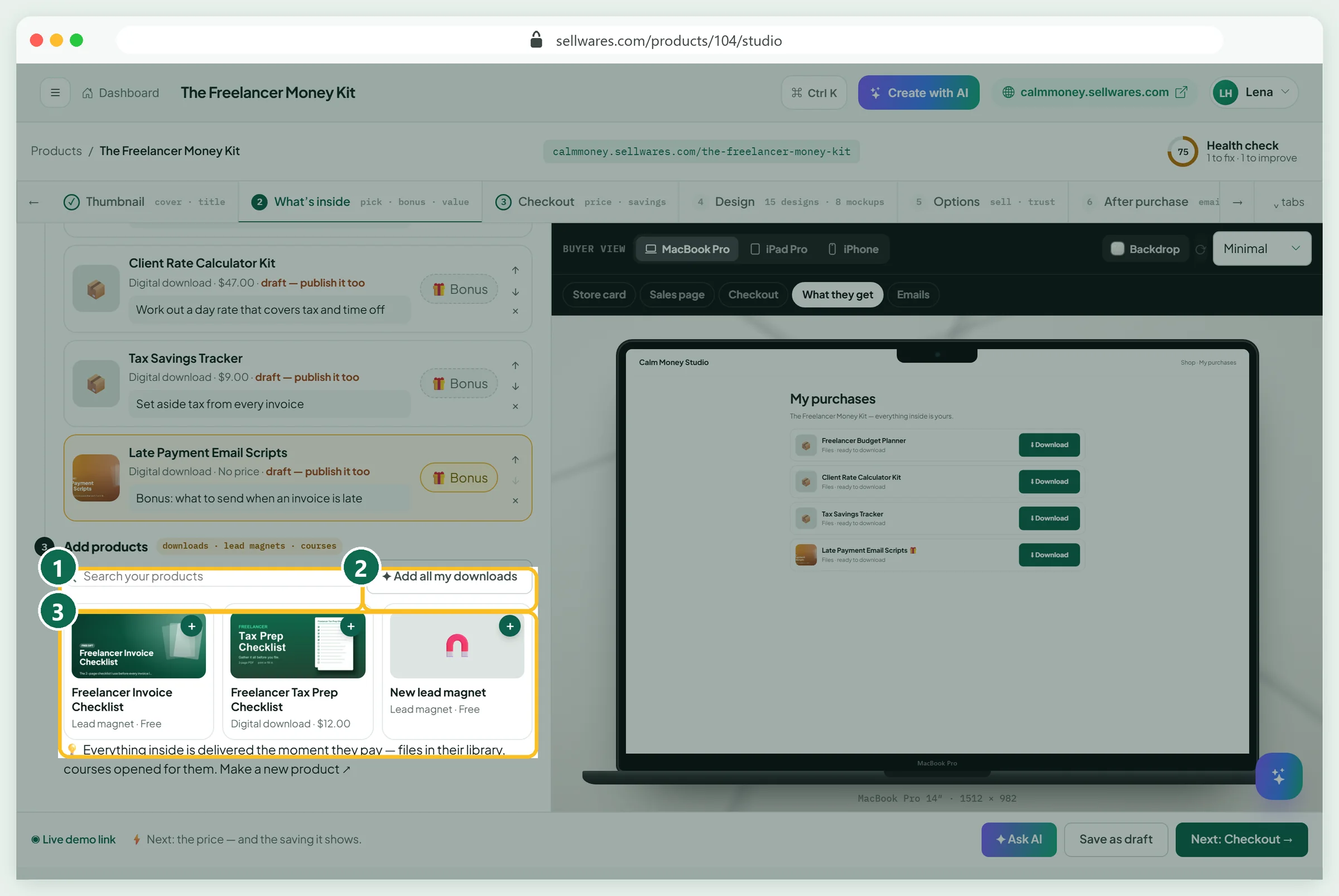
Open What's inside. Under Add products, search your products or tap Add all my downloads, then tap a card's +. A bundle can hold downloads, lead magnets and courses, up to 30 items, but not another bundle.
The meter (1) adds up the worth live: ours says 4 products, worth $83 on their own. In the list (2), the first item is the star; reorder with the arrows. Give each item a short note on why it is there, and tag extras as Bonus (3).
Set the price and the saving
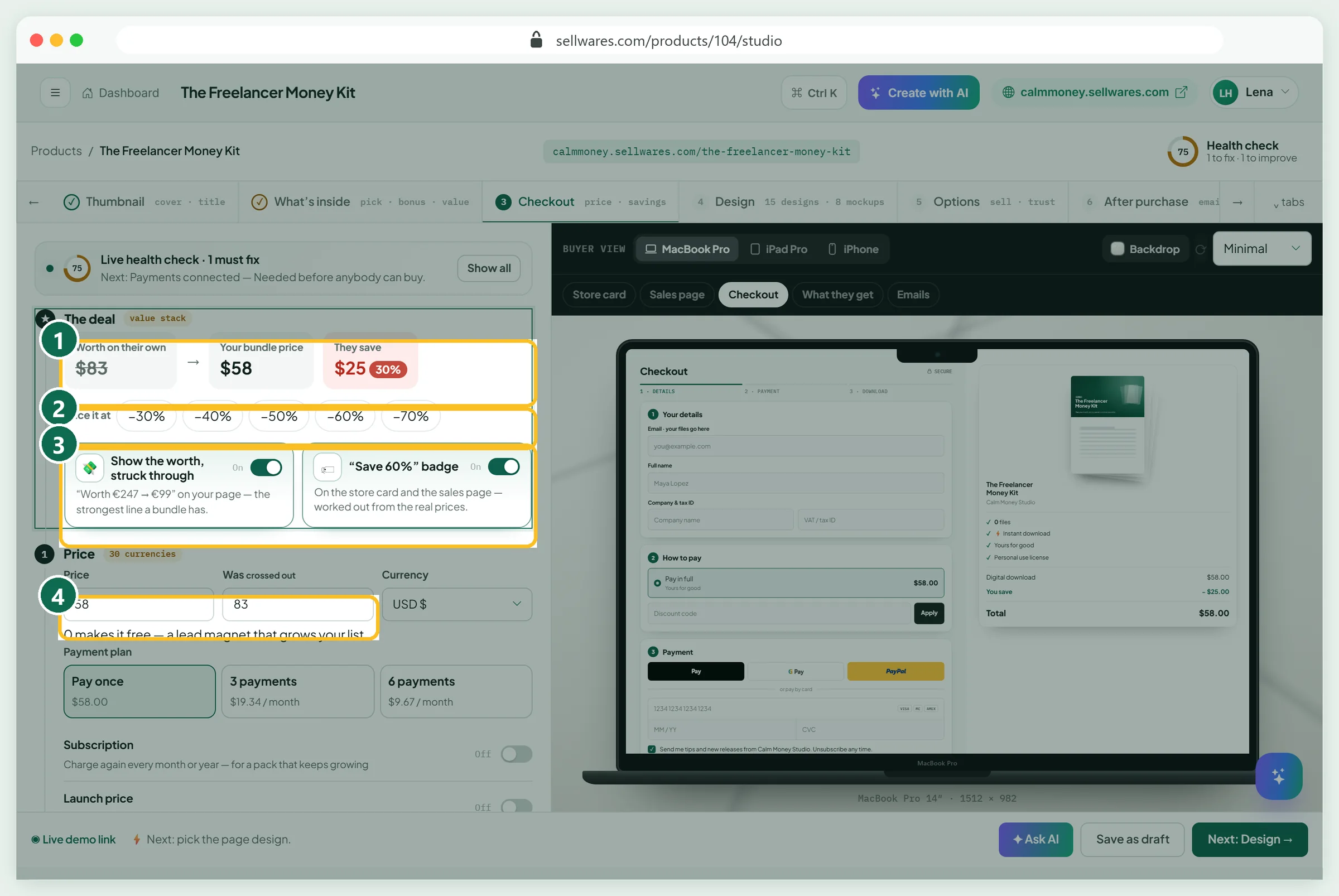
Open Checkout. The deal (1) shows worth, your price and the saving. Tap a preset (2), from −30% to −70%. We tapped −30%: price $58, they save $25.
Two switches (3) control what buyers see: Show the worth, struck through and the "Save 30%" badge. The price fields (4) fill in by themselves; "Was crossed out" takes the real $83. Beginners should start at −30%. You can also offer 3 or 6 payments, but not pay-what-you-like on a bundle.
Choose the button and raise the order
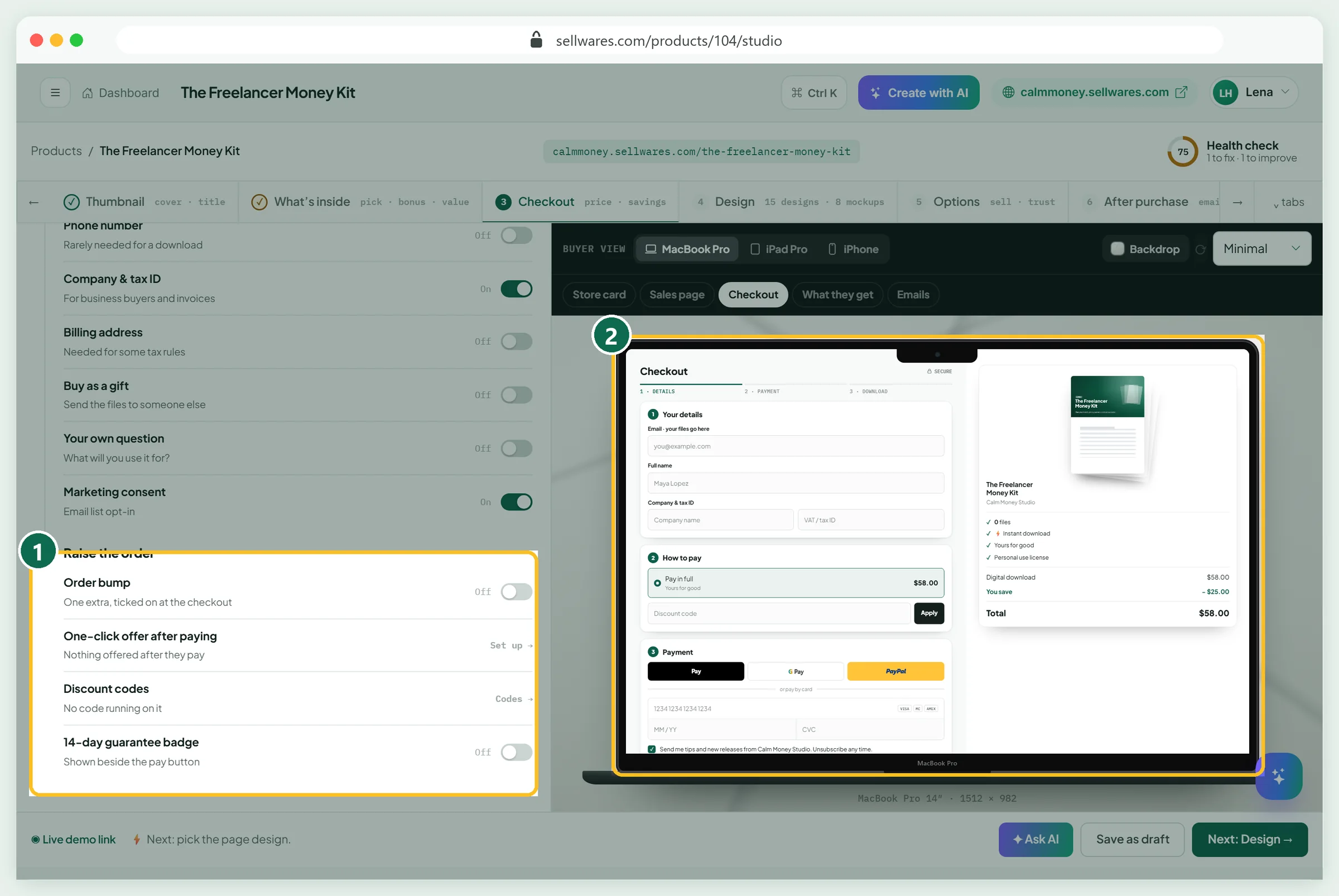
Pick one of 15 ready-made buttons; we chose Get all 3 for {price}. Under What the checkout asks, keep marketing consent on and leave the rest off.
Raise the order (1) links the extras: an order bump ticked on at checkout, a one-click offer after paying, discount codes, and a 14-day guarantee badge. Bumps and upsells are on the Creator plan. A bundle also makes a strong upsell: the ready-made upsell designs include one called Bundle.
Check the sales page on a phone

Open Live demo link at the bottom of the studio. Everything inside (1) lists each product with its own price, the bonus as Free, the total value crossed out, today's price and You save $25.00 (30%). The buy box (2) shows Not available until the bundle is on sale.
Set the tabs a bundle shares
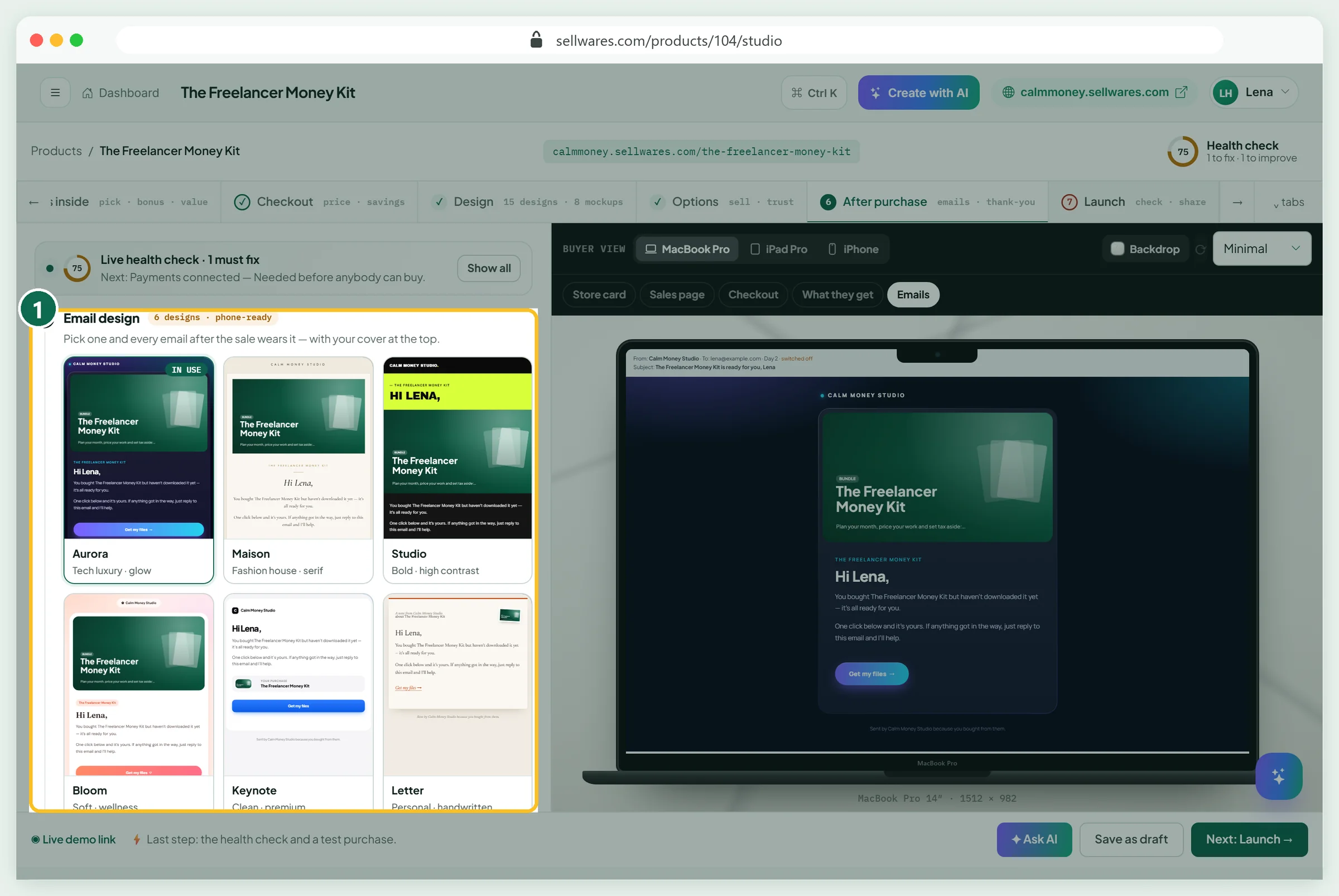
Design, Options and After purchase (1) work as for a single download: page design, reviews and trust badges, then the emails after the sale. Our guide to selling PDFs explains each one. For a bundle, keep the Day 2 Haven't downloaded yet? email on, because there are more files to collect.
Run the launch check and a test purchase
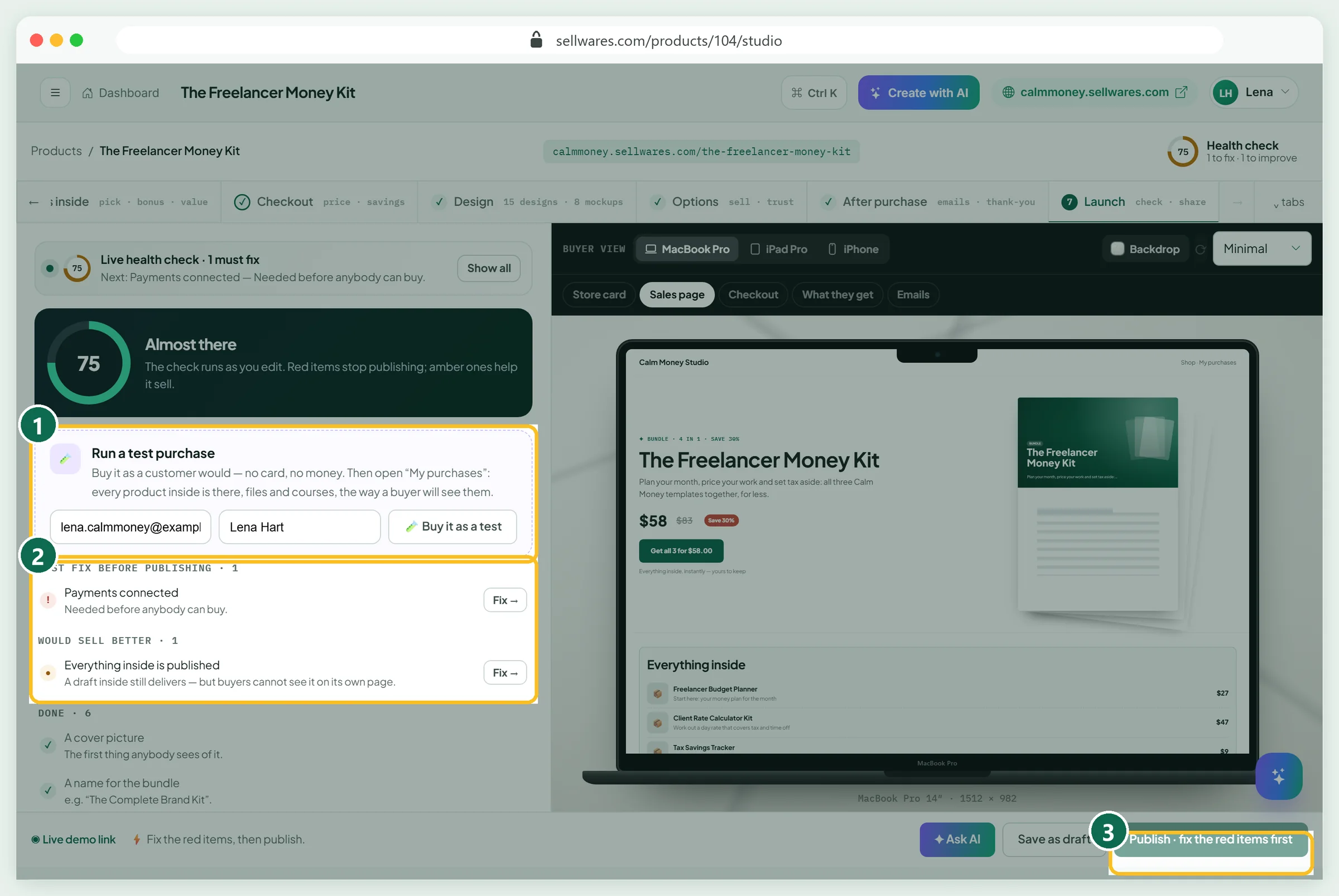
Open Launch. Run a test purchase (1): type an email and press Buy it as a test. No card, no money. Below, the check (2) lists what blocks publishing in red and what would help in amber. Ours: Payments connected (red) and Everything inside is published (amber).
See what the buyer gets
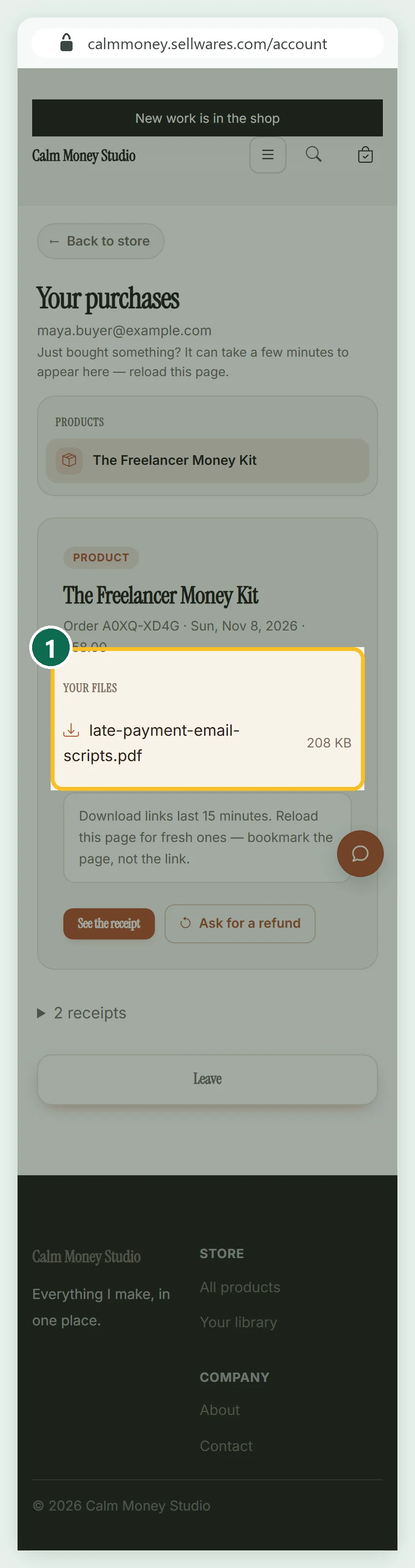
The buyer gets an email with an Open my purchases link, which works once, for 30 minutes. Their purchases page lists the bundle and Your files (1): every file of every product inside. Download links last 15 minutes; the page itself makes fresh ones.
Connect payments and publish
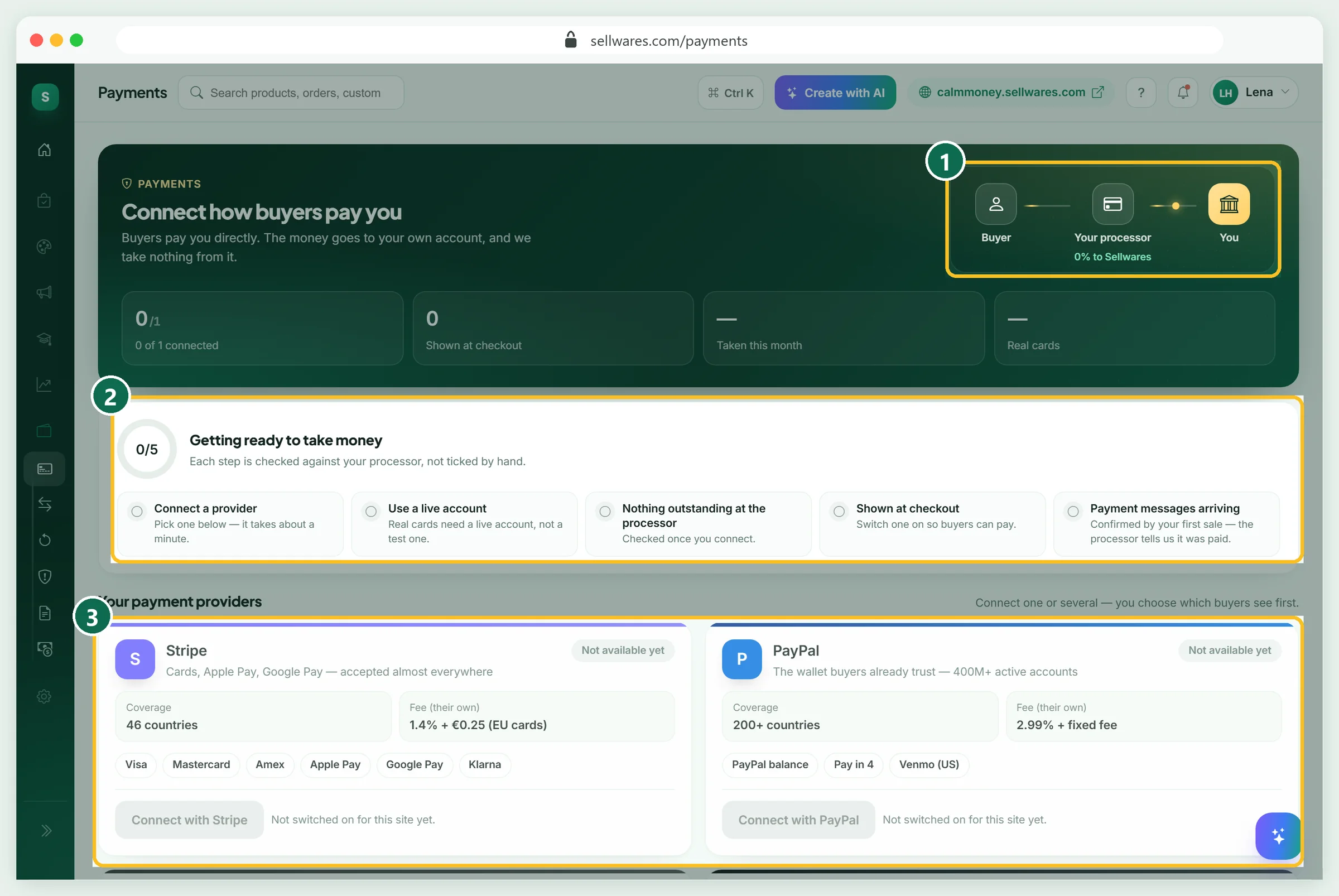
A paid bundle cannot be published until a payment provider is connected, so Publish stays grey. Open Payments and connect Stripe, PayPal or Mollie through their own login, or add a Revolut Business key. The page checks five things, from a live account to the first payment message. Money goes straight to your account (1). Then return to Launch and press Publish.
The bundle maths most pages skip
A good bundle pricing strategy rests on four facts the top pages rarely spell out.
- Who gets the discount. It only costs you on buyers who would have bought everything anyway. If most buyers buy one item, a bundle lifts the order.
- Fees per payment. Card processors charge a percentage plus a fixed fee per payment. One $58 checkout pays one fixed fee, not three; try the Stripe fee calculator.
- A real "worth". Sellwares works the worth out from the products' real prices, so the crossed-out number is one buyers could actually pay.
- Delivery. A bundle has no files of its own. It hands over the files of every product inside.
If something goes wrong
| What you see | Why | Fix |
|---|---|---|
| Test buyer sees "Nothing to download with this one" | The products inside had no files yet; the studio preview still showed sample buttons | Upload files to each product inside, then run the test again |
| Amber "Everything inside is published" | The items are drafts; they still deliver | Publish each product so it has its own page |
| Publish · fix the red items first stays grey | No payment provider connected | Connect Stripe, PayPal, Mollie or Revolut in Payments |
| A bonus shows as "Free" and adds $0 to the worth | That product has no price of its own | Give it a price if it should count in the total |
| An empty "New bundle" in My Products | Pressing Start makes the draft at once | Open it from Continue your draft, or delete it |
| A download link stops working | Links last 15 minutes | Bookmark the purchases page, not the file link |
What we found in the top results
We read the pages Google ranks first for "bundle pricing" on 8 November 2026. DealHub, Salesforce and Pricefy lead, writing for B2B sales teams and retailers. They list the types well and add examples. None has a formula with worked numbers, a floor price, or the tying question. None shows a bundle being built and delivered, which is where creators get stuck.
Next steps
Start with two or three products people already buy, at 30% off. If you still need something to give away, see our lead magnet examples.
Create your free Sellwares store and build your first bundle today.
Questions
What is bundle pricing with an example?
It is selling several products for one price that is lower than their total. Our demo store sells a $27 planner, a $47 rate kit and a $9 tracker, worth $83, as one bundle for $58: the buyer saves $25 (30%).
What is the bundle price?
The bundle price is the one price a buyer pays for everything in the bundle. A simple way to set it: add up the separate prices and take 20-40% off, while keeping it above the price of the most expensive item.
What are the four types of pricing?
Guides list many sets of four. For bundles, the four types are pure bundling (only sold together), mixed bundling (sold alone and together), complementary or cross-sell bundling (items used together) and volume bundling (more of the same, or a reward for spending more).
Is there a bundle pricing calculator?
You do not need one for a first bundle: multiply the separate total by one minus the discount. In Sellwares, the bundle studio does it for you: the presets from -30% to -70% set the price and show the saving.
Does a bundle count as a product on the Free plan?
Yes. Every product counts, bundles included, and the Free plan holds 3 products. Two products plus one bundle fit; for more, the Creator plan has no product limit.
Sources
Related
 BlogEtsy shop ideas · 11 min read32 Etsy Shop Ideas for 2026: Costs, Fees and What You Keep32 Etsy shop ideas for 2026 with start cost, Etsy's exact fees on an example price and what you keep, plus a free demand check in Etsy search.
 Oliver BennettRead the post →
 Sell Digital Products Online with 0% FeesSell ebooks, templates, presets, music and more from your own store. Instant delivery, 0% transaction fee, paid…
 Janie BrooksTake a look →
 Guide15 min · 12 steps8 Lead Magnet Examples (and How to Set One Up)8 lead magnet examples for creators and small businesses, then a real setup: a free PDF checklist, email capture…Janie BrooksFollow the guide →
 BlogPersonal brand · 7 min readHow to Build a Personal Brand: 7 Steps and ExamplesHow to build a personal brand in 7 steps: choose a position, write a brand statement, collect proof and set up a home…Oliver BennettRead the post →
 Guide30 min · 10 stepsHow to Start an Online Coaching Business (2026 Guide)How to start an online coaching business: name the result, set session length, price and hours, take bookings on a…Janie BrooksFollow the guide →