How to Create a Sales Funnel (Step by Step, 2026)
How to create a sales funnel in 10 steps: opt-in, sales page, order bump, one-click upsell and publish, with a real screenshot of every step.

Here is how to create a sales funnel that turns a stranger into a buyer: give something free for an email, show the offer, add a small extra at checkout, offer one more thing after they pay, and end on a clear thank-you page. Below we build a real one, step by step, inside a demo store that sells digital products, with a screenshot of every screen.
Photo: Carlos Muza on Unsplash
We built this funnel on 30 October 2026 for our demo store, Calm Money Studio, which sells budget templates to freelancers. Everything you see is the real Sellwares builder. If you search for how to build a sales funnel or how to make a sales funnel, it is the same job, and the same steps.
How to create a sales funnel: the short answer
- Pick a ready-made funnel and the product it sells.
- Check the journey: opt-in, sales page, upsell, thank you.
- Wire the steps together on the flow map.
- Write the opt-in page that gives something free.
- Write the sales page for your main product.
- Connect how you get paid.
- Add an order bump to the checkout.
- Add a one-click upsell after payment.
- Publish, then share the link.
- Watch where people leave and fix the biggest leak.
What is a sales funnel?
A sales funnel is the path a person takes from first hearing about you to buying, built as a short series of pages. Each page has one job and one button. Fewer people reach each next step, which is why it is drawn as a funnel. The goal is not to push everyone through; it is to give each visitor the next step that fits them.
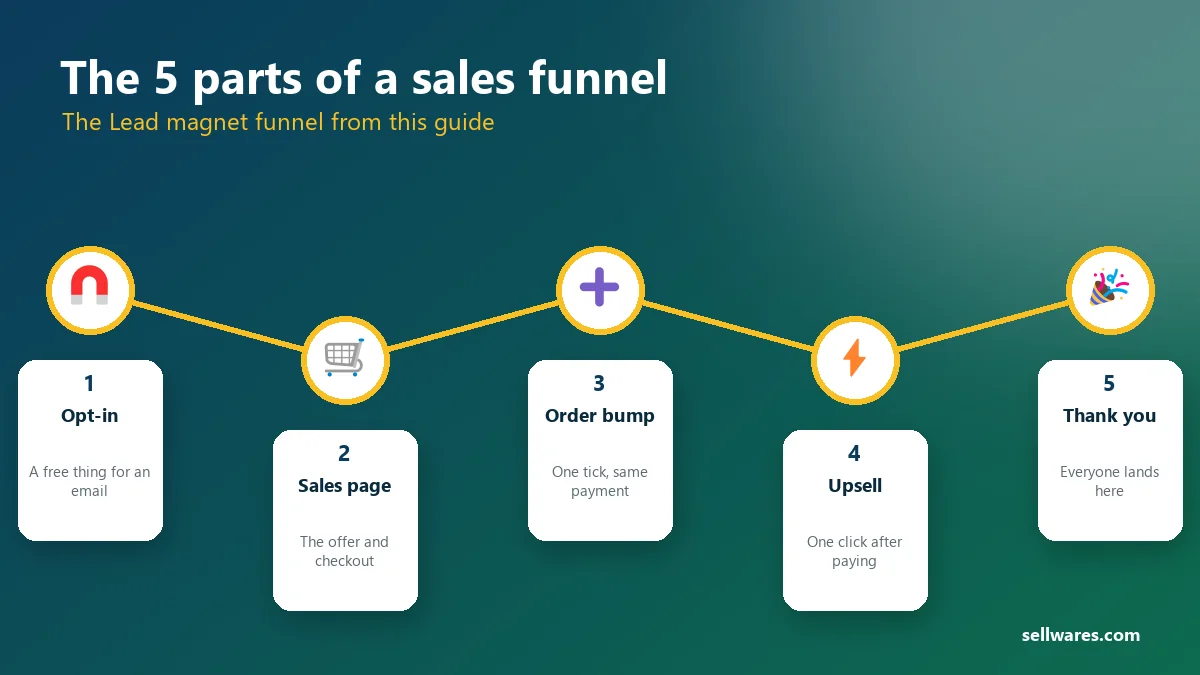
The most common shape for creators is the lead magnet funnel: a free guide or checklist earns the email, then the paid offer arrives while the reader still cares. It suits cold traffic from social media, search and ads, which is why we use it here.
Before you start
You need a Sellwares account on the Creator plan, which includes funnels, order bumps and upsells (the 14-day trial includes them too). You also need one product to sell and one free thing to give away. In our demo store that is the Freelancer Budget Planner ($27) and a free money checklist.
Build the funnel, step by step
Every screenshot below is from the real builder. On a phone, tap any screenshot to open it full size and zoom in.
Pick a ready-made funnel
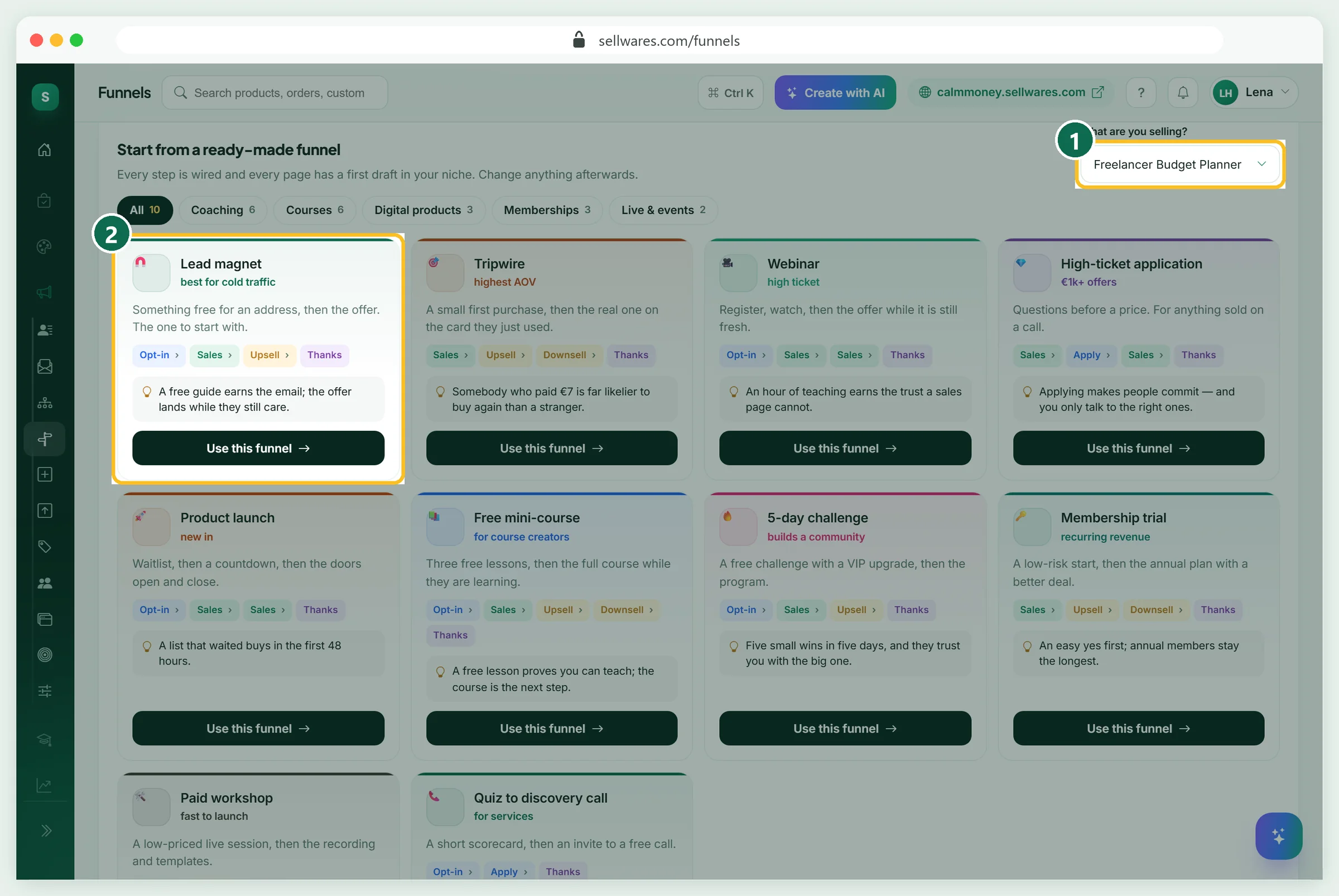
Open Funnels in the menu. Under Start from a ready-made funnel, choose what you are selling in What are you selling? (1), then press Use this funnel on Lead magnet (2).
Sellwares has 10 ready-made funnels, including Tripwire, Webinar, High-ticket application, Product launch, Free mini-course, 5-day challenge, Membership trial, Paid workshop and Quiz to discovery call. Each arrives with every page already written for your niche, so you edit instead of starting from a blank page. Filter them by Coaching, Courses, Digital products, Memberships or Live and events.
Check the journey on Shape
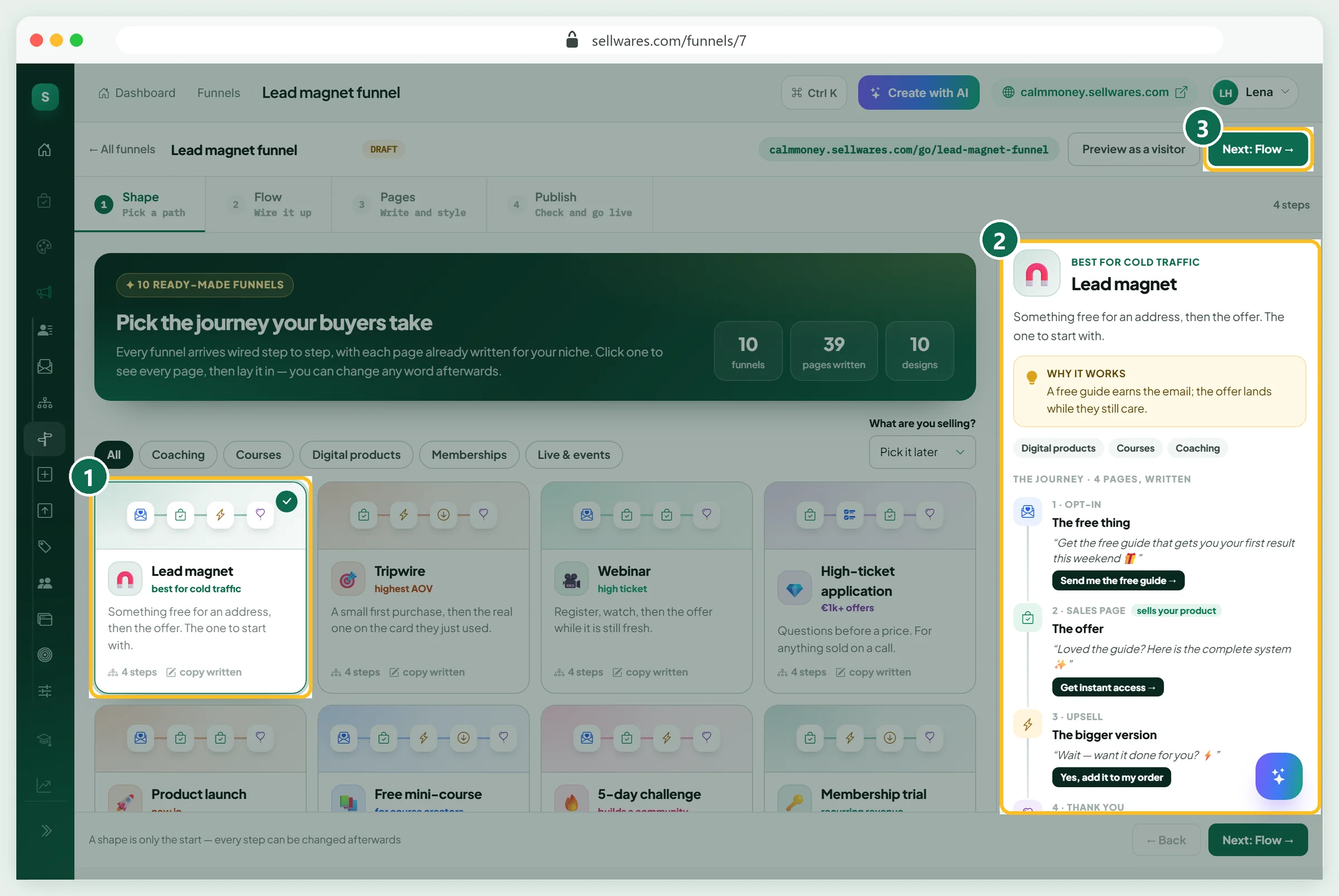
The builder opens on Shape, the first of four stages: Shape, Flow, Pages and Publish. The card you picked is ticked (1). On the right (2) you see why it works and the whole journey with each page's first headline and button. Here: the free thing, the offer, the bigger version and the thank-you page.
Change your mind at any time by picking another shape. When the journey looks right, press Next: Flow (3).
Wire it up on Flow
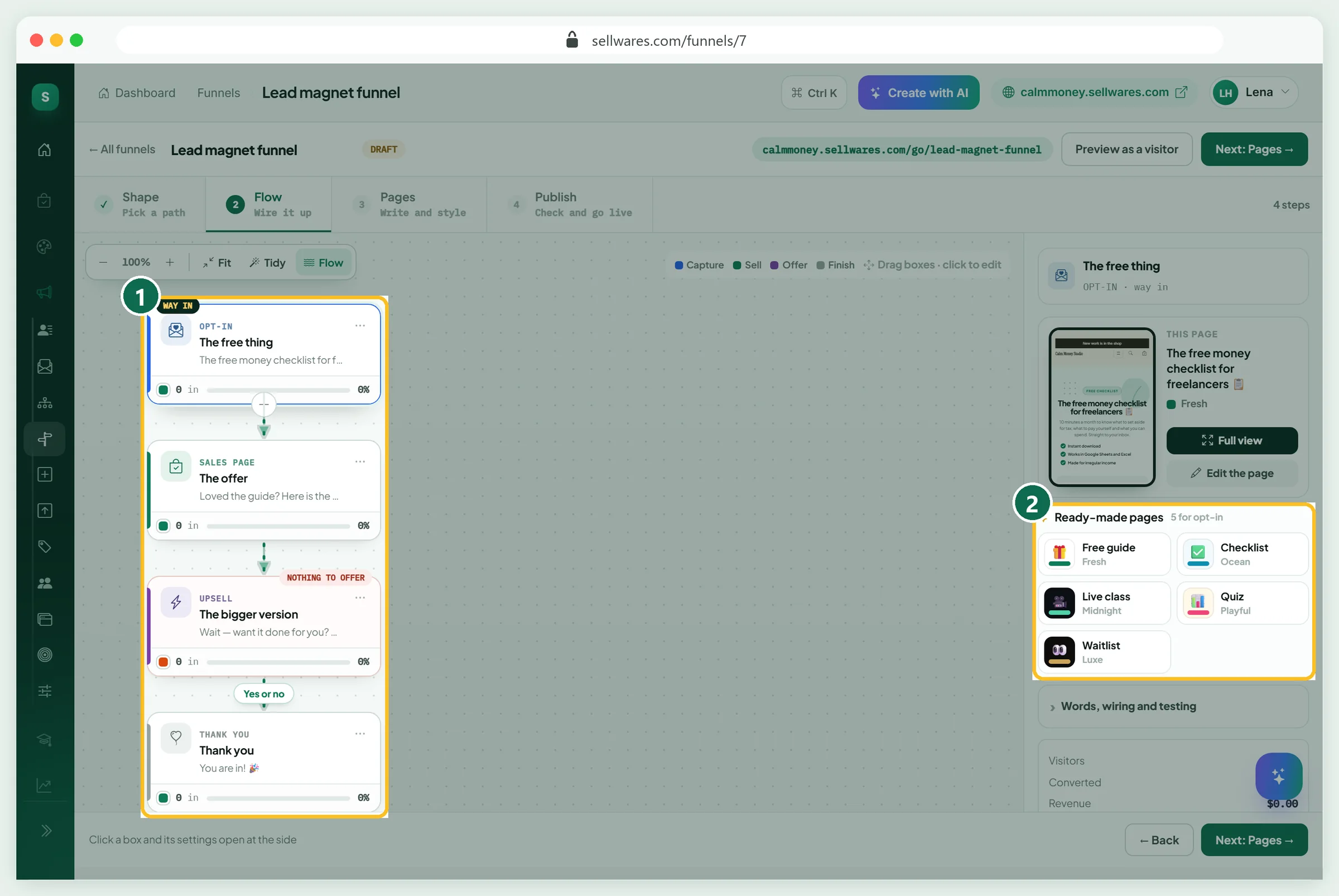
Flow shows the funnel as a map (1). Each box is a page, coloured by its job: capture, sell, offer or finish. Drag boxes to move them, use Fit and Tidy to arrange the map, and click a box to open its settings on the side.
The upsell box has a Yes or no branch, because a buyer can accept or decline. Every step must lead somewhere; the builder warns you if one does not. For each page you can also swap in a ready-made design (2), such as Free guide, Checklist, Live class, Quiz or Waitlist for an opt-in.
Write the opt-in page
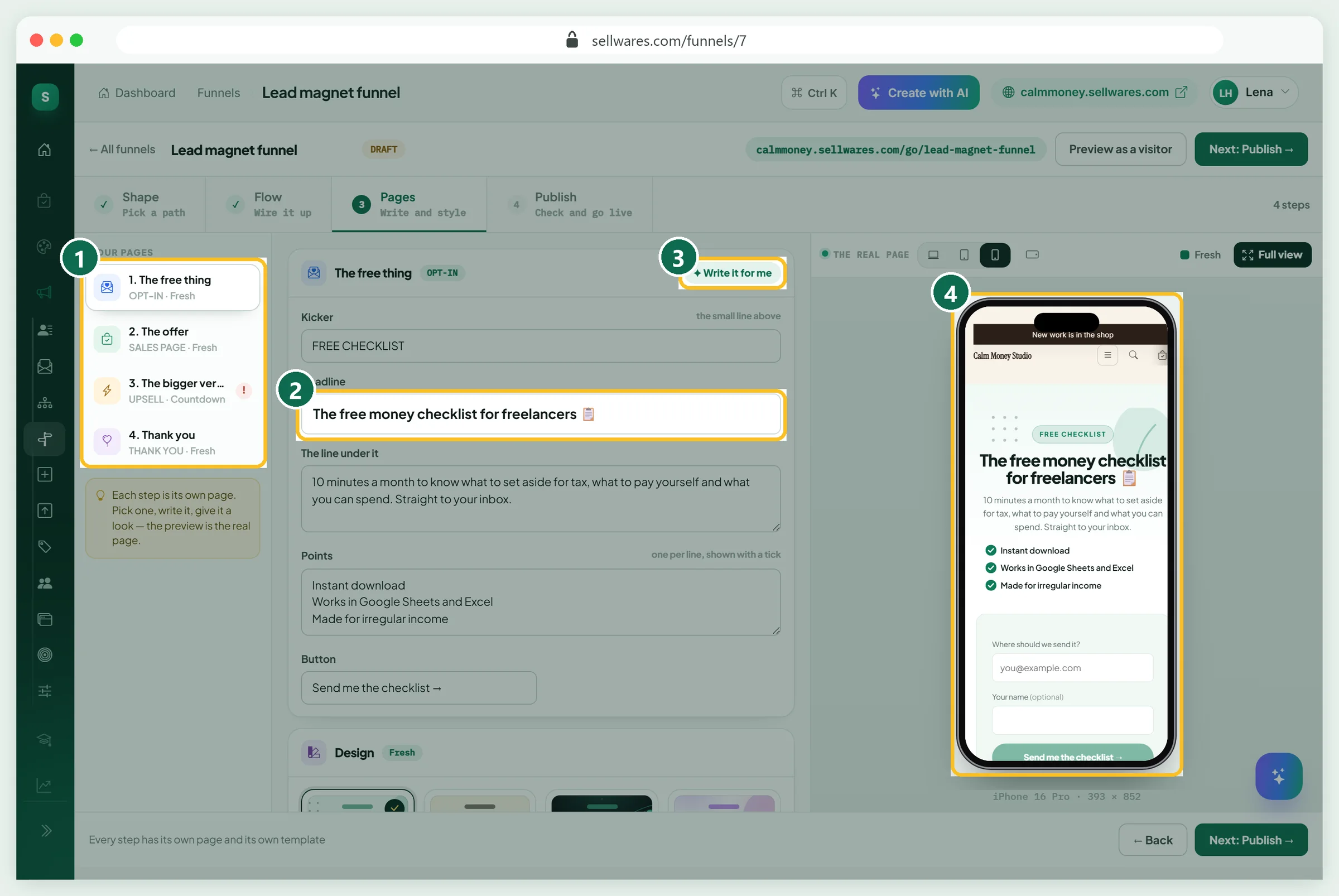
Open Pages. Your pages are listed on the left (1). Start with the free thing, the opt-in page, and write:
- Kicker: the small line above the headline, such as FREE CHECKLIST.
- Headline (2): the result, in the reader's words. Ours: The free money checklist for freelancers.
- The line under it: what they get and how fast.
- Points: three short benefits, shown with a tick.
- Button: say what happens, such as Send me the checklist.
Stuck on words? Write it for me (3) drafts the page from your product. The phone preview (4) shows the real page as you type, because most visitors arrive on a phone. Under Design pick a look, and under Extras on this page add a countdown, social proof or a message when someone tries to leave.
Write the sales page
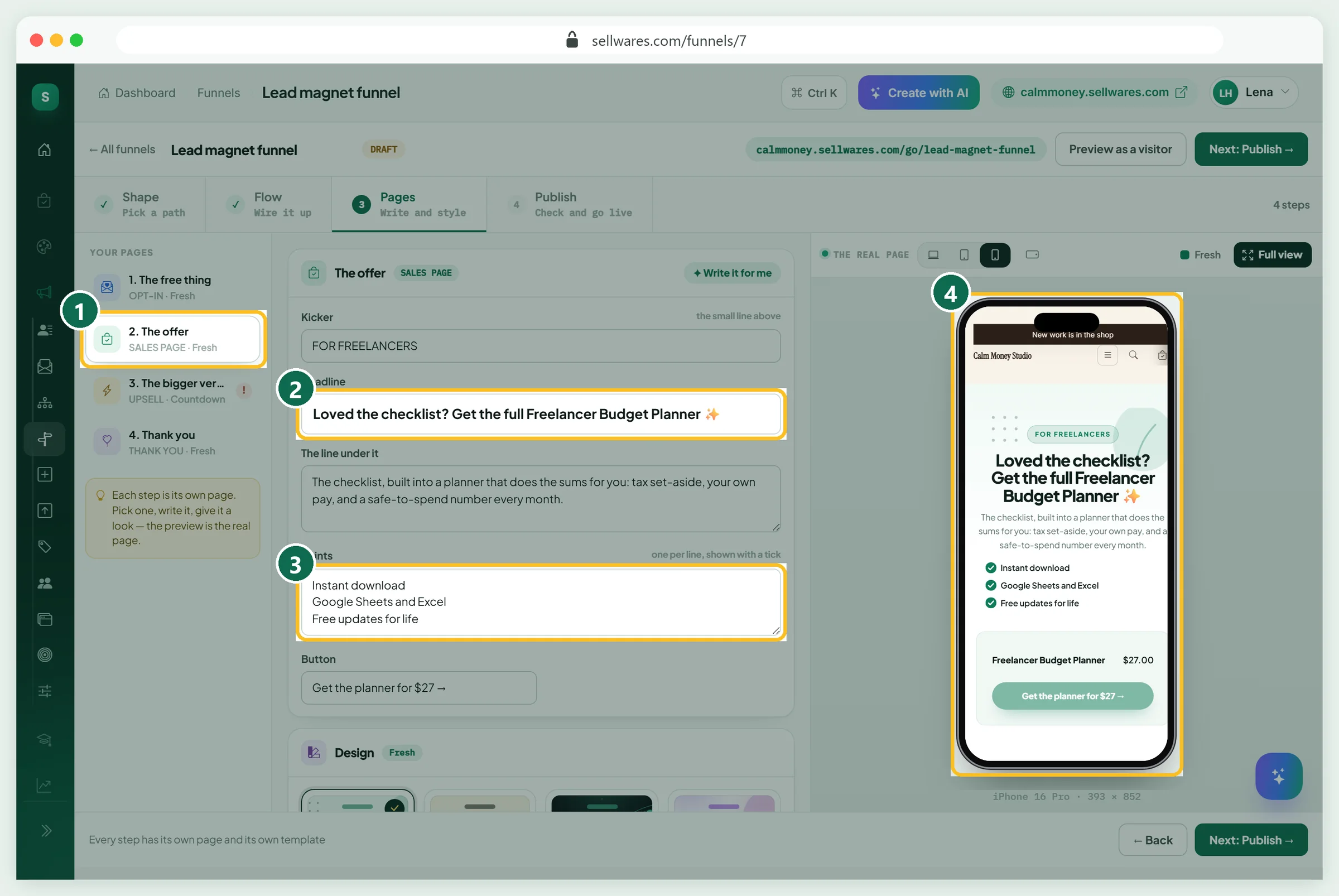
Click The offer in the list (1). This page makes the paid offer. Write a headline (2) that connects to the free thing: Loved the checklist? Get the full Freelancer Budget Planner. Use the points (3) for what they get, and put the price in the button so there are no surprises. The preview (4) shows the product card and price exactly as the buyer will see them.
Connect how you get paid
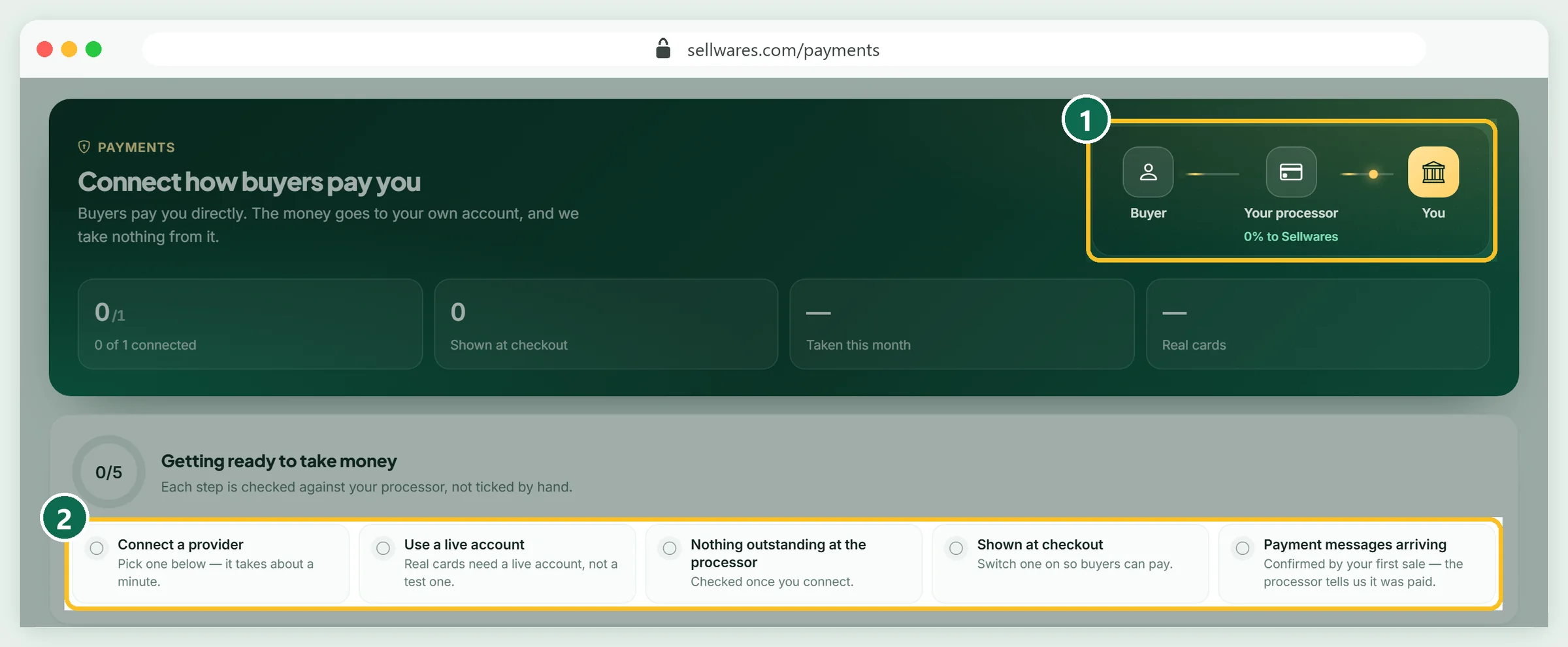
A funnel that sells needs a way to take money, so connect it before you publish. Open Payments. Buyers pay you directly; the money goes to your own account, and Sellwares takes 0% (1).
Connect Stripe, PayPal or Mollie with one click through their own login, or add a Revolut Business key. The page then checks five things for you (2): a provider is connected, it is a live account, nothing is outstanding at the processor, it shows at checkout, and payment messages arrive.
Add an order bump
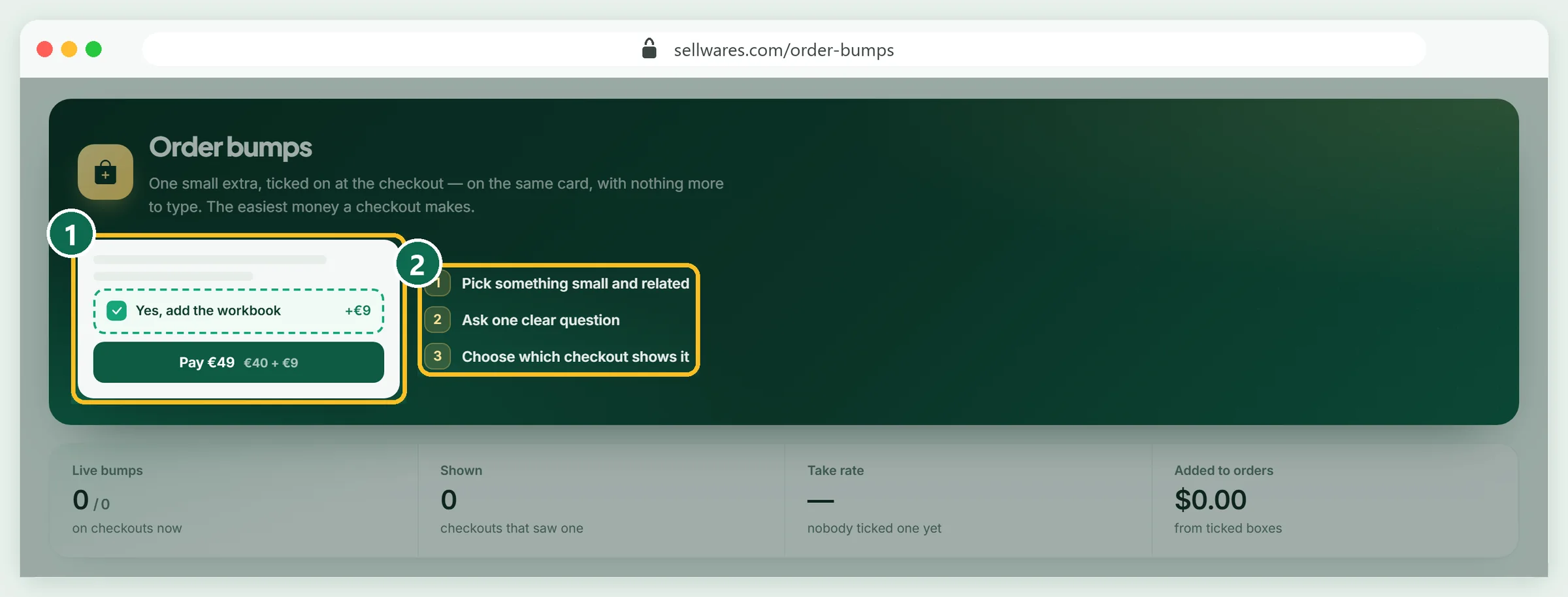
An order bump is one small extra, ticked on at the checkout, on the same payment (1). It is the easiest extra money a checkout makes, because the buyer is already paying. Open Order bumps and follow its three rules (2): pick something small and related, ask one clear question, and choose which checkout shows it.
For our planner, the bump is the Tax Savings Tracker for $9: Yes, add the tax tracker. Only one bump shows on a checkout at a time, the one aimed at that product first, then a store-wide one. The bump must be a published product with a one-off price; a subscription cannot be added by ticking a box.
Add the one-click upsell
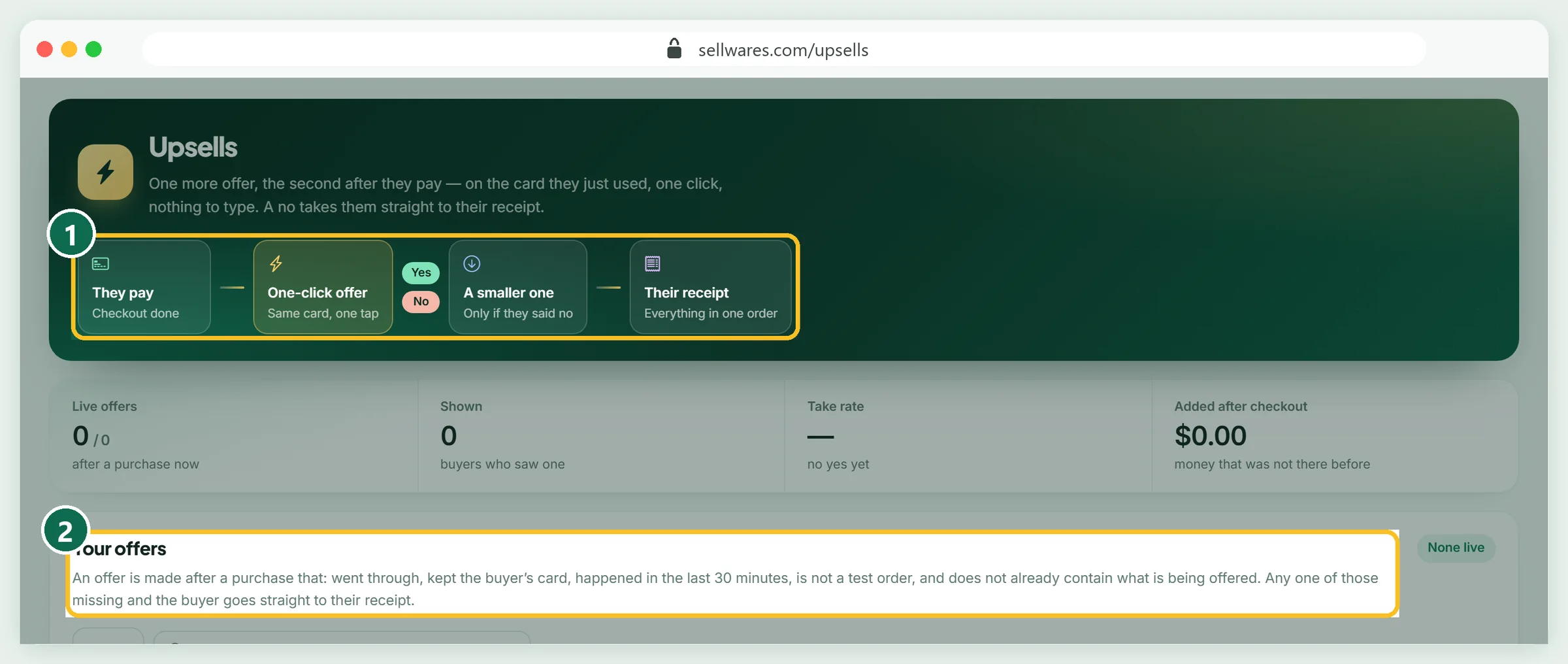
An upsell is offered after they pay, on the card they just used, with one click (1). If they say no, a smaller offer (a downsell) can follow, and either way they land on their receipt. Open Upsells, create the offer, and connect it to the upsell step of your funnel.
Our upsell is the Client Rate Calculator Kit for $47. Sellwares only shows an upsell when it is safe (2): the purchase went through, the card was kept, it happened in the last 30 minutes, it is not a test order, and the order does not already contain the offer.
Publish and share the link
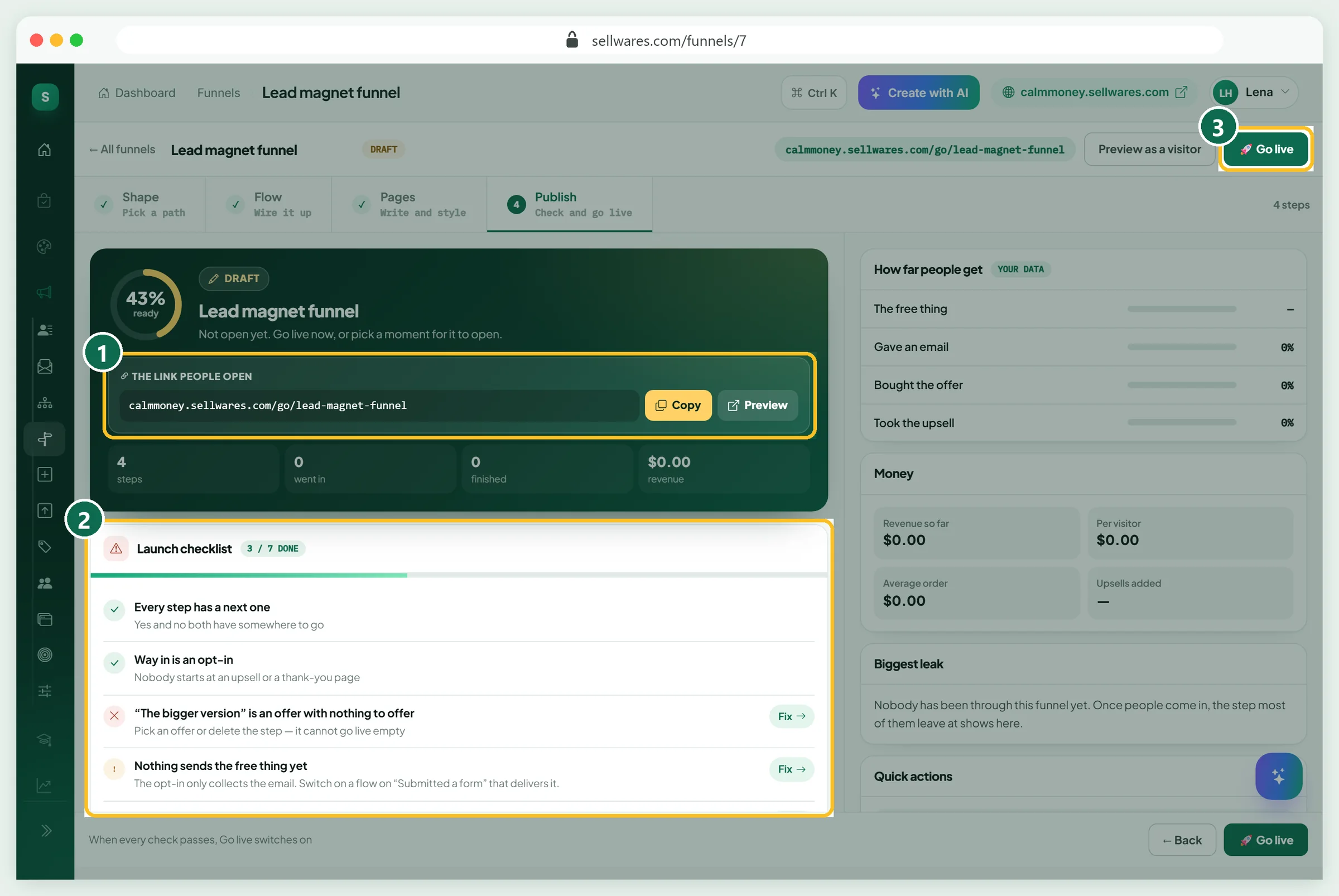
Open Publish. At the top is the link people open (1), such as calmmoney.sellwares.com/go/lead-magnet-funnel, with Copy and Preview. The Launch checklist (2) checks every step and shows a Fix button beside anything missing. When every check passes, Go live (3) switches on.
You can also schedule it: open now, tomorrow at 9:00 or Monday at 9:00, with an optional close date and where people go after it closes. Then pick where people come in (Instagram bio, TikTok, YouTube, your email list, Facebook or Google ads) so each link is tracked.
Watch the numbers and fix the biggest leak
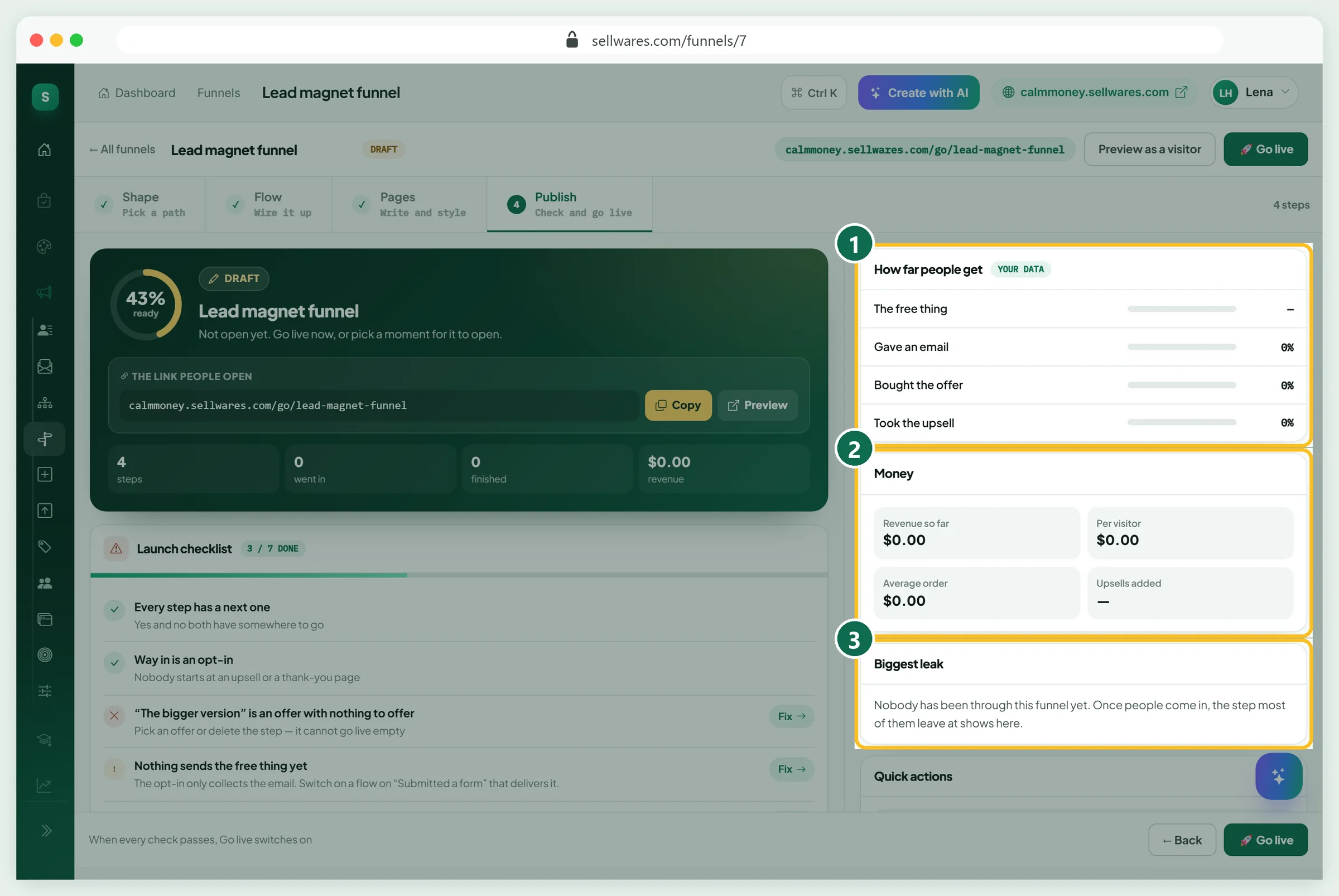
Once people come in, the right side of Publish becomes your dashboard. How far people get (1) shows each step, from opening the free page to taking the upsell. Money (2) shows revenue, per visitor and average order. Biggest leak (3) names the step where most people leave.
Fix one leak at a time. A weak opt-in usually needs a clearer headline; a weak sales page usually needs proof or a clearer price. Test one change at a time with A/B Tests, so you know what worked.
If something goes wrong
| What you see | Why | Fix |
|---|---|---|
| "The bigger version is an offer with nothing to offer" | The upsell step has no offer yet | Create an offer in Upsells and connect it, or delete the step |
| "Nothing sends the free thing yet" | The opt-in only collects the email | Switch on a flow on Submitted a form that delivers the free download |
| The product is missing when you create a bump | Bumps only offer published products with a one-off price | Publish the product and give it a one-off price |
| No upsell after a test purchase | Test orders never see upsells | Check it with a real purchase, or trust the rules in step 8 |
| Go live stays grey | The launch checklist still has open items | Press Fix beside each red item |
| Funnels asks you to upgrade | Funnels are on the Creator plan | Upgrade, or start the 14-day trial |
What we found in the top results
We reviewed the pages Google ranks first for "how to create a sales funnel" on 30 October 2026. Big CRM and marketing sites explain the stages well, and a Reddit thread sits on page one. Very few show a funnel being built, screen by screen, with the order bump and upsell that raise every order. Checkout matters more than most guides admit: Baymard Institute's checkout research found that the average large online shop could raise its conversion rate by 35.26% with a better checkout design.
Next steps
Start with one funnel and one product. Share it from your link in bio, and give it two weeks of traffic before you change anything. Need an idea for the free thing? A checklist, a template or a short guide works well; see what you can sell as a digital product.
Create your free Sellwares store and build your first funnel today.
Questions
What are the stages of a sales funnel?
For creators the usual stages are: an opt-in page that gives something free for an email, a sales page with the main offer, an order bump at checkout, a one-click upsell after payment, and a thank-you page. Each page has one job and one button.
How much does a sales funnel cost?
On Sellwares, funnels, order bumps and upsells come with the Creator plan at €29 a month, with a 0% transaction fee, so the funnel costs the same however much it sells. You only pay your payment provider's normal card fee.
Do I need a website to build a sales funnel?
No. The funnel has its own link, such as yourname.sellwares.com/go/your-funnel, which you can share from your bio, emails and ads. You can also use your own domain on a paid plan.
What is the difference between an order bump and an upsell?
An order bump is a small extra ticked on at the checkout, paid in the same payment. An upsell is offered after the payment, on the card the buyer just used, with one click. Most good funnels use both.
How long does it take to build a sales funnel?
With a ready-made funnel about 30 minutes: the pages arrive written, so you mainly rewrite the headlines for your niche, connect payments and choose the bump and upsell.