How to Add a Link to Your TikTok Bio (2026 Guide)
How to add a link to your TikTok bio in 5 taps, why the option may be missing under 1,000 followers, and which link to use so people click and buy.

Here is how to add a link to your TikTok bio in under a minute, plus what to do when the option is missing. The short version: open your profile, tap Edit profile, and add your link next to Links. The catch is who gets that option, and which link you should put there. One clickable link is all TikTok gives you, so it should point to a link in bio page that holds everything else.
Photo: Solen Feyissa on Unsplash
We checked TikTok's own help pages and the results Google shows first for this search on 30 October 2026. TikTok's support page ranks near the top, followed by a Reddit thread titled after the most common problem: the link option is not there.
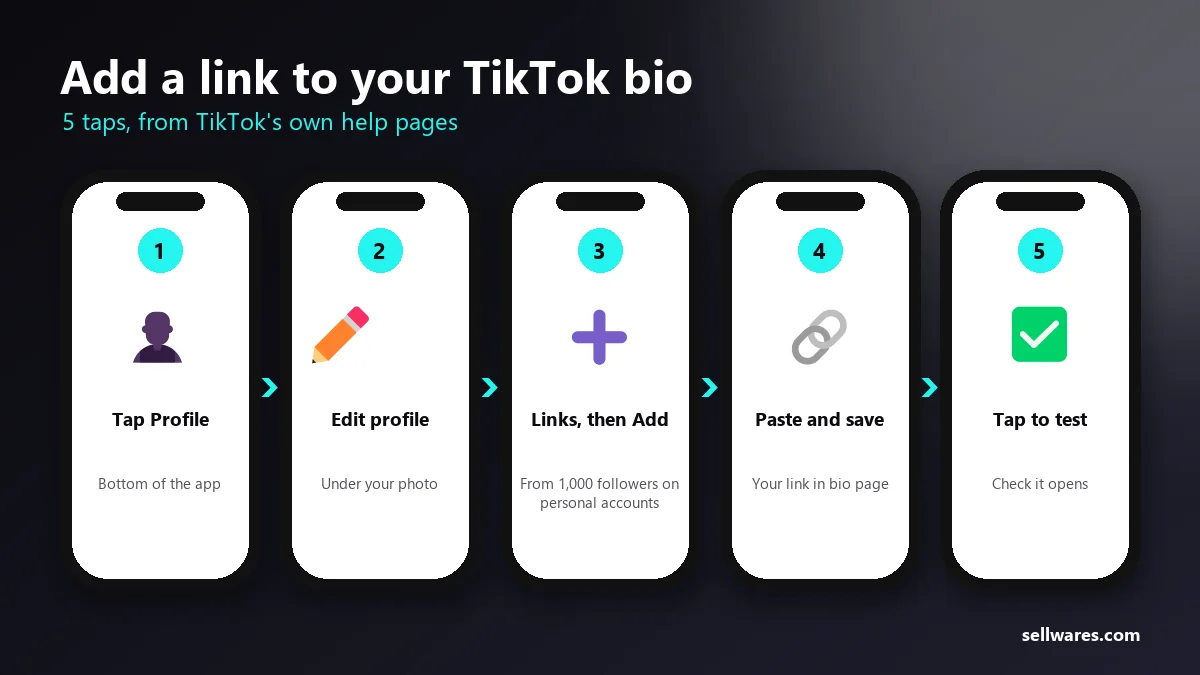
How to add a link to your TikTok bio: the steps
- Open the TikTok app and tap Profile at the bottom.
- Tap Edit profile.
- Next to Links, tap Add.
- Paste your link and follow the steps to save it.
- Go back to your profile and tap the link once to check it opens.
That is the whole process when your account qualifies. If you do not see Links, read the next section.
Why can't I add a link to my TikTok bio?
TikTok does not give the website link to every account. Its support pages say general accounts with at least 1,000 followers can post a website link on their profile. Below that, the field does not appear.
Other common reasons the option is missing:
- You are under 1,000 followers on a personal account.
- The app is out of date. Update it from the App Store or Google Play.
- Your account is new or flagged. Accounts that broke community rules can lose features for a while.
- You are under 18. Some profile features may be limited for younger users.
| Why the link is missing | What to do |
|---|---|
| Under 1,000 followers on a personal account | Try a free Business Account, or put your address in your bio text |
| The app is out of date | Update it from the App Store or Google Play |
| New or flagged account | Features can come back after a while |
| Under 18 | Some profile features may be limited |
How to add a link to your TikTok bio without 1,000 followers
Many creators switch to a Business Account, which TikTok offers for free. Business accounts get different tools, and many people report the website link appearing after the switch. TikTok's own account types page explains what each account can do, so check it before you switch.
To switch: Profile, then the menu in the top corner, then Settings and privacy, then Account, then Switch to Business Account. You can switch back later. Note that business accounts have a smaller music library for videos, because commercial use needs different licences.
If you would rather stay personal, use the time before 1,000 followers well: put your link in bio address in your bio text as plain words, and pin a comment pointing to it.
Which link should you put in your TikTok bio?
TikTok allows one website link. If you paste a single product or video, everything else is hidden. A link in bio page solves that: one address that opens a page with all your links, your products and a sign-up for your email list.
What a good link in bio page has:
- Your best 3 to 5 links, not 20. Every extra button lowers the clicks on the others.
- Clear labels. "Free budget template" gets more taps than "Click here".
- Something to sell or sign up for, so the visit turns into a customer or a subscriber.
- Fast loading on a phone, because almost every TikTok tap happens on mobile data.
On Sellwares the page is free, comes with 10 templates and lets people buy your products without leaving the page. We measured our own link in bio page with Google PageSpeed on a phone; it scores above 90, which matters when people tap from a busy feed.
Photo: Swello on Unsplash
How to add Instagram, YouTube and other accounts to your TikTok profile
TikTok lets you connect Instagram and YouTube separately from the website link. In Edit profile, look for Instagram and YouTube and sign in to link each account. Their icons then show on your profile.
This does not use up your website link, so connect both. Then use the website link for your link in bio page, which can list everything else: your podcast, your newsletter, your store and your latest collaboration.
Can you put a clickable link in a TikTok video or caption?
Not in a normal caption; links there are not clickable. There are three workarounds:
- Say "link in bio" in the video and the caption, then make sure the bio link is right.
- Pin a comment with the address written out, so people can copy it.
- TikTok Shop links products inside videos, but only for sellers approved for TikTok Shop in their country, and it is built for physical products.
For digital products, courses and coaching, the bio link is the main route.
How to get more clicks on your TikTok bio link
Adding the link is step one. These habits get people to tap it:
- Mention the link with a reason. "The full checklist is in my bio" beats "link in bio".
- Match the page to the video. If the video is about budgeting, your budget template should be the first button.
- Change the first button often. Put your newest or most-asked-for item at the top.
- Offer something free. A free guide in exchange for an email turns a passing viewer into someone you can reach again.
- Check what gets tapped and remove links nobody uses.
If you already make videos for brands, the same page can act as your portfolio; see our guide on how to become a UGC creator.
What to write in your TikTok bio next to the link
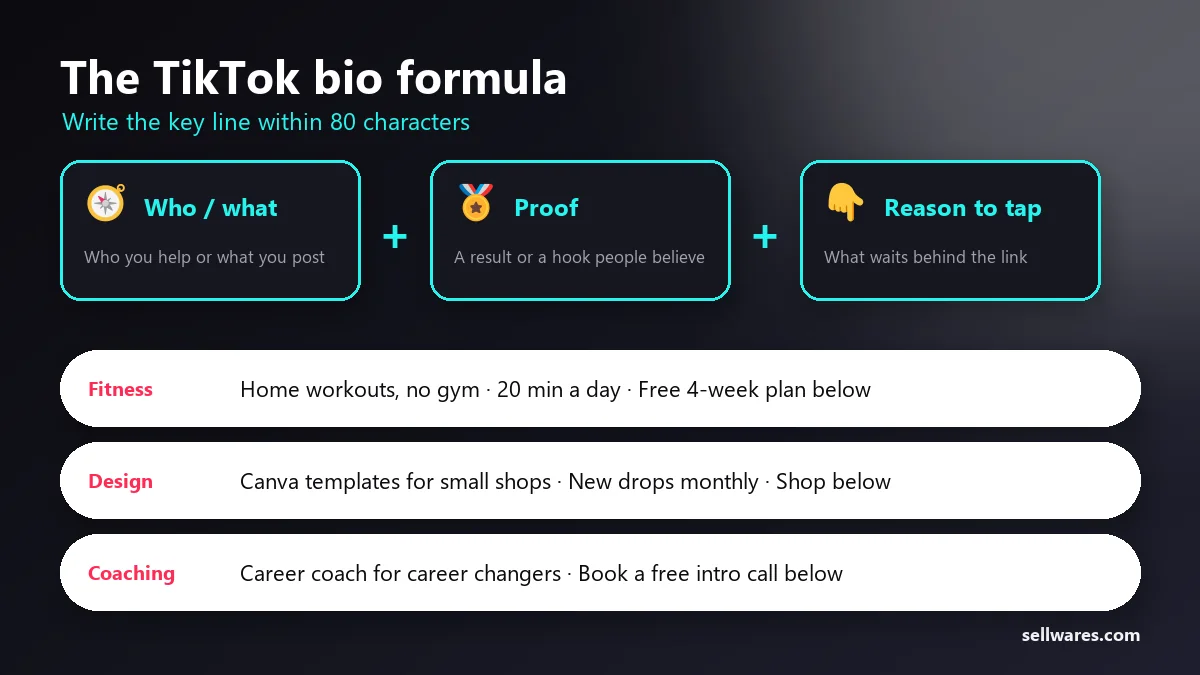
The link gets the tap, but the bio text decides whether anyone wants to tap. The bio is short: many accounts get 80 characters and some now see 160, and TikTok's help pages do not state one limit. Write your key line within 80 characters so it fits everywhere, and every word has to work.
A simple formula that fits:
- Who you help or what you post: "Budget meals for busy parents".
- Proof or a hook: "Feeding 4 for $60 a week".
- A reason to tap: "Free meal plan below".
Examples for different creators:
- Fitness: "Home workouts, no gym · 20 min a day · Free 4-week plan below"
- Design: "Canva templates for small shops · New drops monthly · Shop below"
- Coaching: "Career coach for career changers · Book a free intro call below"
Use the same words on your link in bio page, so people know they landed in the right place. If your first button matches the promise in your bio, more visitors follow through.
Common mistakes with a TikTok bio link
- Linking to one product forever. Your bio link should change as your content changes.
- Using a long, messy address. A short link or your own domain looks safer to tap.
- A slow page. A heavy page loses people before it loads on mobile data.
- Too many choices. Twenty buttons get fewer total clicks than five clear ones.
- No email sign-up. Visitors who are not ready to buy today are lost unless they can join your list.
What we found in the top results
We reviewed the pages Google shows first for this search on 30 October 2026:
- TikTok's support page ranks near the top with 205 linking websites, but it covers only the steps for accounts that already qualify.
- A Reddit thread about the missing option ranks right below it. That is the real question many people have.
- Few pages explain what to link to. They stop once the link is saved, although the page behind the link decides whether anyone clicks or buys.
Make your TikTok link count
The link in your TikTok bio is the only door from your videos to everything you offer. Point it to a page that loads fast, lists your best links and lets people buy on the spot. You can also sell digital products from it with a 0% transaction fee.
Make your free link in bio page and paste it into TikTok today.
Questions
Why can't I put a link in my TikTok bio?
TikTok shows the website link on personal accounts from 1,000 followers. Below that the option is missing. An outdated app, account restrictions or age limits can also hide it.
Do you need 1,000 followers to add a link on TikTok?
On a personal account, yes, according to TikTok's help pages. Many creators switch to a free Business Account instead; check TikTok's account types page to see what each account can do.
How do I make a clickable link in TikTok?
Add it to your profile: Profile, Edit profile, then Add next to Links. Links in normal captions are not clickable, so say "link in bio" in your video and pin a comment with the address.
How do I add Instagram to my TikTok bio?
In Edit profile, connect Instagram and YouTube with their own buttons. Their icons show on your profile and do not use up your website link.
What link should I put in my TikTok bio?
A link in bio page with your best 3 to 5 links, something to buy and an email sign-up, so one link leads to everything you offer.